i follow this
Webutil Configuration on Oracle 12c Forms and Reports Application. (0 Bytes)
but when i test webutil am geting this error
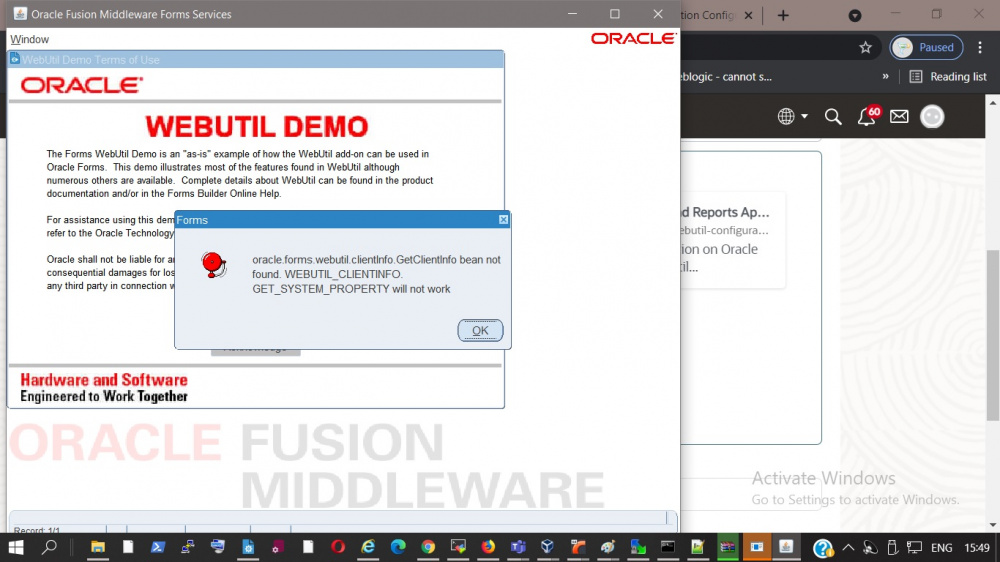 this my cfg
# formsweb.cfg defines parameter values used by the FormsServlet (frmservlet)
# This section defines the Default settings. Any of them may be overridden in the
# following Named Configuration sections. If they are not overridden, then the
# values here will be used.
# The default settings comprise two types of parameters: System parameters,
# which cannot be overridden in the URL, and User Parameters, which can.
# Parameters which are not marked as System parameters are User parameters.
# SYSTEM PARAMETERS
# -----------------
# These have fixed names and give information required by the Forms
# Servlet in order to function. They cannot be specified in the URL query
# string. But they can be overridden in a named configuration (see below).
# Some parameters specify file names: if the full path is not given,
# they are assumed to be in the same directory as this file. If a path
# is given, then it should be a physical path, not a URL.
# USER PARAMETERS
# ---------------
# These match variables (e.g. %form%) in the baseHTML file. Their values
# may be overridden by specifying them in the URL query string
# (e.g. "http://myhost.example.com/forms/frmservlet?form=myform&width=700"))
# or by overriding them in a specific, named configuration (see below)
[default]
# System parameter: default base HTML file
baseHTML=base.htm
# System parameter: base HTML file for use with Java Plug-In
baseHTMLjpi=basejpi.htm
# System parameter: delimiter for parameters in the base HTML files
HTMLdelimiter=%
# System parameter: file setting environment variables for the Forms runtime processes
envFile=default.env
# System parameter: Forms runtime arguments
serverArgs=%escapeparams% module=%form% userid=%userid% debug=%debug% host=%host% port=%port% %otherparams%
# Forms runtime argument: whether to escape certain special characters
# in values extracted from the URL for other runtime arguments
escapeparams=true
# Forms runtime argument: which form module to run
form=test.fmx
# Forms runtime argument: database connection details
userid=
# Forms runtime argument: whether to run in debug mode
debug=no
# Forms runtime argument: host for debugging
# For internal use. Do not change null value.
host=
# Forms runtime argument: port for debugging
# For internal use. Do not change null value.
port=
# Forms runtime argument: BIDI digitSubstitution
digitSubstitution=context
# Other Forms runtime arguments: grouped together as one parameter.
# These settings support running and debugging a form from the Builder:
otherparams=obr=%obr% record=%record% tracegroup=%tracegroup% log=%log% term=%term% ssoProxyConnect=%ssoProxyConnect%
# Sub argument for otherparams
obr=no
# Sub argument for otherparams
record=
# Sub argument for otherparams
tracegroup=
# Sub argument for otherparams
log=
# Sub argument for otherparams
term=
# HTML page title
pageTitle=Oracle Fusion Middleware Forms Services
# HTML attributes for the BODY tag
HTMLbodyAttrs=
# HTML to add before the form
HTMLbeforeForm=
# HTML to add after the form
HTMLafterForm=
# Use HTML page title for Forms frames (webstart, standalone, etc.) by default
webFormsTitle=%pageTitle%
# Forms applet parameter: URL path to Forms ListenerServlet
serverURL=/forms/lservlet
# Forms applet parameter
codebase=/forms/java
# Forms applet parameter
imageBase=codebase
# Forms applet parameter: location for media files
mediaBase=codebase
# Forms applet parameter
width=750
# Forms applet parameter
height=600
# Forms applet parameter
separateFrame=false
# Forms applet parameter
splashScreen=
# Forms applet parameter
allowAlertClipboard=true
# Forms applet parameter
disableValidateClipboard=false
# Forms applet parameter
highContrast=false
# Forms applet parameter
background=
# Forms applet parameter
lookAndFeel=Oracle
# Forms applet parameter
colorScheme=swan
# Forms applet parameter to configure custom color scheme
customColorScheme=
# Forms applet parameter
logo=
# Forms applet parameter, valid range [0-3]
guiMode=0
# Forms applet parameter
restrictedURLparams=pageTitle,HTMLbodyAttrs,HTMLbeforeForm,HTMLafterForm,log
# Forms applet parameter
formsMessageListener=
# Forms applet parameter
recordFileName=
# Forms applet parameter
serverApp=
# Forms applet archive setting for other clients (Java Plugin, Appletviewer, etc)
archive=frmall.jar
# Number of times client should retry if a network failure occurs. You should
# only change this after reading the documentation.
networkRetries=0
# More information regarding jpi and java_version settings can be found here:
# http://docs.oracle.com/javase/8/docs/technotes/guides/jweb/applet/using_tags.html
# Page displayed to users to allow them to download Oracle's Java Plugin.
# This is typically used for non-Microsoft Internet Explorer clients.
jpi_download_page= http://www.oracle.com/technetwork/java/javase/downloads
# Parameter to identify the Java Plugin
jpi_classid=clsid:8AD9C840-044E-11D1-B3E9-00805F499D93
# Parameter related to the version of the Java Plugin and a desired download location
#jpi_codebase=http://example.com/somewhere/jre-8u40-windows-i586.exeVersion=1,8,0,40
# Parameter related to the version of the Java Plugin
jpi_mimetype=application/x-java-applet
# Parameter used to specify which Plugin version to use
java_version=1.7+
# Applet parameter for Oracle's Java Plugin.
legacy_lifecycle=false
# Single Sign-On OID configuration parameter: indicates whether we allow
# dynamic resource creation if the resource is not yet created in the OID.
ssoDynamicResourceCreate=true
# Single Sign-On parameter: URL to redirect to if ssoDynamicResourceCreate=false
ssoErrorUrl=
# Single Sign-On parameter: Cancel URL for the dynamic resource creation DAS page.
ssoCancelUrl=
# Single Sign-On parameter: indicates whether the url is protected in which
# case mod_osso will be given control for authentication or continue in
# the FormsServlet if not. It is false by default. Set it to true in an
# application-specific section to enable Single Sign-On for that application.
ssoMode=false
# Single Sign-On parameter: indicates whether session should operate in proxy
# user support or not. Specify ssoProxyConnect=yes to enable for particular application.
ssoProxyConnect=no
# Single Sign-On parameter: indicates whether session should be logged out
# while exiting
ssoLogOut=false
# Single Sign-On parameter: Redirect URL to which the browser should be
ssoLogOutRedirect=
# Single Sign-On parameter: parameter to hold the name of query parameter on OAM Logout
# URL that holds the landing URL.
logoutTargetURLParamname=
# The parameter allow_debug determines whether debugging is permitted.
# Administrators should set allow_debug to "true" if servlet
# debugging is required, or to provide access to the Forms Trace Xlate utility.
# Otherwise these activities will not be allowed (for security reasons).
allow_debug=false
# Parameter which determines whether new Forms sessions are allowed.
# This is also read by the Forms EM Overview page to show the
# current Forms status.
allowNewConnections=true
# EndUserMonitoring
# EndUserMonitoringEnabled parameter
# Indicates whether EUM/Chronos integration is enabled
EndUserMonitoringEnabled=false
# EndUserMonitoringURL
# indicates where to record EUM/Chronos data
EndUserMonitoringURL=
# Config for javascript integration
applet_name=
enableJavascriptEvent=true
# Config variable that will indicate if heartbeat will
# be blocked when a javascript call is a blocking call.
# The default value if false, i.e heart beat will not be
# blocked for any javascript calls.
JavaScriptBlocksHeartBeat=false
# idleTimeout indicates how many seconds to wait
# before sending a message to the server indicating client-inactivity. Null
# or 0 means this functionality is disabled and there will be no client-idle
# notification.
idleTimeout=
#setting separate_jvm=true is required for audio support
separate_jvm=false
# Example Named Configuration Section
# Example 1: configuration to run forms in a separate browser window with
# "generic" look and feel (include "config=sepwin" in the URL)
# You may define your own specific, named configurations (sets of parameters)
# by adding special sections as illustrated in the following examples.
# Note that you need only specify the parameters you want to change. The
# default values (defined above) will be used for all other parameters.
# Use of a specific configuration can be requested by including the text
# "config=<your_config_name>" in the query string of the URL used to run
# a form. For example, to use the sepwin configuration, your could issue
# a URL like "http://myhost.example.com/forms/frmservlet?config=sepwin".
[sepwin]
separateFrame=True
lookandfeel=Generic
# Example Named Configuration Section
# Example 2: configuration running the Forms ListenerServlet in debug mode
# (debug messages will be written to the servlet engine's log file).
[debug]
serverURL=/forms/lservlet/debug
# Sample configuration for deploying WebUtil. Note that WebUtil is
# only installed with the Forms Builder and is also available for download
# from OTN.
[webutil]
WebUtilArchive=frmwebutil.jar,jacob.jar
WebUtilLogging=off
WebUtilLoggingDetail=normal
WebUtilErrorMode=Alert
WebUtilDispatchMonitorInterval=5
WebUtilTrustInternal=true
WebUtilMaxTransferSize=16384
baseHTML=webutilbase.htm
baseHTMLjpi=webutiljpi.htm
archive=frmall.jar
lookAndFeel=oracle
[jnlp]
basejnlp=base.jnlp
baseHTMLjpi=basejpi_jnlp.htm
[webutil_jnlp]
WebUtilLogging=off
WebUtilLoggingDetail=normal
WebUtilErrorMode=Alert
WebUtilDispatchMonitorInterval=5
WebUtilTrustInternal=true
WebUtilMaxTransferSize=16384
basejnlp=webutil.jnlp
baseHTMLjpi=basejpi_jnlp.htm
lookAndFeel=oracle
[webstart]
basejnlp=base.jnlp
webstart=enabled
[webutil_webstart]
WebUtilLogging=off
WebUtilLoggingDetail=normal
WebUtilErrorMode=Alert
WebUtilDispatchMonitorInterval=5
WebUtilTrustInternal=true
WebUtilMaxTransferSize=16384
basejnlp=webutil.jnlp
webstart=enabled
[standaloneapp]
# Note: baseSAAfile must end with .txt
baseSAAfile=basesaa.txt
# fsalcheck parameter specifies whether to perform checksum comparison
# of Forms stand-alone app launcher or not. When it is enabled, it triggers
# the comparison at server. The checksum of FSAL at client machine will be
# compared with the checksum of FSAL archived at the server repository.
fsalcheck=true
[webutil_standaloneapp]
# Note: baseSAAfile must end with .txt
WebUtilArchive=frmwebutil.jar,jacob.jar
WebUtilLogging=off
WebUtilLoggingDetail=normal
WebUtilErrorMode=Alert
WebUtilDispatchMonitorInterval=5
WebUtilTrustInternal=true
WebUtilMaxTransferSize=16384
baseSAAfile=webutilsaa.txt
fsalcheck=true
this my classpath in env
CLASSPATH=/u01/Oracle/Middleware/Oracle_Home/jlib/frmbipc.jar:/u01/Oracle/Middleware/Oracle_Home/forms/j2ee/frmsrv.jar:/u01/Oracle/Middleware/Oracle_Home/forms/provision/frmconfig.jar:/u01/Oracle/Middleware/Oracle_Home/jlib/ldapjclnt11.jar:/u01/Oracle/Middleware/Oracle_Home/jlib/debugger.jar:/u01/Oracle/Middleware/Oracle_Home/oracle_common/jlib/ewt3.jar:/u01/Oracle/Middleware/Oracle_Home/oracle_common/modules/oracle.bali.share/share.jar:/u01/Oracle/Middleware/Oracle_Home/jlib/utj.jar:/u01/Oracle/Middleware/Oracle_Home/jlib/zrclient.jar:/u01/Oracle/Middleware/Oracle_Home/reports/jlib/rwrun.jar:/u01/Oracle/Middleware/Oracle_Home/forms/java/frmwebutil.jar:/u01/Oracle/Middleware/Oracle_Home/oracle_common/modules/oracle.jps/jps-manifest.jar:/u01/Oracle/Middleware/Oracle_Home/oracle_common/modules/oracle.dms/dms.jar:/u01/Oracle/Middleware/Oracle_Home/oracle_common/modules/oracle.odl/ojdl.jar:/u01/Oracle/Middleware/Oracle_Home/oracle_common/modules/javax.management.j2ee.jar:/u01/Oracle/Middleware/Oracle_Home/forms/java/jacob.jar:/u01/Oracle/Middleware/Oracle_Home/forms/java/frmall.jar:/u01/Oracle/Middleware/Oracle_Home/oracle_common/jdk/jre/lib/rt.jar
this my webutil cfg
# ---------------------------------------------------------------------------
# webutil.cfg - WebUtil default configuration file
# ---------------------------------------------------------------------------
# This file provides all of the configuration settings for webutil. These are
# divided into the following sections:
# 1. Logging Options
# 2. Installation Options
# 3. File Upload and Download Options
# 1. Server Side Logging Options for logging errors and log messages
# You must set logging.enabled to true to allow mid-tier logging. Without this
# mid-tier logging will not take place no matter what PL/SQL or URL options
# are supplied to switch it on. Once logging is enabled the other settings come
# into play.
# Details
# -------
logging.file : Defines the file name and location of the log file.
Note that WebUtil does no log file management. You may
need to manually clean this file up from time to time.
logging.enabled : Can be TRUE or FALSE
logging.errorsonly : Can be TRUE or FALSE. Setting to true will ensure that
only errors and not normal informational log messages
are written to the log file. For product use this would
normally be set to TRUE
logging.connections: Can be TRUE or FALSE. Setting to true will cause each
connection from a client using WebUtil to write into
the log as it sets up.
logging.file=
logging.enabled=FALSE
logging.errorsonly=FALSE
logging.connections=FALSE
# 2. Installation Options
# WebUtil needs to download some files to the client in order to perform
# certain integration operations such as OLE or Registry Access. These files
# are downloaded to the client when webutil is being run for the first time.
# Subsequent runs will use the cached dll. You have to define the location of
# these files on the server and the location on the client.
# Here is a table that shows various numeric constants and their meanings. They
# are used in the install options configurations. These constants are defined
# in WEBUTIL_CORE package spec. Note that the Client OS Processor Architecture
# is typically the architecture of the JVM that will be running on the client,
# not necessarily same as the actual client OS architecture.
# <os> - Client OS Family <arch> - Client OS Processor Architecture
0 - Windows 0 - 32 bit architecture
1 - Linux 1 - 64 bit architecture
2 - SOLARIS
3 - HP
4 - AIX
5 - Mac
9 - Unknown
# <package> - Package Name
7 - WEBUTIL_OLE2
9 - WEBUTIL_C_API
# We don't yet have downloads for other packages. If there is a need, refer
# WEBUTIL_CORE package spec for the constants of other packages
# Details
# -------
NOTE: For all settings <arch> field is optional. Without this field, the
setting will be applicable for both 32 bit and 64 bit client OS (JVM)
architectures.
install.syslib.location.<os>.<arch> :
The virtual path to the directory holding the webutil library files on the
server side. This must either be an absolute URL or a URL that is relative
to the documentbase.
NOTE: <os> field is optional for this setting. In the absence of a setting
that has the matching client OS and ARCH, it will use
install.syslib.location. <arch> cannot be specified if <os> is omitted.
install.syslib.location.client.<os>.<arch> :
The path to the directory on the client machine where webutil library
files will be downloaded. This must either be an absolute path or a path
that is relative to client user profile or HOME. Directory will be created
if necessary along with other required parent directories. If the path is
not set, it will be treated as a special case where libraries will be
downloaded to client JRE\bin (windows) or JRE/lib (unix). If this
directory is changed, all the libraries will be redownloaded again.
Please keep in mind that other Forms server could also have a similar
location setting and thus libraries could be overwritten when the same
client runs webutil from different forms server. It is therefore
advisable that the location has a subdirectory that can be unique to your
server, such as server host name. You could use $(SERVERHOST) in the
location. This string will be replaced with the actual server host name
install.syslib.<os>.<arch>.<package>.<n> :
The name(s) of the libraries required for particular webutil beans. The
format of this is name|size|version|showDownloadDialog. Multiple libraries
can be downloaded per package. But ensure that the <n> values are
consecutive and start at 1 for a given os, arch and package set.
install.syslib.location=/webutil
install.syslib.location.0.0=/webutil/win32
install.syslib.location.0.1=/webutil/win64
# Add/change the following if you want to specify a different client location
# where the syslib libraries can be downloaded.
# Format:
# install.syslib.location.client.<os>.<arch>=<location>
install.syslib.location.client.0.0=webutil\syslib\$(SERVERHOST)\win32
install.syslib.location.client.0.1=webutil\syslib\$(SERVERHOST)\win64
# Change size and version if necessary, like when upgrading the library.
# Normally this would not be required since most of these libraries come with
# install itself. Jacob however does not come with install
# Format:
# install.syslib.<os>.<arch>.<package>.<n>=name|size|version|showDownloadDialog
#install.syslib.0.0.7.1=jacob-1.18-M2-x86.dll|167424|1.18-M2|true
#install.syslib.0.1.7.1=jacob-1.18-M2-x64.dll|204800|1.18-M2|true
#install.syslib.0.0.9.1=JNIsharedstubs.dll|45056|1.0|true
#install.syslib.0.1.9.1=JNIsharedstubs.dll|58368|1.0|true
#install.syslib.0.0.9.2=d2kwut60.dll|81920|1.0|true
#install.syslib.0.1.9.2=d2kwut60.dll|102400|1.0|true
# You can also add your own libraries in here, e.g.
#install.syslib.0.0.user.1=testwebutil.dll|204872|1.0|true
#install.syslib.0.0.user.1=ffisamp.dll|40960|1.0|true
#install.syslib.0.1.user.1=ffisamp.dll|35328|1.0|true
# 3. Upload / Download options
# For the file upload and download options you can define the default locations
# on the server that webutil can use as a work area. Optionally you can switch
# upload and download off
# Details
# -------
transfer.database.enabled : Can be TRUE or FALSE - allows you to enable or
disable upload and download from the database
server.
transfer.appsrv.enabled : Can be TRUE or FALSE - allows you to enable or
disable upload and download from the
application server.
transfer.appsrv.workAreaRoot: The root of the location in which WebUtil can
store temporary files uploaded from the client.
If no location is specified, application server
user_home/temp will be assumed.
This location is always readable and writable
no matter what the settings in
transfer.appsrv.* are. This setting is
required if you need the Client side
READ/WRITE_IMAGE_FILE procedures.
transfer.appsrv.accessControl:Can be TRUE or FALSE - allows you to indicate
that uploads and downloads can only occur from
the directories named in the
transfer.appsrv.read.n and
transfer.appsrv.write.n entries and their
subdirectories. If this setting is FALSE,
transfers can happen anywhere.
transfer.appsrv.read.<n>: List of directory names that downloads can read
from.
transfer.appsrv.write.<n>: List of directory names that uploads can write
to.
#NOTE: By default the file transfer is disabled as a security measure
transfer.database.enabled=TRUE
transfer.appsrv.enabled=TRUE
transfer.appsrv.workAreaRoot=
transfer.appsrv.accessControl=TRUE
#list transfer.appsrv.read.<n> directories
transfer.appsrv.read.1=/u01
#list transfer.appsrv.write.<n> directories
transfer.appsrv.write.1=/u01
# 4. Others
# Details
# -------
# BlockAllowHeartBeat : To continue the heart beat communication with the
server when set to TRUE. By default the value is
set to False. When False there would not be heart
beat communication in blocking mode.
BlockAllowHeartBeat=False