Dear all,
O.S is : Oracle Linux 6.7
I did vmware cloning. (vm1 to vm2)
After cloning, i am getting multiple network adapters are on VM2.
>> Please review attached screenshot - i want to delete ( Auto_eth1, Auto_eth2, and Auto_eth3) permanently ?
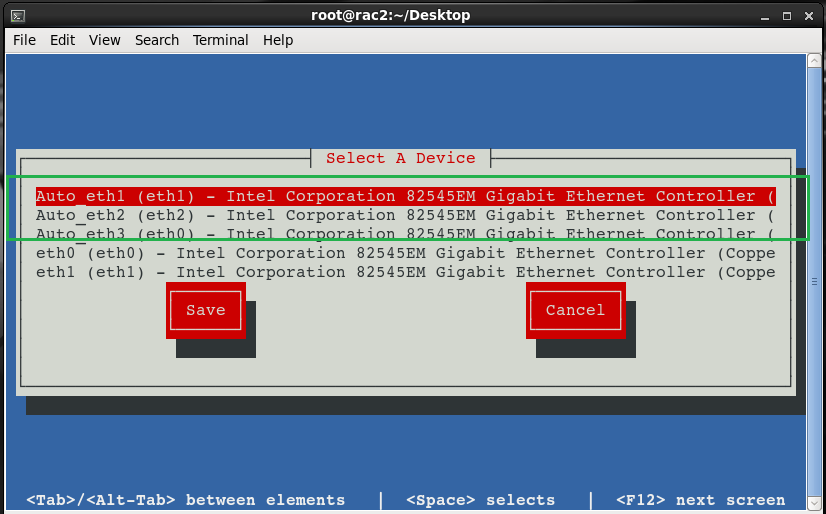
I deleted some entries from following file
# cat /etc/udev/rules.d/70-persistent-net.rules
# This file was automatically generated by the /lib/udev/write_net_rules
# program, run by the persistent-net-generator.rules rules file.
# You can modify it, as long as you keep each rule on a single
# line, and change only the value of the NAME= key.
# PCI device 0x8086:0x100f (e1000)
SUBSYSTEM=="net", ACTION=="add", DRIVERS=="?*", ATTR{address}=="00:0c:29:41:5c:d8", ATTR{type}=="1", KERNEL=="eth*", NAME="eth0"
# PCI device 0x8086:0x100f (e1000)
SUBSYSTEM=="net", ACTION=="add", DRIVERS=="?*", ATTR{address}=="00:0c:29:41:5c:ec", ATTR{type}=="1", KERNEL=="eth*", NAME="eth2"
# PCI device 0x8086:0x100f (e1000)
SUBSYSTEM=="net", ACTION=="add", DRIVERS=="?*", ATTR{address}=="00:0c:29:41:5c:e2", ATTR{type}=="1", KERNEL=="eth*", NAME="eth1"
# cd /etc/sysconfig/network-scripts/
[root@rac2 network-scripts]# ls -l ifcfg*
-rw-r--r-- 5 root root 243 Oct 30 23:28 ifcfg-eth0
-rw-r--r-- 5 root root 242 Oct 30 23:27 ifcfg-eth1
-rw-r--r-- 5 root root 239 Oct 30 23:18 ifcfg-eth2
-rw-r--r--. 1 root root 254 Apr 10 2015 ifcfg-lo
[root@rac2 network-scripts]# cat ifcfg-eth0
TYPE=Ethernet
BOOTPROTO=none
IPADDR=192.168.56.12
PREFIX=24
DEFROUTE=yes
IPV4_FAILURE_FATAL=yes
IPV6INIT=no
NAME=eth0
UUID=efde6d5c-cdc7-404c-b8ae-ad661ff6e1b7
ONBOOT=yes
DEVICE=eth0
USERCTL=no
HWADDR=00:0C:29:41:5C:D8
LAST_CONNECT=1540902323
[root@rac2 network-scripts]# cat ifcfg-eth1
TYPE=Ethernet
BOOTPROTO=none
IPADDR=192.168.10.2
PREFIX=24
DEFROUTE=yes
IPV4_FAILURE_FATAL=yes
IPV6INIT=no
NAME=eth1
UUID=22a0967f-b86a-429d-b342-aaaedf84906a
ONBOOT=yes
DEVICE=eth1
USERCTL=no
HWADDR=00:0C:29:41:5C:E2
LAST_CONNECT=1540902323
[root@rac2 network-scripts]# cat ifcfg-eth2
TYPE=Ethernet
BOOTPROTO=dhcp
DEFROUTE=yes
IPV4_FAILURE_FATAL=yes
IPV6INIT=no
NAME=eth2
UUID=720c7538-834d-4b1f-a0b2-ff841343eaef
ONBOOT=yes
HWADDR=00:0C:29:41:5C:EC
PEERDNS=yes
PEERROUTES=yes
LAST_CONNECT=1540900364
DEVICE=eth2
USERCTL=no