Hi gurus,
right now i'm building a template using bootstrap and font-awesome css, i followed following instruction here
but i got stuck because the icon didn't appear:
picture:
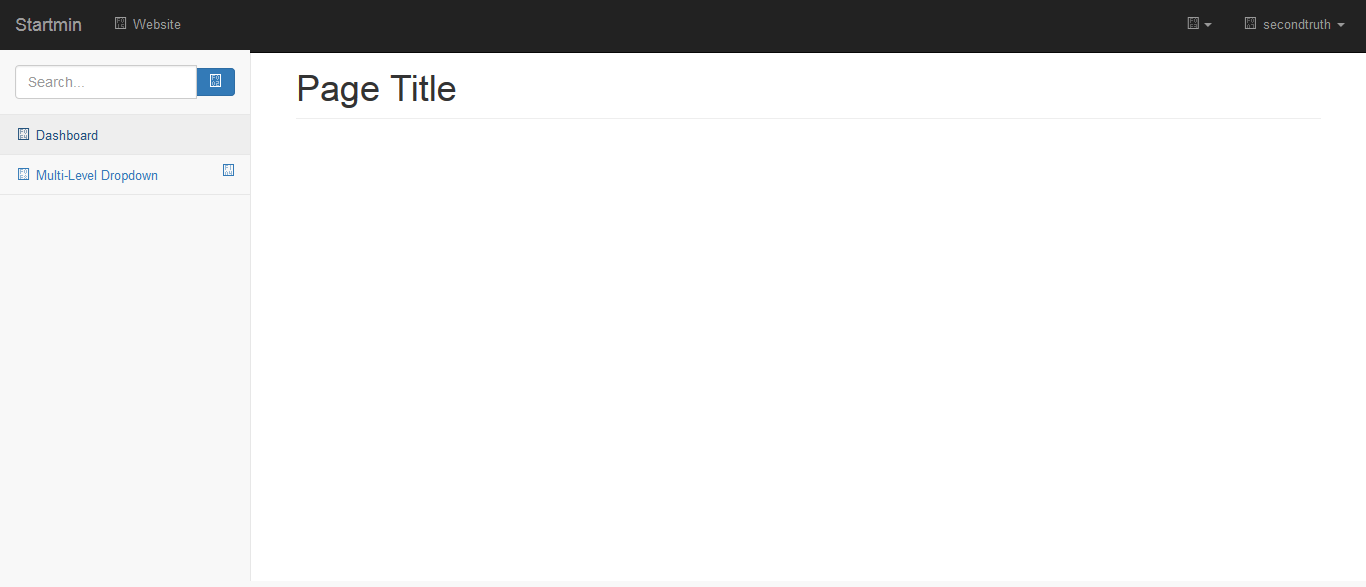
i noticed that my custom skin already loaded in firebug console, here are the skin code:
/**ADFFaces_Skin_File / DO NOT REMOVE**/
@namespace af "http://xmlns.oracle.com/adf/faces/rich";
@namespace dvt "http://xmlns.oracle.com/dss/adf/faces";
/*!
* Font Awesome 4.6.3 by @davegandy - http://fontawesome.io - @fontawesome
* License - http://fontawesome.io/license (Font: SIL OFL 1.1, CSS: MIT License)
*/
@font-face {
font-family: 'FontAwesome';

src: url('../../fonts/fontawesome-webfont.eot?v=4.6.3');

src: url('../../fonts/fontawesome-webfont.eot?#iefix&v=4.6.3') format('embedded-opentype'), url('../../fonts/fontawesome-webfont.woff2?v=4.6.3') format('woff2'), url('../../fonts/fontawesome-webfont.woff?v=4.6.3') format('woff'), url('../../fonts/fontawesome-webfont.ttf?v=4.6.3') format('truetype'), url('../../fonts/fontawesome-webfont.svg?v=4.6.3#fontawesomeregular') format('svg');

font-weight: normal;

font-style: normal
}
.fa {
display: inline-block;

font: normal normal normal 14px/1 FontAwesome;

font-size: inherit;

text-rendering: auto;

-webkit-font-smoothing: antialiased;

-moz-osx-font-smoothing: grayscale
}
.fa-dashboard:before,
.fa-tachometer:before {
content: "\\f0e4"
}
and here is the template code:
<li>
                    \<a href="#" class="active">\<i class="fa fa-dashboard fa-fw">\</i> Dashboard\</a>

                            \</li>

                \<li>
Please note that all the css file and skin already loaded, so i believe the code isn't correct, any suggestion for this?
best Regards,
Galih