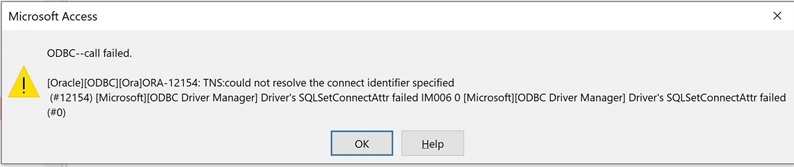
User area reports the above error. Here is the text of their post in our ticket system:
"
To clarify, the issue is specifically with Access O365 on Windows 10. The issue does not occur when using Office/Access 2013 on Windows 10, or when using Office 365 on Windows 7.
We have installed multiple different versions of Oracle and tried on other devices to no avail. I have done some research on the error and all support forums/knowledge articles point to it being an issue with the TNS_Names.ORA file but I've verified that this file is configured correctly and has all the necessary entries to correspond with the ODBC drivers & oracle DBs. Some articles make note/mention of the System/Environment variables which was also already pointing to the correct location. I also verified that all pertinent registry keys were pointing to the correct directory for the Oracle installation & the TNS names.
Running Win10 (64bit)
with Office 365 (32bit)
When opening Access or doing ODBC it fails
Can TNS Ping, so it sees the Oracle Server
Works on Wins 10 with Office 2013
Works on win7 (64bit) with Office 365 (32 bit)
The issue seems to be specifically with Office 365 on Windows 10 trying to link to ODBC or Oracle. "
My area is not familiar with ms-access. Please provide suggestions - seems like ora-12154 means what is always has meant, but the users seem able to connect in some cases.