Skip to Main Content

E-Business Suite

Announcement

For appeals, questions and feedback about Oracle Forums, please email oracle-forums-moderators_us@oracle.com. Technical questions should be asked in the appropriate category. Thank you!

Unable to launch the Java Virtual Machine Located at path: ...\..jdk\jre\bin\client\jvm.dll

Datta BachateApr 1 2019 — edited Feb 8 2021

Hi Guy's,

I extracted the OAExtension patch for Oracle EBS R12.2.5 correctly from metalink. But while opening jdevW.exe getting the following error.
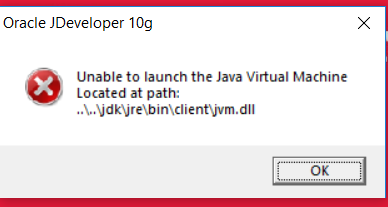
pastedImage_0.png

Java version installed in my system: 1.8.0_201 (32 bit as well as 64 bit)

SQL Developer: It is working fine Version- 18

If you have faced such issue kindly help me to resolve it.

Thanks,

Datta

This post has been answered by Datta Bachate on Apr 1 2019
Jump to Answer
Comments
Post Details
Added on Apr 1 2019
5 comments
862 views