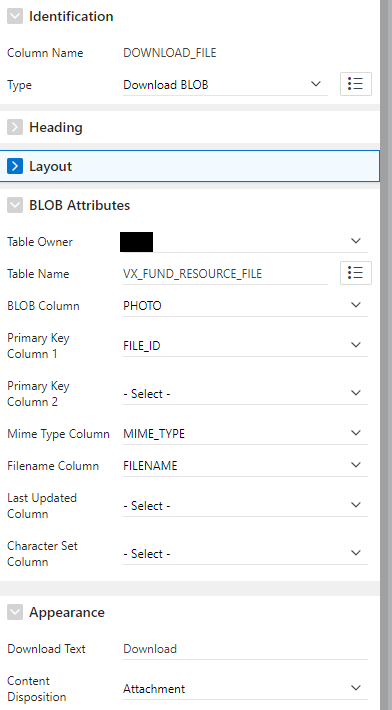
I'm presenting my data in a read-only FOEX Grid Region and I'm unable to download a BLOB that's in a table in a schema other than the Parsing Schema.
I've read through the possible issues down this task:
- https://forum.foex.at/question/blob-download-issue
- https://forum.foex.at/question/how-to-use-download-blob-in-a-grid
What I've done:
- The read-only Grid's Primary Key Column is to the right column.
- The Apex query includes a column with the file size for the download file.
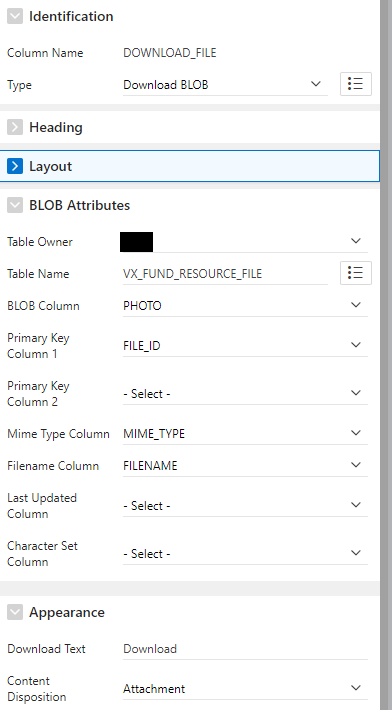
- The Download BLOB column has all its BLOB Attributes set as the attachment shows.
- The FOEX Config for the Download BLOB column has Column Filterable disabled.
The browser's Network log gives the following error:
ORA-00942: table or view does not exist<br />ORA-06512: at \"FOEX_040200.FX_P_GRID\",
line 8154\nORA-06512: at \"FOEX_040200.FX_P_GRID\", line 8507\n"
I checked and updated the GRANTs for the table without success.
On a whim, I decided to copy the table to the Parsing Schema, I changed the references in the Download BLOB column and it worked perfectly.
We try to keep all our tables in a central schema away from our Apex Parsing Schema, then grant access as needed. We could move this table, if needed, but we'd rather not.
Obviously I can't recreate this issue in our FOEX Workspace.
Our environment:
- Apex version 19.2
- Oracle version 19.x
- FOEX version 4.2.0.4494.00
Suggestions?