I have a good old fashioned classic report that uses apex_item.switch to generate a switch item for each row.
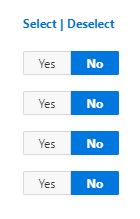 I use the following SQL to generate the column.
 ,apex_item.switch
   (p_idx => 1
   ,p_value => i.id
   ,p_on_value => i.id
   ,p_on_label => 'Yes'
   ,p_off_value => 'N'
   ,p_off_label => 'No'
   ,p_item_id => 'chkmine-'||i.id
 ) as my_switch
And I use this JS expression on demand to generate a list of selected IDs, excluding those set to No.
$("[name='f01']").map(function(){
     if (this.value != 'N')
       return this.value;
 }).get().join("~")
So out of four rows, with 3 selected, I might get a list of
123~456~789
If I manually selecting/unselecting checkboxes, the map function returns results as I would expect.
I then changed the column heading to allow toggling select/deselect for all rows, using the following expressions
// deselect all
$("[name^='chkmine']").each(function(){
   return $(this).prop('checked', 'N');
 });
// select all
$("[name^='chkmine']").each(function(){
  if (this.value != 'N')
   return $(this).prop('checked', true);
 });
However, I don't think these actions are quite aligned. When I run the map function after using the selecting/deselecting expressions, it appears the input values are not changed, only the UI.
To say that another way, if all switches are checked, and I run the deselect expression, the UI appears as though they're all now set to No, but the underlying value is still set, and map function returns values.
So I think there is someting wrong with my toggle expressions.
This is on APEX 19.2, using Chrome.
Scott