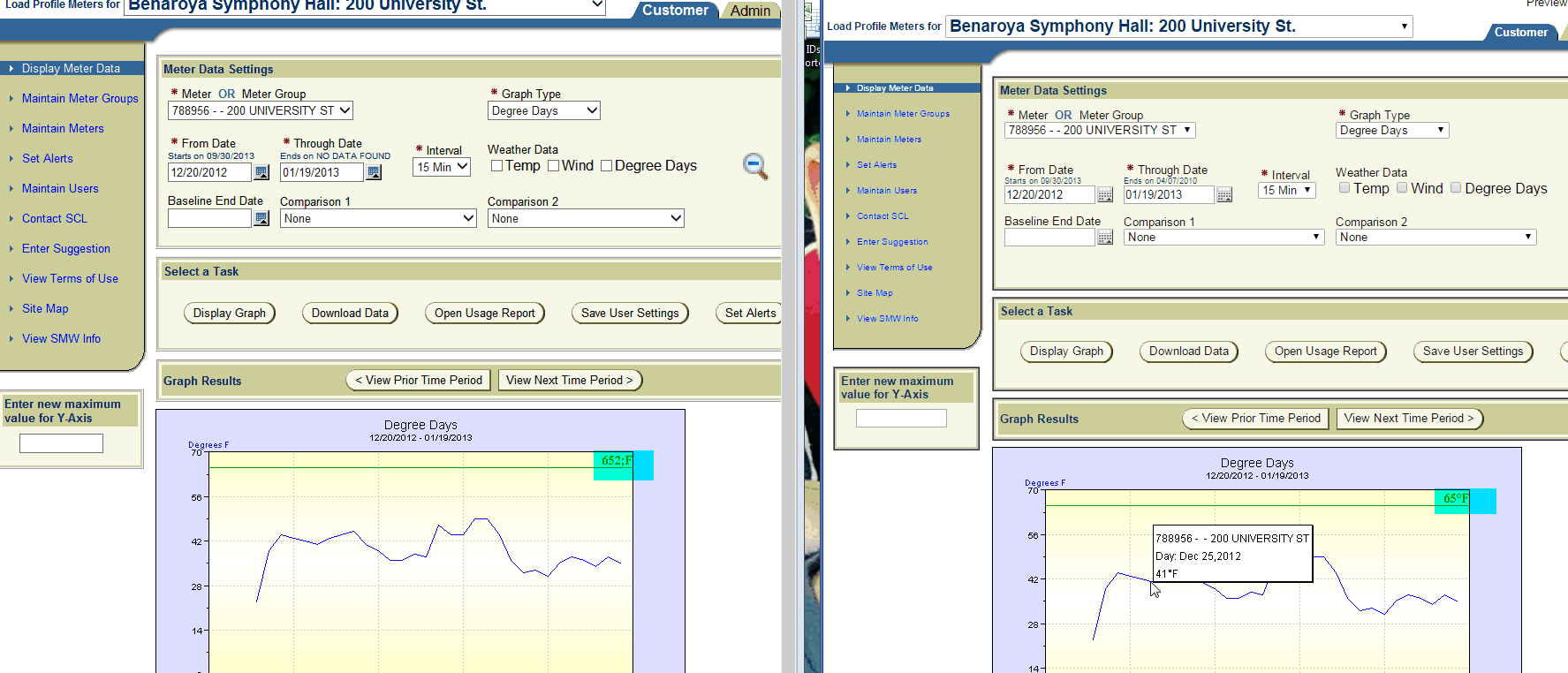
I am using htp package to create an applet below is the code that generates the applet. The applet generates the graphs but 65 degrees F is displaying as 652;F. The left screen shot (hypertext in blue show the error on the left screen shot the right is how it should be).
Please advice
Here is the sample code..Please let em know if you have any suggestions
here is the piece of code that creates the graphs below: ( I am using oracle version 11G apex application is 4.0( although this is a plsql htp package issue I just mentioned the application it is being used in**) )**
WHEN 'DEGREEDAYS' THEN
IF v\_y\_axis\_end \< 65 THEN
v\_y\_axis\_end := 70;
END IF;
HTP.PRINT ('\<APPLET CODE="javachart.applet.dateLineApp" archive="dateLineApp.jar" codebase="/i/" width=600 height=400>');
HTP.PRINT ('\<PARAM NAME="dwellYString" VALUE="#°F">');
HTP.PRINT ('\<PARAM NAME="titleString" value="Degree Days">');
HTP.PRINT ('\<PARAM NAME="xAxisTitle" VALUE="">');
HTP.PRINT ('\<PARAM NAME="yAxisTitle" value="Degrees F">');
HTP.PRINT ('\<PARAM NAME="auxAxisTitle" value="F">');
HTP.PRINT ('\<PARAM NAME="yAxisThresholdLine0Value" VALUE="65">');
htp.print ('\<PARAM NAME="yAxisThresholdLine0Color" VALUE="009900">');
HTP.PRINT ('\<PARAM NAME="yAxisThresholdLine0LabelString" VALUE="65°F">');
HTP.PRINT ('\<PARAM NAME="yAxisThresholdLine0LabelFont" VALUE="TimesRoman,14,1">');
HTP.PRINT ('\<PARAM NAME="yAxisThresholdLine0LabelColor" VALUE="009900">');
Please look at the bottom part of the screen shot looks like the issue is with the value being interpreted in the line HTP.PRINT ('<PARAM NAME="dwellYString" VALUE="#°F">'); causing it to display 65 degrees F as 652;F