Hi,
I have a problem with Detach button in ADF 12.2.1.4 . I have a toolbar and a table in panel collection. My jsff code as follows.
<af:panelGroupLayout layout="vertical" id="pgl1">
<af:showDetailHeader text="#{res['survey.survey.result']}"
disclosed="true" id="sdh1">
<af:panelHeader text="" id="ph2">
<af:panelCollection id="pc1" styleClass="AFStretchWidth"
partialTriggers="::cb1 ::cb2">
<f:facet name="toolbar">
<af:toolbar id="tb1">
<af:commandToolbarButton text="#{res['survey.global.new']}"
id="ctbNew"
icon="/images/survey/add_ena.png"
rendered="#{resourceAuthorizationBean.helper['survey.survey.ctbNew'].visible}"
disabled="#{resourceAuthorizationBean.helper['survey.survey.ctbNew'].disable}"
action="#{pageFlowScope.survey_SurveyAndQuestAndTrtmt.ctbNew_action}"/>
<af:commandToolbarButton text="#{res['survey.global.update']}"
id="ctbUpdate"
icon="/images/survey/edit.png"
rendered="#{resourceAuthorizationBean.helper['survey.survey.ctbUpdate'].visible}"
disabled="#{resourceAuthorizationBean.helper['survey.survey.ctbUpdate'].disable ? 'true' : bindings.Survey.estimatedRowCount<=0}"
actionListener="#{pageFlowScope.survey_SurveyAndQuestAndTrtmt.ctbUpdate_action}"
partialTriggers="search"/>
</af:toolbar>
<af:table value="#{bindings.Survey.collectionModel}" var="row"
rows="#{bindings.Survey.rangeSize}"
emptyText="#{bindings.Survey.viewable ? res['survey.global.table.empty.message'] : res['survey.global.access.message']}"
fetchSize="#{bindings.Survey.rangeSize}"
styleClass="AFStretchWidth"
columnStretching="last" rowBandingInterval="0"
rowSelection="single"
selectedRowKeys="#{bindings.Survey.collectionModel.selectedRow}"
selectionListener="#{bindings.Survey.collectionModel.makeCurrent}"
binding="#{pageFlowScope.survey_SurveyAndQuestAndTrtmt.searchResultTable}"
partialTriggers=":::qryId1" id="search">
<af:serverListener type="doubleClickOnRow"
method="#{pageFlowScope.survey_SurveyAndQuestAndTrtmt.currentRowOfFlowTable}"/>
<af:clientListener method="goEditRow" type="dblClick"/>
<af:column sortProperty="Name" sortable="false"
headerText="#{bindings.Survey.hints.Name.label}"
id="c10" width="125">
<af:outputText value="#{row.Name}" id="ot4"/>
</af:column>
</af:table>
</af:panelCollection>
</af:panelHeader>
</af:showDetailHeader>
</af:panelGroupLayout>
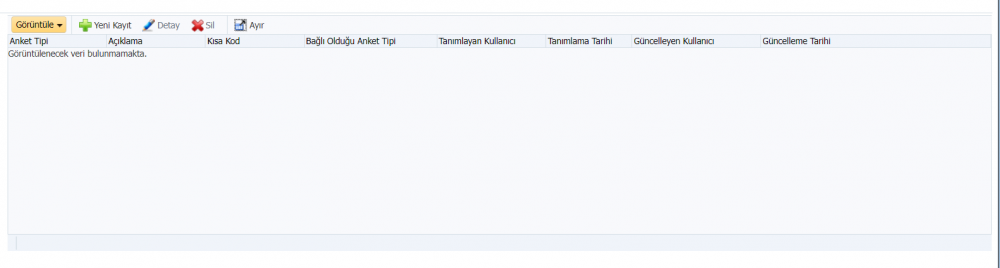
Before clicking the Detach button, the appearance of the table is as follows, while there is no record in the table.
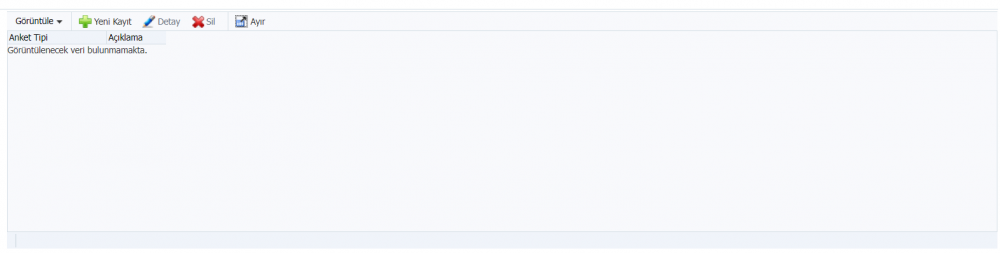
After Click Detach button,and close the detached popup,back the table, table looks like as follows, column names of table disappearing.
Also I noticed that, when the column names in different tables do not fit on the screen, a horizontal scroll appears below. In tables with scroll, such a thing does not happen when the detach button is pressed and closed back.
Is there a problem with the properties of the table or I could not understand Detach button. Do you have any suggested solution?
Thanks.