Oracle APEX 24.1.6 | Oracle DB 19c
Hi, this probably has a simple solution but I'm not finding out what it is.
I have a page with a Form region, let's call it Form A. Form A has a sub-region, also of type Form, we'll call it Form B.
Form A has a Page Item where the user can select a FK value from the table underlying Form B. That is only the case though if they are adding an existing record from that table.

If they want to add a new Form B record, however, they can toggle the switch and then Form B pops up
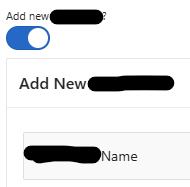
The “Name” field shown above is mandatory if they are in fact adding a new Form B record. But when they are simply selecting an existing Form B record, it shouldn't be mandatory… well, it actually should be N/A because I don't want that form to submit in that scenario.
The issue I am running into is that when I try to add an existing record, not a new record, I get the validation error about “Name” being required.
The process for Form B is conditionally set to run on the switch being equal to “Y”, so the process itself doesn't seem to run. But I think the validation is not tied into the process per se, and it is executing before. But it is a validation based on the property “Value Required” being set to true for the “Name” page item, so I can't (I think) apply a condition to it in the same way I would with a custom validation.
This is my first time combining two forms on one page, each form tied to a different table. I've been playing around with server-side conditions, making Form B read only conditionally, and other options, but I seem to be running into problems with everything I've tried. I basically would like Form B to submit only if that switch / Page Item is equal to Y / True.
Thanks for any insight and guidance.