The starter templates which i downloaded using the yeoman generator for Oracle JET v3.1.0 is not working and throwing some errors. The command is as below
yo oraclejet web-app-navdrawer --template=navdrawer:hybrid
The following is the folder structure for the starter template when viewed using Netbeans IDE.
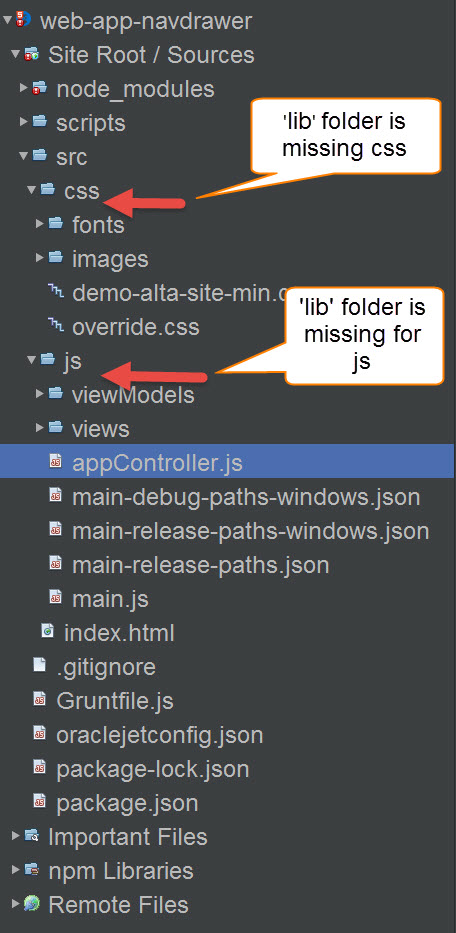
Netbeans is not throwing error for the project (i.e. icon is not RED).
But while launching the web app chrome shows the below error in the console.
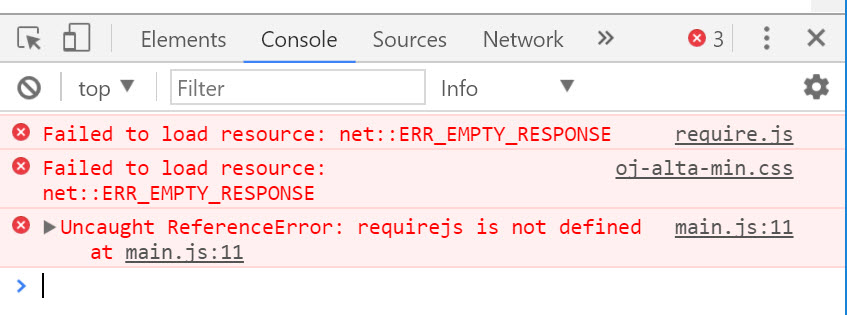
So the navdrawer dashboard did not load up and the page was blank.
As per my understanding for version 3.1.0 oracle has deprecated the 'bower' package manager and 'bower_components' and is using 'node.js' instead so all the 'js' and 'css' files has to be inside the 'src' folder but the problem is that the library files for the same is not present in their respective folders so there is no library file to be reffered.
So how can be the library files installed there ?
And so when I run the grunt build command it is coming up with the following error -
Oracle JET Tooling
Warning: ENOENT: no such file or directory, open 'C:\xx_path\NetBeansProjects\web-app-navdrawer\node_modules\oraclejet\package.json' Use --force to continue.
What can be the cause for the above error ?