Hi all,
I ran into what looks like a regression in SQLcl 25.4.1 on Windows related to SQLcl Project / Liquibase and APEX-generated XML changesets.
Environment
- SQLcl 25.4.1
- Windows
- SQLcl Project / Liquibase
- APEX- Project's generated XML changesets
Preconditions
- SQLcl was used before upgrading to 25.4.1
- Existing APEX XML changesets were already deployed at least once
- Upgrade to 25.4.1 is performed on Windows
Observed Behavior
After upgrading to 25.4.1 on Windows:
- Previously deployed APEX changesets are redeployed on every deployment
- Even when there are no changes
DATABASECHANGELOG records do not get recognized as already executed
This can become very time-consuming when deploying multiple or large APEX applications.
Root Cause (Suspected)
It appears that starting with 25.4.1, SQLcl on Windows writes logicalFilePath (filename) using backslashes \ instead of forward slashes /.
Evidence
Query:
select * from DATABASECHANGELOG_ACTIONS where id = 'INSTALL_100';
After upgrade, the filename / logicalFilePath is stored with:
releases\apex\f100\f100.xml
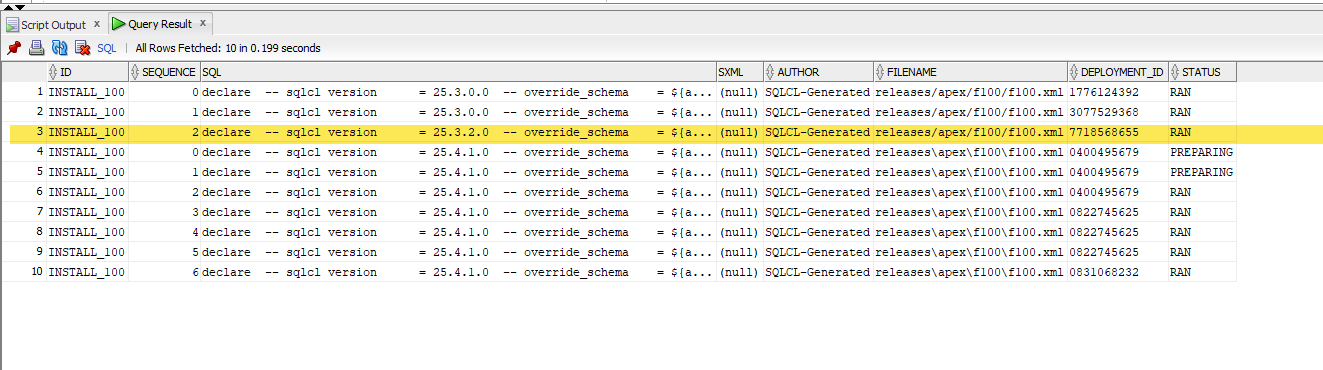
However:
select * from DATABASECHANGELOG where id = 'INSTALL_100';
Still shows:
releases/apex/f100/f100.xml
Because Liquibase considers (id, author, filename) as the unique identifier, this path separator change causes Liquibase to treat the changeset as new.
However, I must add that new record in DATABASECHANGELOG forn ID INSTALL_110 and path releases\apex\f100\f100.xml is not created either,
As a result:
- Changesets are ALWAYS re-executed
DATABASECHANGELOG does not match previous executions- Status handling becomes inconsistent
Impact Scope
You are affected if:
- You develop AND deploy on Windows
You are likely NOT affected if:
- You develop on Windows but deploy via Docker / Linux
- Your entire team develops on and deploys from macOS/Linux
For Windows-only teams, this can be disruptive.
Temporary Workaround (Windows-only Teams)
Manually align the filename in DATABASECHANGELOG:
update CLA_DEPLOYER.DATABASECHANGELOG set filename = 'releases\apex\f100\f100.xml' where id = 'INSTALL_100';
After adjusting the path separator to match 25.4.1 behavior, deployments resume normal operation.
⚠️ However, this is not viable for mixed Windows/macOS teams because the path separator will differ by platform.
Suggested Permanent Solutions:
- Reverse logic and generate logical path always with / even on Windows
- Add changeset parameter logicalFilePath="f100/f100.xml" every time you generate APEX XML wrapper changeset, exactly the same way you generate it for SQL files.
Additional Concern: UPDATE Statement on DATABASECHANGELOG_ACTIONS
While investigating, I noticed SQLcl issues the following update:
update CLA_DEPLOYER.DATABASECHANGELOG_ACTIONS set status = 'RAN' where id = 'INSTALL_100' and status != 'FAILED' and sequence = ( select max(sequence) from CLA_DEPLOYER.DATABASECHANGELOG_ACTIONS where id = 'INSTALL_100' );
This appears problematic because Liquibase documentation clearly states that a changeset is uniquely identified by:
(id, author, filename)
id alone is NOT unique.
A safer version would include author and filename, for example:
update CLA_DEPLOYER.DATABASECHANGELOG_ACTIONS tgt set status = 'RAN' where id = :p_id and author = :p_author and filename = :p_filename and status != 'FAILED' and sequence = ( select max(sequence) from CLA_DEPLOYER.DATABASECHANGELOG_ACTIONS src where src.id = tgt.id and src.author = tgt.author and src.filename = tgt.filename );
This is separate from the separator issue but may cause incorrect updates when multiple changesets share the same id.
Summary
- SQLcl 25.4.1 on Windows appears to change path separators in
logicalFilePath
- This causes existing APEX changesets to redeploy repeatedly
- Workaround exists for Windows-only teams
- No clean workaround for mixed OS teams
- There may also be a secondary issue in the
DATABASECHANGELOG_ACTIONS update logic
Has anyone else observed this behavior?
Happy to provide additional reproduction details if needed.
sqlcl-lb-1770845096947.log