Skip to Main Content

SQL Developer

Announcement

For appeals, questions and feedback about Oracle Forums, please email oracle-forums-moderators_us@oracle.com. Technical questions should be asked in the appropriate category. Thank you!

SQL Developer cannot show accents on table data

pawuyulanSep 14 2017 — edited Sep 18 2017

When I insert or select data from a sqlplus command window, it shows accented characters correctly (áéíóúüºª)

But the table data tab on SQL Developer substitutes accents with other characters.

I checked that the default font "DialogInput" supports accents. What else I need to do?
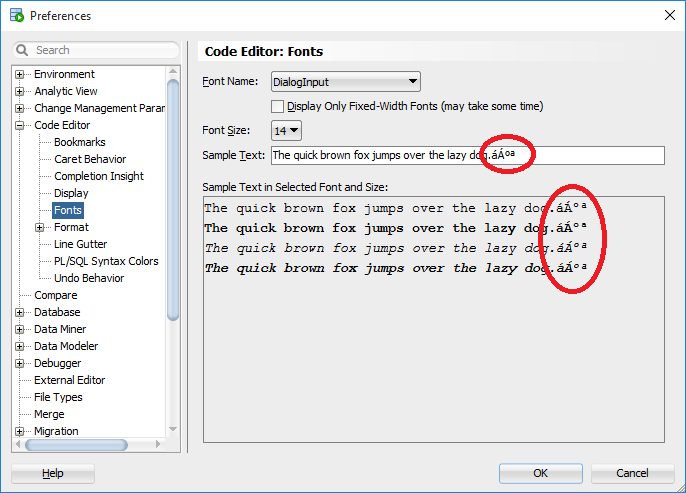
Untitled.png

The OS is Windows 7 in English. I don't know if that is an issue. Any other software works correctly with accents.

This post has been answered by B.Delmée on Sep 15 2017
Jump to Answer
Comments
Locked Post
New comments cannot be posted to this locked post.
Post Details
Locked on Oct 16 2017
Added on Sep 14 2017
14 comments
5,883 views