hi all,
I'm looking for a way to translate ADF to my locale language, German, and can't find any solution!
my default locale is de(German). i have configured this in faces-config.xml as below ,
<locale-config>
  \<default-locale>de\</default-locale>

  \<supported-locale>en\</supported-locale>

\</locale-config>
i have created a separate project, which contains bundle files as for english common_en.properties and for german common_de.properties.
i have generated the JAR file from the common project and added in my viewcontroller project. i have added these two resource bundle files in viewcontroller. please refer the below screenshot.
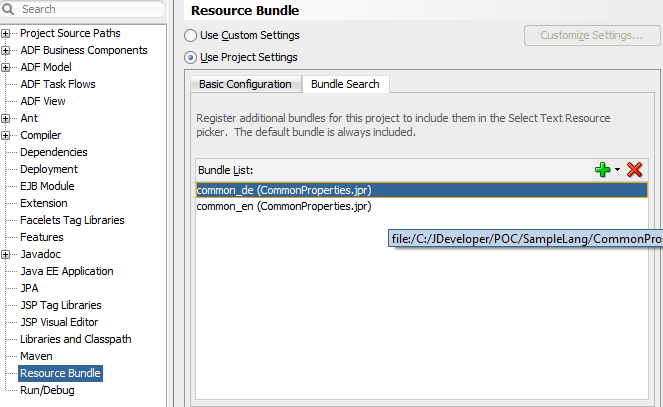
In my jspx page, the following below code,
<?xml version='1.0' encoding='UTF-8'?>
<jsp:root xmlns:jsp="http://java.sun.com/JSP/Page" version="2.1" xmlns:f="http://java.sun.com/jsf/core"
      xmlns:af="[http://xmlns.oracle.com/adf/faces/rich](http://xmlns.oracle.com/adf/faces/rich)" xmlns:c="[http://java.sun.com/jsp/jstl/core](http://java.sun.com/jsp/jstl/core)">

\<c:set var="de" value="#{adfBundle\['common\_de'\]}"/>

\<c:set var="en" value="#{adfBundle\['common\_en'\]}"/>

\<jsp:directive.page contentType="text/html;charset=UTF-8"/>

\<f:view>

    \<af:document title="MainPage" id="d1">

        \<af:form id="f1">

            **\<af:outputText id="ot3" value="#{de.anndecsht}" partialTriggers="b1"/>**

            \<af:spacer height="30" id="s4"/>

           **\<af:button text="Change locale" actionListener="#{backingBeanScope.headerBean.changeLanguageText}"**

                       **id="b1"/>**

        \</af:form>

    \</af:document>

\</f:view>
</jsp:root>
On click of button, it should change the locale as en (English) and i am not able to display the English translation message in outputtext. the following below code on click of button,
| | public void changeLanguageText(ActionEvent actionEvent) { | |
| | FacesContext fc = FacesContext.getCurrentInstance(); | |
| | |
| | if (fc.getApplication().getDefaultLocale().equals(Locale.GERMAN)) { | |
| | fc.getViewRoot().setLocale(Locale.ENGLISH); | |
| | } |
| | else { | |
| | fc.getViewRoot().setLocale(Locale.GERMAN); | |
| | |
| | } |
| | |
| | } |
How can I change it from any application's adf faces web page dynamically?
**thanks
**