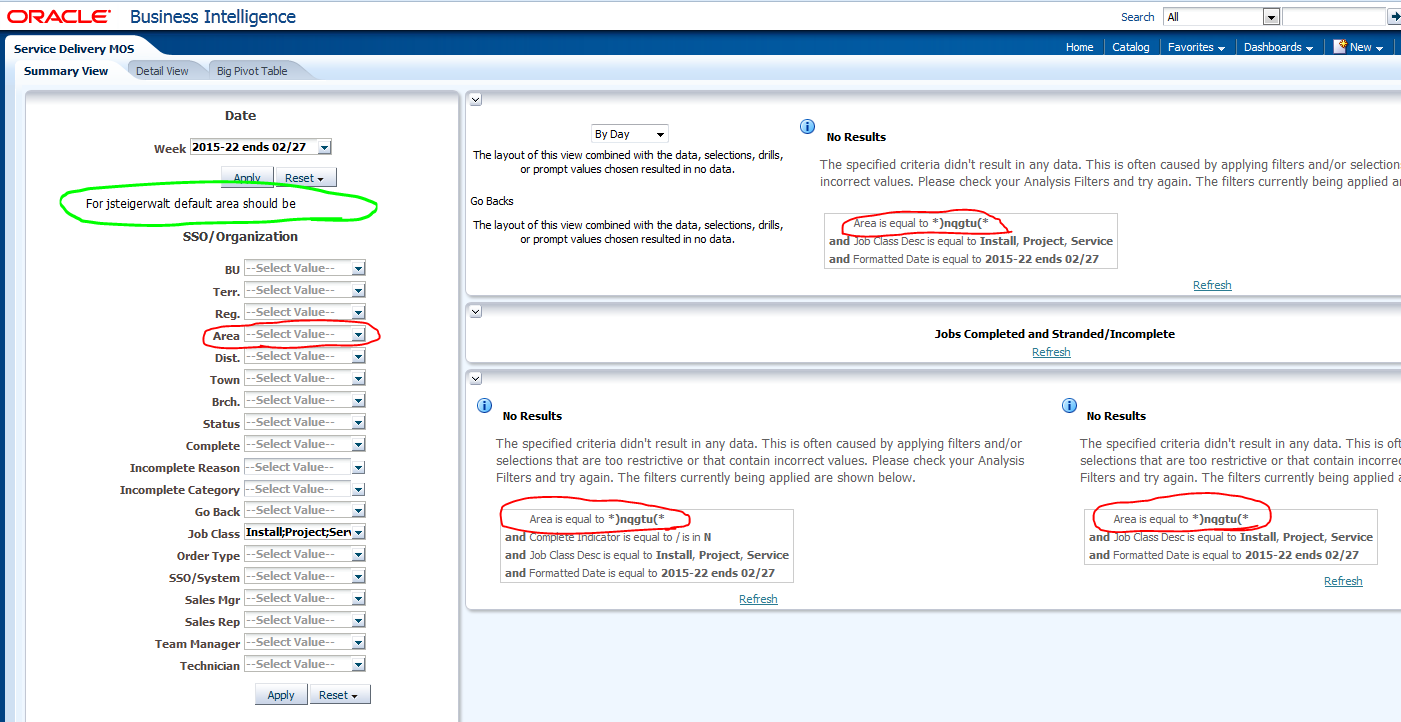
Hi,
I have a business requirement that a dashboard that we have built have localization so that users who belong to a certain geographic location arrive at the default view of the dashboard with prompts set to their own geographic area. It's just giving them a default view to make their experience better when they log in each day. Because of the way that we have set the default value for the time period they are looking at, USING SAVED CUSTOMIZATIONS IS NOT AN OPTION.
I have created the default values for the prompt called "Area" in an initialization block; this variable is called V_USER.
My issue is that only about 80% of the users have an "Area" value in our employee hierarchy. I would like for anyone else to default to "(All Column Values)". I have been unable to figure out how and where to do this.
Some of the things I have tried:
| (1) | Setting the default value in the initialization block to a blank space ( '' in SQL) |
| (2) | Setting the default value in the initialization block to "(All Column Values)" |
| (3) | Setting the default value in the initialization block to "null" |
None of these have worked and the result is that the user that does not have an area ends up with a zombie dashboard loading and while the prompt has resulted in the "--Select Value--" mode, the user has to press "Apply" again to get the dashboard to show data.
The text that is behind the area circled in green below is correctly getting the variable value for V_USER (it's blank as default and I don't have an area).
For @{biServer.variables['NQ_SESSION.USER']} default area should be @{biServer.variables['NQ_SESSION.V_USER']}{}
In the red circles below you can see that the prompt is actually getting a value: *)nqgtu(*
The image below shows the default for a user who does not have an area. the second prompt block is not updated till you press apply again...