Goodmorning Community,
I am using APEX 5.1.0.00.45 with Oracle 12c Database & Google Chrome
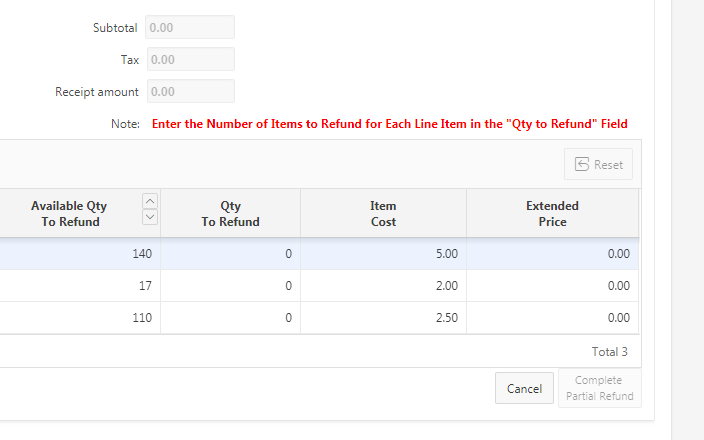
I would like to set Focus to a specific (Extended Price) column in an IG after hitting Tab and a simple Calcuation of 2 Columns (Qty * Cost) = Extended Price
The User would enter a number in the "Qty To Refund" Column press 'Tab" and some Javascript(Below) Calculates the Extended Price (Qty To Refund * Item Cost)
Then I would like to SetFocus Automatically to the Extended Price Field so that it Formats the Number with Accounting Brackets I.E. (-10 * 50) = <50.00>
var $te = $(this.triggeringElement);
//Get the ID of the row
var rowId = $te.closest('tr').data('id');
//Identify the particular interactive grid
var ig$ = apex.region("gridRefundReceiptLog").widget();
//Fetch the model for the interactive grid
var model = ig$.interactiveGrid("getViews","grid").model;
//Fetch the record for the particular rowId
var record = model.getRecord(rowId);
var thisrowOrigItemQty = model.getValue(record,"ORIGINAL_ITEM_QTY");
var thisrowItemCost = model.getValue(record,"ITEM_COST");
var thisrowItemQty = this.triggeringElement.value;
var nSumOfExtended = 0;
if ( thisrowItemQty >= 0 ) {
if ( Math.abs(thisrowItemQty) > thisrowOrigItemQty ) {

    apex.item(this.triggeringElement).setValue(0);

    //model.setValue(record,"EXTENDED\_PRICE", 0.00);

    if (parseFloat($v("P98\_SUBTOTAL").replace(/\[^\\d\\.\\-eE+\]/g, "")) == 0)  {

    apex.item( "btnCompletePartialRefund" ).disable();

}

else{

    apex.item( "btnCompletePartialRefund" ).enable();

}

    //apex.item(this.triggeringElement).focus();

    swal("Validation Error","Qty To Refund Entered\\nwas Greater Than \\nAvailable Qty To Refund");    // If we see the alert, everything before it worked (did't crash js)

}

else {                // We have a valid number. Let's do this.

    var newExtendedPrice = thisrowItemQty \* thisrowItemCost \* -1;          **HERE IS WHERE THE CALCULATIONS TAKE PLACE**

    model.setValue(record,"EXTENDED\_PRICE", newExtendedPrice);

    alert('test');

    apex.item( "itemcost" ).enable();

   apex.item( "myExtended" ).enable();

  //apex.item( "EXTENDED\_PRICE" ).setStyle( "color", "red" );

  //model.setFocus(record,"EXTENDED\_PRICE",newExtendedPrice);

 //apex.item( "myExtended" ).setFocus();

//apex.item( "myExtended" ).disable();

    alert('test');

    apex.modelColumns\["myExtended"\].setFocus();
Function and Global Variable Declaration --- Here is a Function where I was attempting to setFocus()
function myFunction_Tab(event) {
alert('test');

var x = event.key;

alert('this key was pressed from Global / Function -----> ' + x );

if (x === 'Tab' || x === 'Enter')  {

 //event.preventDefault();

 //apex.item( "myExtended" ).setFocus();

   apex.item( "EXTENDED\_PRICE" ).setFocus();

}
}