Hi guys,
I tried to create a tabular form of a table, where I can do Insert, Update, and Delete operation of a table's data. Let's say the table should list students' data like classroom_number, name, email, etc. This tabular form page will be accessed from another page, where I can choose a classroom number. So when the classroom number clicked, it will open the tabular form, which shows only students from the chosen classroom number. It also set the classroom number in a hidden item at the tabular form page (e.g. P2_CLASS_NUMBER).
Since the classroom number is supposed to be the same and does not need to be edited, I set the Class_Number column as hidden-type column. But the problem comes when I clicked the "Add Row" button of the generated tabular form, the Class_Number of course will be null, and to make it worse, a hidden-type column does not allow me to set the "Default Value" attribute from the Page Designer.
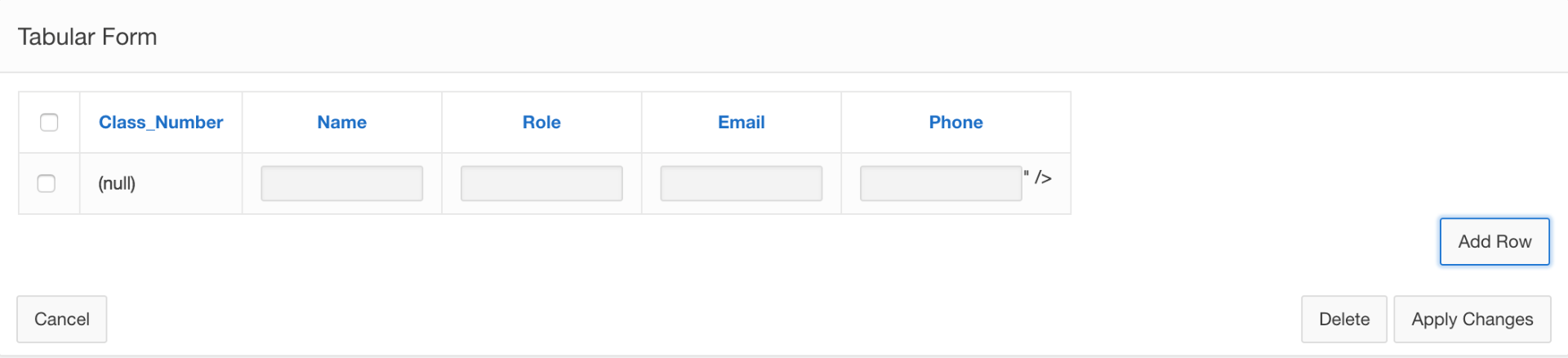
(There is also a weird "/> character generated by Apex at the Phone column )
How can I automatically set the Class_Number column value when clicking the Add Row button?
P.S. I am using Apex v5.0.4