I followed below steps to Send Emails from Microsoft Office 365 and Oracle Database 19c in PL/SQL
but I'm getting below error, the user is not locked , can anyone please suggest if there is any other additional steps required apart from below mentioned,
“ORA-29279: SMTP permanent error: Authentication unsuccessful, user is locked by your organization's security defaults policy. Contact your administrator.
[DX0P273CA0072.AREP273.PROD.OUTLOOK.COM 2025-01-24T09:53:36.320Z 08DD3BE27C324079]
ORA-06512: at "SYS.UTL_SMTP", line 57
ORA-06512: at "SYS.UTL_SMTP", line 142
ORA-06512: at "SYS.UTL_SMTP", line 446
ORA-06512: at line 28”
Steps I followed
Once installed Oracle Database, the first step is generate the Oracle Wallet to store the certificates, we can use command-line utility orapki. This utility can be found in $MIDDLEWARE_HOME/oracle_common/bin path in case your environment has a middleware installation like Oracle WebLogic 12c, orapki is also available inside $ORACLE_HOME path. Create the Oracle wallet with this command.
orapki wallet create -wallet C:/Oracle/Middleware/Wallets/Office365 -pwd MySecretPass_1 -auto_login
Then we need to get the Trusted Root Certificates from Microsoft, they are available for download here https://docs.microsoft.com/en-us/microsoft-365/compliance/encryption-office-365-certificate-chains. We need the O365_Root_Certs_20170321.pb7 file. Now we can import the certificates into our Oracle Wallet.
orapki wallet add -wallet C:/Oracle/Middleware/Wallets/Office365 -trusted_cert -cert O365_Root_Certs_20170321.p7b
If everything went right until now, we can confirm the actual contents of the Oracle Wallet with this command.
orapki wallet display -wallet C:/Oracle/Middleware/Wallets/Office365
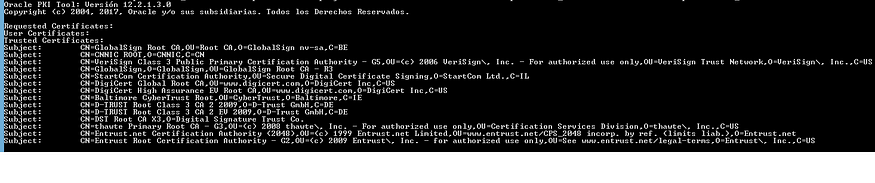
Oracle Wallet containing the Microsoft Office 365 Root Certificates Chain
Depending of the environment configuration, it could be needed to change or adjust the permissions assigned to the newly created .p12 file.

Here for simplicity all permissions are asigned to anyone but in a real productive environment only the appropiate permissions should be applied for security concerns
That’s it, we have finish the configuration, now we are going to write a simple PL/SQL code that send an email test with some dynamic content. I am going to use SQL Developer to execute the code below so after connecting to the database and execute the script an email should arrive to destination email.