Hello,
To make a call to a report from a form, I´m trying to start the in-process reports server in development mode.
Environement :
- Windows 7 64 bits
- Forms/Report 11gR2 (11.1.2.1.0 32 Bits)
- Weblogic 10.3.6
- Java 32 bits 1.6.0
When I try to start the in-process server using the following url http://host:port/reports/rwservlet/startserver, it shows the HTTP 500 error
while starting it from the commande line using rwserver server= name_server shows the following exception:
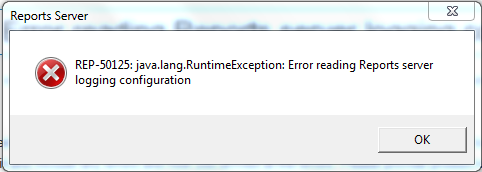
Content of log files:
- rwEng-0_diagnostic.log: empty
- wrservlet_diagnosis.log:
[2017-11-22T08:36:28.861+01:00] [AdminServer] [WARNING] [] [oracle.reports.servlet] [tid: 12] [userId: <anonymous>] [ecid: 0000LzYdsqg2RPy707AhMF1Q5IK6000001,0:1] [APP: reports#11.1.2] ServletCmdMgr:startInProcessServer failed to start inprocess server with error: oracle.reports.RWException: IDL:oracle/reports/RWException:1.0
[2017-11-22T08:36:01.152+01:00] [AdminServer] [WARNING] [] [oracle.reports.server] [tid: 16] [userId: <anonymous>] [ecid: 0000LzYdsqg2RPy707AhMF1Q5IK6000001,1:18471] [APP: reports#11.1.2] Multicast:init java.net.SocketException: Unrecognized Windows Sockets error: 0: no Inet4Address associated with interface
[2017-11-22T08:36:01.152+01:00] [AdminServer] [WARNING] [] [oracle.reports.server] [tid: 16] [userId: <anonymous>] [ecid: 0000LzYdsqg2RPy707AhMF1Q5IK6000001,1:18471] [APP: reports#11.1.2] Multicast:init java.net.SocketException: Unrecognized Windows Sockets error: 0: no Inet4Address associated with interface
[2017-11-22T08:36:01.152+01:00] [AdminServer] [WARNING] [] [oracle.reports.server] [tid: 16] [userId: <anonymous>] [ecid: 0000LzYdsqg2RPy707AhMF1Q5IK6000001,1:18471] [APP: reports#11.1.2] Multicast:init java.net.SocketException: Unrecognized Windows Sockets error: 0: no Inet4Address associated with interface
[2017-11-22T08:36:01.152+01:00] [AdminServer] [WARNING] [] [oracle.reports.server] [tid: 16] [userId: <anonymous>] [ecid: 0000LzYdsqg2RPy707AhMF1Q5IK6000001,1:18471] [APP: reports#11.1.2] Multicast:init java.net.SocketException: Unrecognized Windows Sockets error: 0: no Inet4Address associated with interface
[2017-11-22T08:36:01.152+01:00] [AdminServer] [WARNING] [] [oracle.reports.server] [tid: 16] [userId: <anonymous>] [ecid: 0000LzYdsqg2RPy707AhMF1Q5IK6000001,1:18471] [APP: reports#11.1.2] Multicast:init java.net.SocketException: Unrecognized Windows Sockets error: 0: no Inet4Address associated with interface
[2017-11-22T08:36:21.683+01:00] [AdminServer] [NOTIFICATION] [REP-56105] [oracle.reports.server] [tid: 17] [userId: <anonymous>] [ecid: 0000LzYdsqg2RPy707AhMF1Q5IK6000001,0] [APP: reports#11.1.2] EngineManager:manage Echec du moteur rwEng-0 avec l"erreur {1}.
[2017-11-22T08:36:23.846+01:00] [AdminServer] [NOTIFICATION] [REP-56105] [oracle.reports.server] [tid: 17] [userId: <anonymous>] [ecid: 0000LzYdsqg2RPy707AhMF1Q5IK6000001,0] [APP: reports#11.1.2] EngineManager:manage Echec du moteur rwEng-0 avec l"erreur {1}.
[2017-11-22T08:36:25.726+01:00] [AdminServer] [NOTIFICATION] [REP-56105] [oracle.reports.server] [tid: 17] [userId: <anonymous>] [ecid: 0000LzYdsqg2RPy707AhMF1Q5IK6000001,0] [APP: reports#11.1.2] EngineManager:manage Echec du moteur rwEng-0 avec l"erreur {1}.
[2017-11-22T08:36:25.726+01:00] [AdminServer] [INCIDENT_ERROR] [REP-56105] [oracle.reports.server] [tid: 17] [userId: <anonymous>] [ecid: 0000LzYdsqg2RPy707AhMF1Q5IK6000001,0] [APP: reports#11.1.2] REP-56105 : Echec du moteur rwEng-0 avec l"erreur . [[
oracle.reports.RWException: IDL:oracle/reports/RWException:1.0
at oracle.reports.utility.Utility.newRWException(Utility.java:1053)
at oracle.reports.server.EngineManager.manage(EngineManager.java:431)
at oracle.reports.server.IdleThread.run(IdleThread.java:95)
]]
Any help would be appreciated !