Version=Oracle APEX 24.1
I have an interactive report where one of the columns is defined as a link. When you hover over the link, a tooltip is shown that is formatted HTML. For the link attribute, the value is:
onmouseover="toolTip_enable(event,this,'#APP_SUMMARY#')"
…where APP_SUMMARY is one of the columns specified in the SQL query in the IR. It is defined as:
replace(
'<b>PURPOSE</b>' || '<BR>' || UP.APP_PURPOSE || '<BR>' || '<BR>' ||
'<b>AUDIENCE</b>' || '<BR>' || UP.APP_AUDIENCE || '<BR>' || '<BR>' ||
'<b>ROLES</b>' || '<BR>' || UP.APP_ROLES || '<BR>' || '<BR>' ||
'<b>POCS</b>' || '<BR>' || UP.APP_POCS,
CHR(13) || CHR (10), '<BR>')
as APP_SUMMARY
When hovering over the column value in the IR, the HTML is rendered as (sample where the column values are blank):
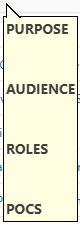
I'm in the process of modernizing our APEX applications and want to remove the dependency on the old javascript libraries. For example, the ones defined in the Application Definition.

If I uncheck these boxes in the Application Definition, I get this error in the browser:

So that error tells me that toolTip_enable was likely deprecated in one of the previous releases of APEX. Does anyone know of a replacement for this function that renders HTML? Or perhaps a better way to render HTML in a tooltip?
Note: Please don't respond with using Title= or <tt> tag as those solutions don't render HTML.