Good evening,
Hopefully, there is a simple solution to this issue (Oracle APEX 20.1)
I am designing a classic report page with search filters in regions below the the breadcrumb region. When I use only text items, date pickers, or select lists, all the rows line up vertically. But when I add check boxes or radio groups, they no longer align vertically as the check boxes and radio groups appear to occupy more pixels in height than the other items. Is it possible to reduce the height of those items so that my rows are aligned?
In the example below, the two sets of radio groups push the bottom of the Contact Name text field below the items in the adjacent columns.
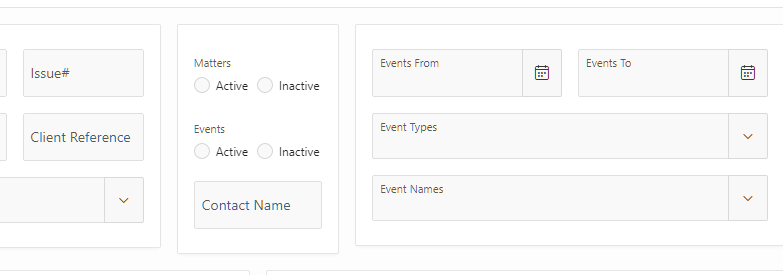
All items on the page use the default template and default template options, as shown for the top radio group below:

Any suggestions would be greatly appreciated.
Alan