Running the DBCA for Oracle 23.26.1, and my X-windows won’t display on the MacBook using XQuarts.
This works find on older macbooks from 2013 and 2018 using XQuartz with no tweaks at all, but not on an MBP-M5pro with the deluxe nano-texture screen.
For now, I consider this an “oracle” problem: XQuartz blackens only on the DBCA windows: they are totally Black. The cute xeyes and regular xterm all work fine from that database-server.
on starting DBCA, The splash-window still displays in usual +/-beige, but then it all goes Black. I can “blindly” find the exit button, and the popup is readable in the expected beige color as well. But the main window remains stubbornly black. Will try screenshot…
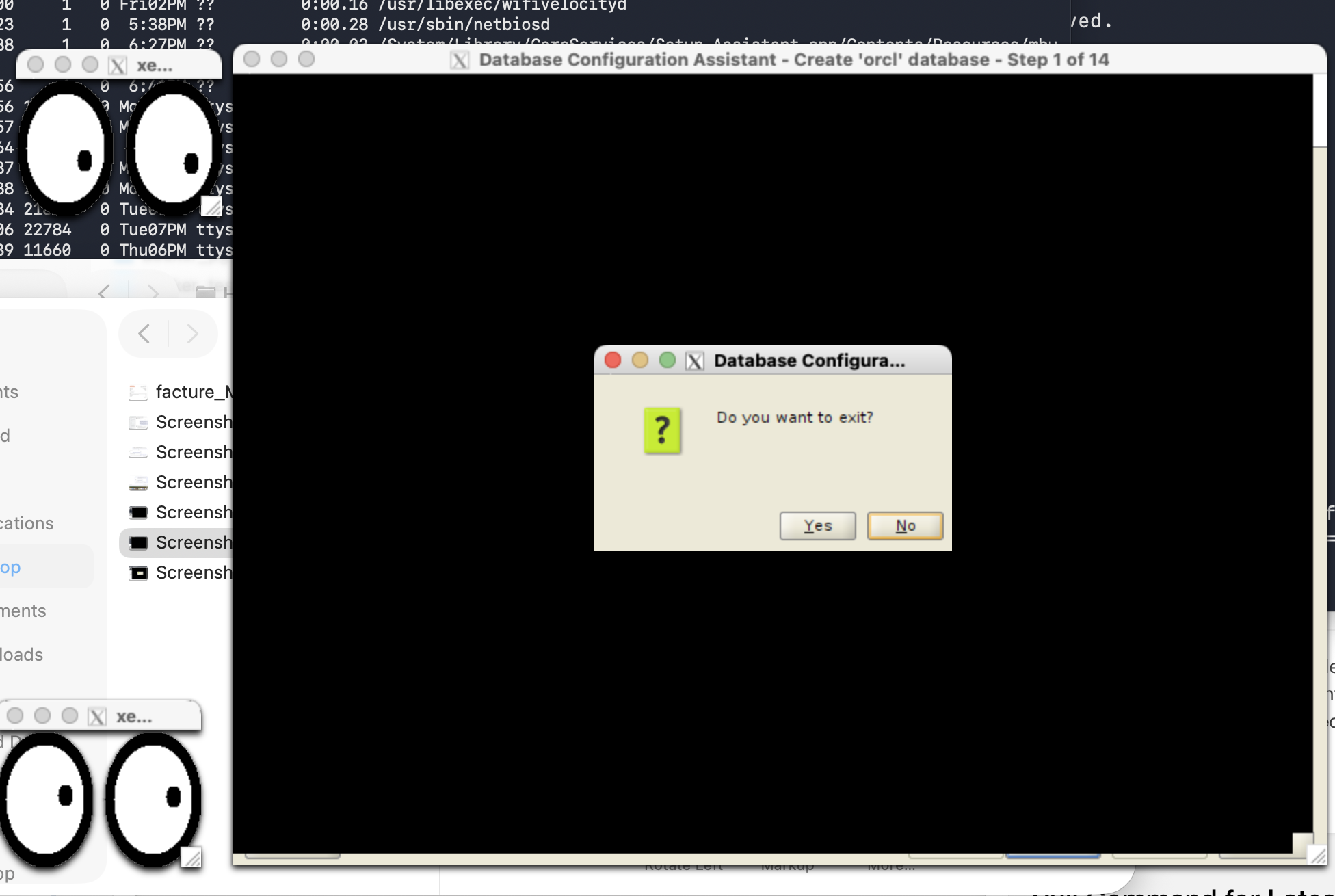
Google + other “ assistants” seems to acknowledge the problem, but have no “fix” that works for me.
I already tried adjusting the color-settings in XQuartz but none of the settings help, all remains black (yes, I restarted). Also I tried a few exotic java-tool settings about rendering and colors: all no help.
Is there anything I can do, either on the database-server (hmm, a container :-) ) where I am running DBCA or in XQuartz on the Macbook to make this window appear readable again ?
TIA (from someone who still runs DBCA… )