I am attempting to install and configure Oracle Mapviewer 12c (v12.1.3). The installation appears successful but after performing the installation, I am unable to access the Mapviewer 12c Administration Console. The default Admin Console URL is http://[host]:[port]/mapviewer. I can reach the URL using a browser (Firefox, Chrome, IE) but the admin welcome page will not display. The browser just "spins it's wheels" as it tries to load the page. The image below is from Firefox
Examining the browser's developer console (by pressing F12) while the page is loading, you can see it cycling through the login page repeatedly (see image below).

My environment consists of the following:
-
Server OS: Linux x86_64 (RedHat Enterprise 5.11)
-
Oracle Weblogic Server 12c - "Oracle Fusion Middleware Infrastructure" distribution
As per the documentation, Oracle Mapviewer 12c requires specific dependencies that the Generic Weblogic Server installation will not provide (i.e. http://www.oracle.com/technetwork/middleware/weblogic/overview/index.html). Instead, you must use the "Oracle Fusion Middleware Infrastructure" distribution, to install weblogic server and all the required dependencies.
The Oracle Fusion Middleware Infrastructure distribution was downloaded from the Oracle ADF download page on OTN or from the Oracle Software Delivery Cloud.
- Oracle ADF download page on OTN: http://www.oracle.com/technetwork/developer-tools/adf/downloads/index.html
- JAR file fmw_12.1.3.0.0_infrastructure_Disk1_1of1.zip
- Oracle Fusion Middleware MapViewer Version 12c (12.1.3)
- downloaded from http://www.oracle.com/technetwork/middleware/mapviewer/downloads/index.html
- JAR file is fmw_12.1.3.0.0_mapviewer.jar
Following the instructions in the Users Guide for Oracle Mapviewer 12c E29624-02 (http://docs.oracle.com/middleware/1213/core/JIMPV/index.html), I first installed and configured Weblogic Server 12c, followed by Mapviewer 12c.
I made two different installation attempts:
a) I installed Mapviewer Using the Universal Installer
b) I Manually Deployed an Exploded MapViewer EAR Folder in WebLogic Server
Both attempts produced the same results.
Specifically, after installing and configuring Mapviewer, I could verify the version of Mapviewer using the URL:
http://[host]:[port]/mapviewer/omserver?getv=t
Accessing this URL immediately resulted in the expected response text string:
Ver12.1.3_B140430.1010
I could also successfully access the Weblogic Admin Console (http://[host]:[port]/console) and confirm the Weblogic is running, and that Mapviewer has been successfully deployed and running as well.
However, at this point, if I try accessing the Mapviewer 12c Administration Console via http://[host]:[port]/mapviewer, the Console launch page does not display (as described above).
At this point, I am asking myself why does Oracle's Demo site work (http://slc02okf.oracle.com) and mine doesn't. I assumed Oracle's own demo site for Mapviewer was using Mapviewer 12c. I based that assumption on the fact that Orqacle's Demo site (http://slc02okf.oracle.com/mvdemo/demo/oracle_maps_demo_v2.jsp) displays a header referencing Mapviewer 12c (see image below).
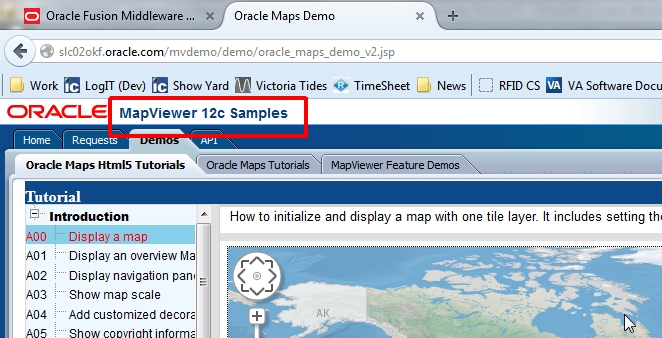
However, when I queried the version URL for Oracle's Demo site (i.e. http://slc02okf.oracle.com/mapviewer/omserver?getv=t), I see instead that they are running Mapviewer 11g!!
Ver11_1_1_7_3_B140717
So, long story short, has anyone successfully deployed Mapviewer 12c, and if so, can you access the Mapviewer 12c Administration Console??
Any and all input is greatly appreciated.
Wayne