Hi All,
I have 64 bit windows system. I want to connect to the oracle database from my SSIS packages.
I installed 64-bit Oracle Data Access Components (ODAC) from the below path.
Installation was successful.
ODAC122011_x64
https://www.oracle.com/technetwork/database/windows/downloads/index-090165.html
To connect Oracle database successfully, I have to install 32-bit Oracle Data Access Components (ODAC) with Oracle Developer Tools for Visual Studio also.
https://www.oracle.com/technetwork/topics/dotnet/utilsoft-086879.html :ODTwithODAC122011
This installation is unsuccessful and getting error : OUI-10022: The target area cannot be used because it is in an invalid state.
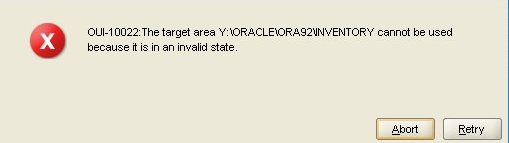
Y:\Oracle\ORA92\INVENTORY is a shared path and I don't have Write permission to this path.
Could you please suggest any work around for this issue?
Thanks,