Dear all,
i am following the following tuorial
http://www.oracle.com/webfolder/technetwork/tutorials/obe/db/dotnet/EntityFrameworkOBE/EntityFrameworkOBE.htm
i have visual studio 2015 with oracle database 12c 64bit on windows.
i download ODAC 12c Release 4 (12.1.0.2.4) which is 32 bit because the trutorial says it should include visual studio tools , which i cannot found in the 64 bit version of odac.
i tried to install it, first it give error for MTS services, i stop the oracle MTS services, and retry the installation, and it proceed well.
then at the end of installation, i receive the following message.
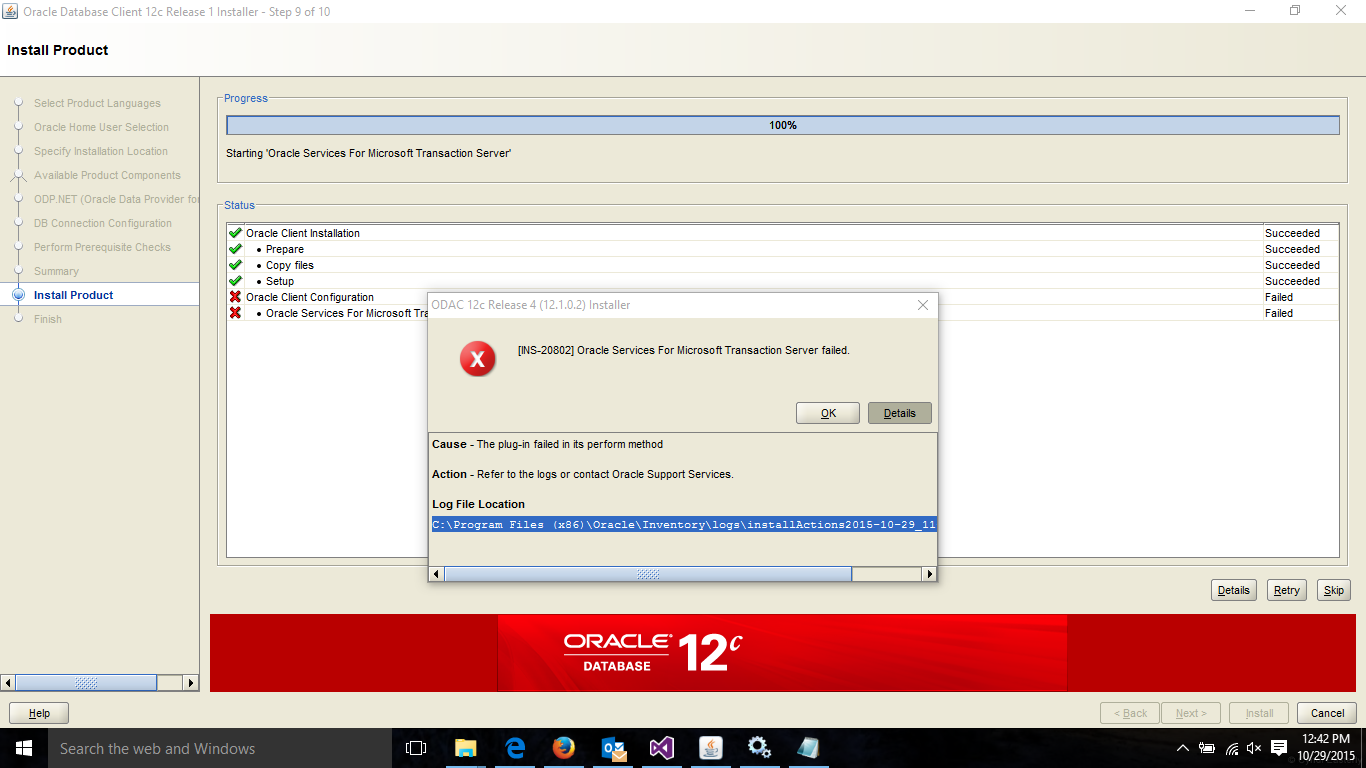
Some of the last lines from the log is below
INFO: Successfully updated Transient Parameters in the Aggregates
INFO: Configuration log directory - C:\app\welcome\product\12.1.0\dbhome_1\cfgtoollogs
INFO:
The Runconfig command constructed is C:\app\welcome\product\12.1.0\dbhome_1\oui\bin\runConfig.bat ORACLE_HOME=C:\app\welcome\product\12.1.0\dbhome_1 MODE=perform ACTION=configure RERUN=true %*
INFO: Since the option is to overwrite the existing C:\app\welcome\product\12.1.0\dbhome_1\cfgtoollogs\configToolAllCommands file, backing it up
INFO: The backed up file name is C:\app\welcome\product\12.1.0\dbhome_1\cfgtoollogs\configToolAllCommands.bak.2
INFO: ConfigClient.saveSession method called
INFO: Calling event ConfigSessionEnding
INFO: ConfigClient.endSession method called
INFO: Completed preparation for configuration
INFO: Completed 'Prepare for configuration steps'
INFO: Performing Configuration
INFO: Entering ConfigClient.init method
INFO: ConfigClient.init sOracleHomeLoc=C:\app\welcome\product\12.1.0\dbhome_1, sTopAggId=oracle.odac.client
INFO: Entering ConfigClient.initClientAndSession method
INFO: ConfigClient.initClientAndSession status : connected to the config framework
INFO: ConfigClient.initClientAndSession session begun oracle.sysman.emCfg.client.CfwSession@8ff0ca
INFO: ConfigClient.initClientAndSession m_oAggregate=[Loracle.sysman.emCfg.common.IAggregate;@9946e
INFO: Configuration log directory - C:\app\welcome\product\12.1.0\dbhome_1\cfgtoollogs
INFO: Exiting ConfigClient.init method
INFO: Calling event ConfigSessionInitialized
INFO: ConfigClient.registerOutErrStream method called
INFO: Updating Transient Parameters in the Aggregates
INFO: Updating Transient Parameters for oracle.odac.client
INFO: Updating Transient Parameters for OuiConfigVariables
INFO: Updating Transient Parameters for oracle.ntoramts
INFO: Setting value to transient variable S_WINSERVICEUSERPASSWORD
INFO: Setting value to transient variable s_winServiceUserPasswordFlag
INFO: Successfully updated Transient Parameters in the Aggregates
INFO: Entering ConfigClient.getToolsList method
INFO: Created config job for Oracle Services For Microsoft Transaction Server
INFO: Configuration log directory - C:\app\welcome\product\12.1.0\dbhome_1\cfgtoollogs
INFO:
The Runconfig command constructed is C:\app\welcome\product\12.1.0\dbhome_1\oui\bin\runConfig.bat ORACLE_HOME=C:\app\welcome\product\12.1.0\dbhome_1 MODE=perform ACTION=configure RERUN=true %*
INFO: Since the option is to overwrite the existing C:\app\welcome\product\12.1.0\dbhome_1\cfgtoollogs\configToolAllCommands file, backing it up
INFO: The backed up file name is C:\app\welcome\product\12.1.0\dbhome_1\cfgtoollogs\configToolAllCommands.bak.3
INFO: Entering ConfigClient.executeToolsInAggregate method
INFO: ConfigClient.executeToolsInAggregate oAggregate=oracle.odac.client:oracle.odac.client:12.1.0.2.0:common
INFO: Entering ConfigClient.assignAction method
INFO: ConfigClient.assignAction actionref=[Loracle.sysman.emCfg.common.IActionReference;@cc3e77
INFO: ConfigClient.assignAction action is of type :configuration
INFO: Exiting ConfigClient.assignAction method
INFO: ConfigClient.executeToolsInAggregate action assigned
INFO: Started Plugin named: Oracle Services For Microsoft Transaction Server
INFO: Found associated job
INFO: Starting 'Oracle Services For Microsoft Transaction Server'
INFO: Starting 'Oracle Services For Microsoft Transaction Server'
INFO: MTSInternalPlugIn: ... adding </ouiinternal>
INFO: Executing MTS
INFO: Command C:\Windows\system32\cmd /c call C:\app\welcome\product\12.1.0\dbhome_1\bin\oramtsctl.exe -new -internal
INFO: ... GenericInternalPlugIn.handleProcess() entered.
INFO: ... GenericInternalPlugIn: getting configAssistantParmas.
INFO: ... GenericInternalPlugIn: checking secretArguments.
INFO: No arguments to pass to stdin
INFO: ... GenericInternalPlugIn: starting read loop.
INFO: Completed Plugin named: Oracle Services For Microsoft Transaction Server
there is a service created in windows when we install oracle 12c, the service name is OracleOraDB12Home1MTSRecoveryService
i try to start this service after the error message, but it is not restarting.
how could i fix this?
thank you