Hi,
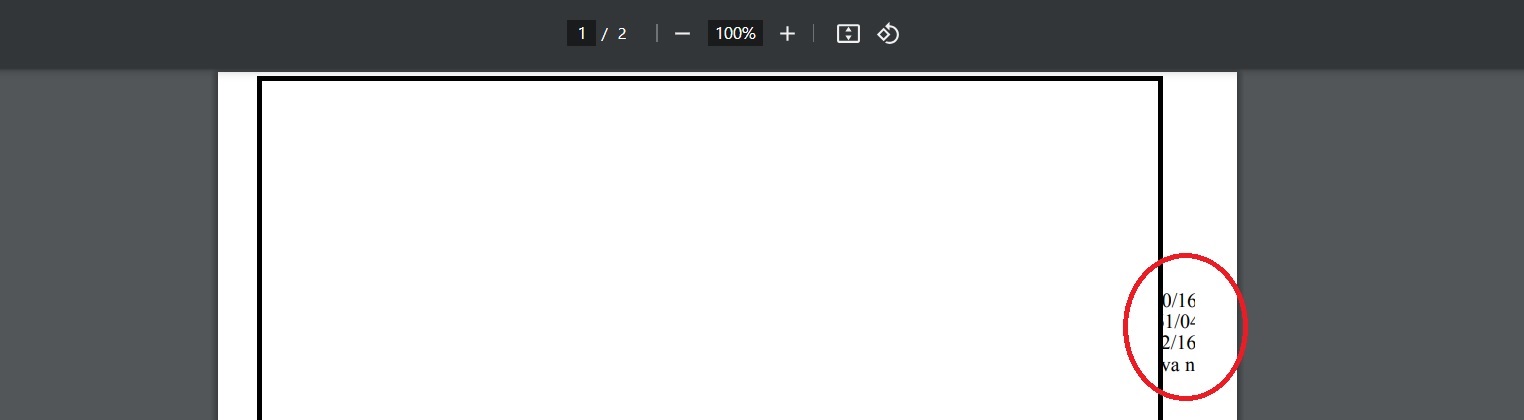
I've been encountering a recurring issue with Oracle Reports 12.2.1.19, specifically related to running reports. When generating reports as pdf, I've noticed that the output is on good amount of reports cut off on the right side. This results in missing letters, and in some cases, letters being cut in half mostly its cut just half letter or letter and half.
While running the reports as HTML displays them correctly, switching to PDF results in the content being cut off on the right side. This issue is particularly crucial as we are in the process of upgrading older forms and reports, and we need to maintain the consistency of the output for our users.
Running on Oracle Linux 8.8
I sincerely appreciate your time and assistance.
Updated (filled in additional information):
I encountered a similar issue on Windows, but upon closer inspection, I realized that I had copied the entire uifont.ali file from a Linux system. Consequently, I edited the [ PDF:Subset ] section, and this resolved the problem. The layout and text no longer suffered from cuts on the right side, and the overall presentation became flawless.
On Linux systems, despite editing the same [ PDF:Subset ] section, the issue persists. Moreover, if the [ GLOBAL ] section is not entirely commented out, special characters such as č, ć … are lost. Although the layout remains intact, uncommenting [ GLOBAL ] disrupts the layout, causing some content to be pushed onto the second page even when there is enough space on the first page. Notably, the problem of the page being cut from the right side still exists in both scenarios.
Here is uifont.ali in question: https://pastebin.com/raw/K4vgkbbn
Hey, @michael-ferrante-oracle could you please help me with this?
Update 2: Believe report is using Letter instead of A4 size, any idea how to print it as A4 instead?
Screenshot of the issue (Please note that for confidentiality reasons, I have covered most of the content in the image):