Hello,
I am trying to install Oracle 18c express on a PC running windows 10 and the installation get stuck when it creates the XE database. I checked the logs and see that I have these errors:
Event ID: 8213
Volume Shadow Copy Service error: The process that hosts the writer with name Oracle VSS Writer - XE and ID {26d02976-b909-43ad-af7e-62a4f625e372} does not run under a user with sufficient access rights. Consider running this process under a local account which is either Local System, Administrator, Network Service, or Local Service.
Operation:
Initializing Writer
Context:
Writer Class Id: {26d02976-b909-43ad-af7e-62a4f625e372}
Writer Name: Oracle VSS Writer - XE
Writer Instance Name: XE
And:
Event ID:8230
Volume Shadow Copy Service error: Failed resolving account Enrico with status 1376. Check connection to domain controller and VssAccessControl registry key.
Operation:
Initializing Writer
Context:
Writer Class Id: {4969d978-be47-48b0-b100-f328f07ac1e0}
Writer Name: BITS Writer
Error-specific details:
Error: NetLocalGroupGetMemebers(Enrico), 0x80070560, The specified local group does not exist
I have completely uninstalled/reinstalled the DB at least 3 times but still get the same error. I believe it is related to the value of the VSSAccessControl Key in the registry:
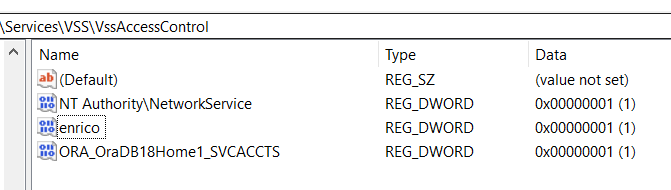
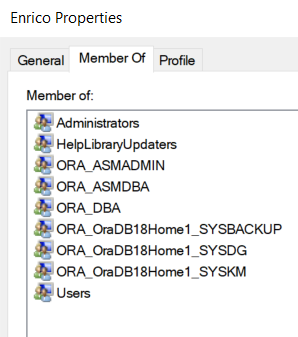
Enrico is a local admin account on the PC and he needs to access the DB with his account. His account is part of the following groups:
What should be the right name and value of the VSSAccessControl Key?
Many thanks,
egit