Hi Everyone
From Last Couple of Days i am trying to Configure apex as sso with https://support.pingidentity.com/ and saml 2 . Below are Server details
OS : ubuton
Apex 18.2
Apache 7
Below Steps i already followed for Generating Endpoint and Security Assertion URLs
Step 1)
Installing the mod_auth_mellon Using Package Manager On Ubunto
sudo apt-get install libapache2-mod-auth-mellon
It Will create folder mellon under apache2
Run below command to see mellon folder
cd /etc/apache2/
cd mellon
Here you will see below .sh file
mellon_create_metadata.sh
Run below command to make it executable.
chmod a+x mellon_create_metadata.sh
Step 2)
Create the SAML2 metadata using above .sh file
Run below command while you are in Mellon directory under apache2 it will create endpoint URL to assertion Consumer service url
sudo ./mellon_create_metadata.sh https://test.vertum.ch/entityid https://test.vertum.ch/myendpoint
The above command will show below output
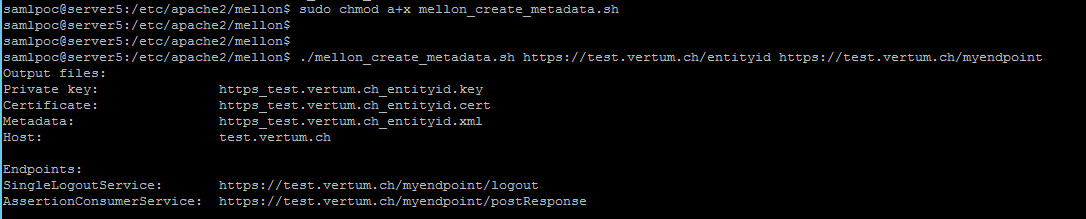
From the Ping Identity i got the metadata files as attached metadata.xml
After that i Have set below Configuration in
/etc/apache2/mods-available/ssl/conf
# Adds Mellon session information to all requests to the web server
# Adds Mellon session information to all requests to the web server
<Location />
MellonEnable "info"
# Use the filenames provided by the mellon_create_metadata.sh script
MellonSPPrivateKeyFile /etc/apache2/mellon/https_test.vertum.ch_entityid.key
MellonSPCertFile /etc/apache2/mellon/https_test.vertum.ch_entityid.cert
MellonSPMetadataFile /etc/apache2/mellon/https_test.vertum.ch_entityid.xml
# Add the full path to the IdP metadata that was downloaded when configuring the IdP
MellonIdPMetadataFile /etc/apache2/mellon/metadata.xml
# Map the Mellon variable USERNAME to the attribute return by Azure's SAML assertion.
MellonSetEnv "USERNAME" "http://schemas.xmlsoap.org/ws/2005/05/identity/claims/name"
# The endpoint path used when generating the SP metadata
MellonEndpointPath /myendpoint
</Location>
# Enable Mellon for the ORDS path
<Location /ords/>
MellonEnable "auth"
ProxyPass https://localhost/ords/
ProxyPassReverse https://localhost/ords/
ProxyPreserveHost on
RequestHeader add X-APPUSER %{MELLON_USERNAME}e
</Location>
After that i did apex level configuration like
Creating an Authentication scheme Http Header Variable and Header Variable name as X-APPUSER
Logout SSO URL to /myidentity/logout
bounce apache2
sudo systemctl restart apache2
Once i run the Apex builder or application
like https://test.vertum.ch/ords/
it goes to below URL and nothing happend
https://test.vertum.ch/myendpoint/login?ReturnTo=https%3A%2F%2Ftest.vertum.ch%2Fords%2Ff%3Fp%3D103%3ALOGIN_DESKTOPmyendp…
Any Please advise what wrong here