Hi All,
I am trying to have a header throughout my application that has the possible of a button/icon on the top left, page title in middle, and a button/icon on the top right. Based on what the viewModel is I either display or hide the buttons.
I had everything working as desired previously as I just had the button in top left and title in middle. Now, I am trying to also add the button in the top right. It seems like this should be simple enough looking at the cookbook but for whatever reason it doesnt work me. I am using a hybrid template so my header is contstructed as follows in all of my views:
\<div class="oj-applayout-fixed-top">

    \<!--

       \*\* Oracle JET V8.0.0 hybrid mobile application header pattern.

       \*\* Please see the Oracle JET Cookbook App Shell: Hybrid Mobile demos for

       \*\* more information on how to use this pattern.

    -->

    \<header role="banner" class="oj-hybrid-applayout-header">

        \<oj-module config="\[\[headerConfig\]\]">\</oj-module>

    \</header>

\</div>
The headerConfig then creates the view / viewModel referencing header.html and header.js. In header.html I am trying to do something like (removed all icons, etc to simplify example):
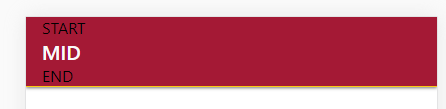
<div class="oj-flex-bar-start">
START
</div>
<div class="oj-hybrid-applayout-bar-title">
\<h1 class="oj-hybrid-applayout-header-title">

    MID

\</h1>
</div>
<div class="oj-flex-bar-end">
END
</div>
However, it just doesnt seem to work. I keep getting something like what is shown below. Doesnt seem to be stretching horizontally like it seems to work by default in all the cookbook examples I seem to look at? Tried quite a few different things so just wanted to see what I am doing wrong.
For what it's worth I was trying to replicate the cookbook in examples such as:
https://www.oracle.com/webfolder/technetwork/jet/jetCookbook.html?component=hybrid&demo=hybridHeaderDynButtons&mode=ios_…