Experts,
I have Solaris 11.5(32/64 bit ) and jdk 1.7.0_221. i installed the weblogic server 10.3.6 and when i try to install the OID 11.1.1.9 , all the prerequisite checks got fails. Please find the below image.
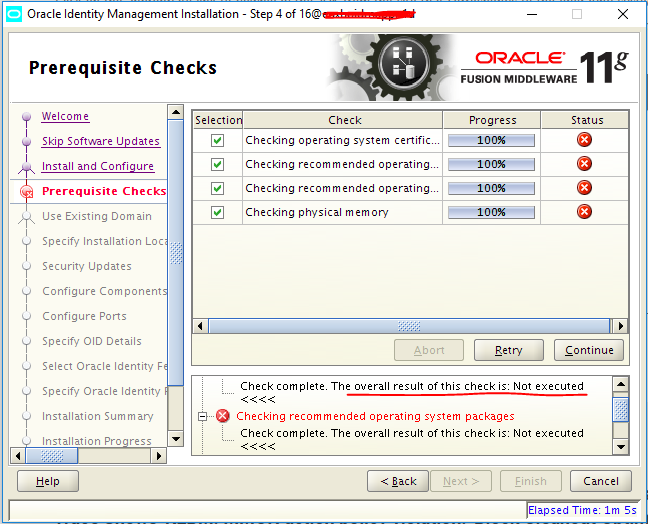
In solaris , the jdk 7 installation is bit different, first i installed the jdk 1.7 32 bit then i installed the jdk.1.7 64 bit on top of 32 bit location. Then i confirmed by putting "java -d64 -version". Everything is working fine upto here.
Once i run th ./runInstaller.sh i got failed in the above prerequisites check. Log 1 shows when i run the ./runInstaller.sh under Disk1/runInstaller.sh, Log 2 shows when i run the ./runInstaller under Disk1/install/solaris.
I tried providing the below options in the command prompt before it running the run Installer but no luck.
export JRE_MEMORY_OPTIONS=" -Xmx512m -XX:MaxPermSize=256m -d64"
export _JAVA_OPTIONS=" -XX:MaxPermSize=512m -d64 "
JAVA_OPTS="-d64 -Xms1024m -Xmx1024m"
Expecting your guidance for this.
My assumption is that OID GUI is taking the java as 32 bit not 64 bit. so finally it got failed.
Log 1:
heck Description:This is a prerequisite condition to test whether the Oracle software is certified on the current O/S or not.
/etc/inittab does not seem to contain default runlevel information.
oracle.sysman.oip.oipc.oipcr.OipcrExecuteRuleException: Unable to execute rule 'CertifiedVersions' from ruleset 'OSChecks'. The underlying test 'oracle.sysman.oip.oipc.oipcz.OipczOSChecks.checkCertifiedOSVersions' has thrown an unhandled exception [null]. If the exception results in a failure of the test and the exception needs to be propagated, then encapsulate the exception in the result object and return the result.
at oracle.sysman.oip.oipc.oipcr.OipcrRulesEngine.executeRule(OipcrRulesEngine.java:375)
at oracle.sysman.oip.oipc.oipcp.OipcpPrereqChecker.executeCheck(OipcpPrereqChecker.java:581)
at oracle.sysman.oip.oipc.oipcp.OipcpPrereqChecker.runChecks(OipcpPrereqChecker.java:536)
at oracle.sysman.oip.oipc.oipcp.OipcpPrereqChecker.executePrereqs(OipcpPrereqChecker.java:437)
at oracle.as.install.engine.modules.prereq.action.PrereqLauncher.executePrereqs(PrereqLauncher.java:254)
at oracle.as.install.engine.modules.prereq.PreRequisiteModule.startPreReqs(PreRequisiteModule.java:773)
at oracle.as.install.engine.modules.prereq.PreRequisiteModule.run(PreRequisiteModule.java:231)
at java.lang.Thread.run(Thread.java:745)
Caused by: java.lang.reflect.InvocationTargetException
at sun.reflect.NativeMethodAccessorImpl.invoke0(Native Method)
at sun.reflect.NativeMethodAccessorImpl.invoke(NativeMethodAccessorImpl.java:57)
at sun.reflect.DelegatingMethodAccessorImpl.invoke(DelegatingMethodAccessorImpl.java:43)
at java.lang.reflect.Method.invoke(Method.java:606)
at oracle.sysman.oip.oipc.oipcr.OipcrRulesEngine.executeRule(OipcrRulesEngine.java:325)
... 7 more
Caused by: java.lang.NullPointerException
at oracle.sysman.oip.oipc.oipch.OipchSolarisKernelReader.readSysdefKernelInfo(OipchSolarisKernelReader.java:360)
at oracle.sysman.oip.oipc.oipch.OipchSolarisOSCreator.updateKernelInfo4(OipchSolarisOSCreator.java:357)
at oracle.sysman.oip.oipc.oipch.OipchSolarisOSCreator.createOS(OipchSolarisOSCreator.java:159)
at oracle.sysman.oip.oipc.oipch.OipchOSCreator.getOS(OipchOSCreator.java:114)
at oracle.sysman.oip.oipc.oipch.OipchHostCreator.getOS(OipchHostCreator.java:84)
at oracle.sysman.oip.oipc.oipch.OipchHostCreator.build(OipchHostCreator.java:57)
at oracle.sysman.oip.oipc.oipck.OipckKnowledgeSourceFactory.getKnowledgeSourceImpl(OipckKnowledgeSourceFactory.java:239)
at oracle.sysman.oip.oipc.oipck.OipckKnowledgeSourceFactory.getKnowledgeSource(OipckKnowledgeSourceFactory.java:60)
at oracle.sysman.oip.oipc.oipck.OipckKnowledgeSourceLibrary.loadKnowledgeSource(OipckKnowledgeSourceLibrary.java:160)
at oracle.sysman.oip.oipc.oipck.OipckKnowledgeSourceLibrary.getKnowledgeSource(OipckKnowledgeSourceLibrary.java:79)
at oracle.sysman.oip.oipc.oipcr.OipcrRulesEngine.getKnowledgeSource(OipcrRulesEngine.java:611)
at oracle.sysman.oip.oipc.oipcz.OipczOSChecks.checkCertifiedOSVersions(OipczOSChecks.java:74)
... 12 more
Check complete. The overall result of this check is: Not executed <<<<
Log 2:
dding /tmp/OraInstall2019-08-07_11-54-31PM for deletion.
CUSTOM_COPY_RIGHT@oracle.as.idm.install.ui.resources.WelcomePage.ScreenRes
java.lang.UnsatisfiedLinkError: /tmp/OraInstall2019-08-07_11-54-31PM/oui/lib/solaris/liboraInstaller.so: ld.so.1: java: fatal: /tmp/OraInstall2019-08-07_11-54-31PM/oui/lib/solaris/liboraInstaller.so: wrong ELF class: ELFCLASS64 (Possible cause: architecture word width mismatch)
at java.lang.ClassLoader$NativeLibrary.load(Native Method)
at java.lang.ClassLoader.loadLibrary1(ClassLoader.java:1965)
at java.lang.ClassLoader.loadLibrary0(ClassLoader.java:1890)
at java.lang.ClassLoader.loadLibrary(ClassLoader.java:1851)
at java.lang.Runtime.load0(Runtime.java:795)
at java.lang.System.load(System.java:1062)
at oracle.sysman.oii.oiip.osd.unix.OiipuUnixOps.loadNativeLib(OiipuUnixOps.java:402)
at oracle.sysman.oii.oiip.osd.unix.OiipuUnixOps.<clinit>(OiipuUnixOps.java:125)
at oracle.as.install.engine.modules.statistics.util.SysInfo.getAvailableMemory(SysInfo.java:162)
at oracle.as.install.engine.modules.statistics.element.AvailableMemoryElement.<init>(AvailableMemoryElement.java:39)
at oracle.as.install.engine.modules.statistics.standard.StandardElementLocator.loadElements(StandardElementLocator.java:63)
at oracle.as.install.engine.modules.statistics.boot.ProfilerInitializer.initializeProfile(ProfilerInitializer.java:82)
at oracle.as.install.engine.modules.statistics.Statistics.launchModule(Statistics.java:285)
at sun.reflect.NativeMethodAccessorImpl.invoke0(Native Method)
at sun.reflect.NativeMethodAccessorImpl.invoke(NativeMethodAccessorImpl.java:57)
at sun.reflect.DelegatingMethodAccessorImpl.invoke(DelegatingMethodAccessorImpl.java:43)
at java.lang.reflect.Method.invoke(Method.java:606)
at oracle.as.install.engine.InstallEngine.launchModule(InstallEngine.java:542)
at oracle.as.install.engine.InstallEngine.processAndLaunchModules(InstallEngine.java:493)
at oracle.as.install.engine.InstallEngine.startOperation(InstallEngine.java:446)
at oracle.sysman.oio.oioc.OiocOneClickInstaller.main(OiocOneClickInstaller.java:608)
java.lang.reflect.InvocationTargetException
at sun.reflect.NativeMethodAccessorImpl.invoke0(Native Method)
at sun.reflect.NativeMethodAccessorImpl.invoke(NativeMethodAccessorImpl.java:57)
at sun.reflect.DelegatingMethodAccessorImpl.invoke(DelegatingMethodAccessorImpl.java:43)
at java.lang.reflect.Method.invoke(Method.java:606)
at oracle.as.install.engine.InstallEngine.launchModule(InstallEngine.java:542)
at oracle.as.install.engine.InstallEngine.processAndLaunchModules(InstallEngine.java:493)
at oracle.as.install.engine.InstallEngine.startOperation(InstallEngine.java:446)
at oracle.sysman.oio.oioc.OiocOneClickInstaller.main(OiocOneClickInstaller.java:608)
Caused by: java.lang.UnsatisfiedLinkError: no oraInstaller in java.library.path
at java.lang.ClassLoader.loadLibrary(ClassLoader.java:1886)
at java.lang.Runtime.loadLibrary0(Runtime.java:849)
at java.lang.System.loadLibrary(System.java:1088)
at oracle.sysman.oii.oiip.osd.unix.OiipuUnixOps.loadNativeLib(OiipuUnixOps.java:420)
at oracle.sysman.oii.oiip.osd.unix.OiipuUnixOps.<clinit>(OiipuUnixOps.java:125)
at oracle.as.install.engine.modules.statistics.util.SysInfo.getAvailableMemory(SysInfo.java:162)
at oracle.as.install.engine.modules.statistics.element.AvailableMemoryElement.<init>(AvailableMemoryElement.java:39)
at oracle.as.install.engine.modules.statistics.standard.StandardElementLocator.loadElements(StandardElementLocator.java:63)
at oracle.as.install.engine.modules.statistics.boot.ProfilerInitializer.initializeProfile(ProfilerInitializer.java:82)
at oracle.as.install.engine.modules.statistics.Statistics.launchModule(Statistics.java:285)
... 8 more
[ERROR]: Installer has encountered an internal Error. Contact Oracle support with details
[EXCEPTION]:java.lang.reflect.InvocationTargetException
Regards,
Ove