Skip to Main Content

Enterprise Manager

Announcement

For appeals, questions and feedback about Oracle Forums, please email oracle-forums-moderators_us@oracle.com. Technical questions should be asked in the appropriate category. Thank you!

OEM Disk Space is full

User_H95GNAug 19 2016 — edited Aug 24 2016

Oracle Installed: 12.1.0.2.0

OEM Installed: 12.1

Linux Installed: Red Hat Enterprise Linux Server release 6.7

Problem: My OEM Linux Server's disk space keeps filling up to almost 100%. I have tried deleting the logs via ADRCI but it does not creates enough free disk space. I use this OEM to keep an eye on my ORACLE RAC servers

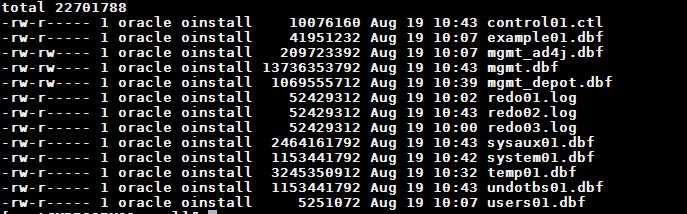
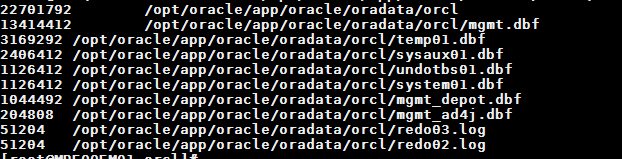
  1- Can I delete anything from the mgmt.dbf or any other dbf file ? I will post the screen shots below that will show the size of dbf files.

  2- OEM Cloud Control Guide recommends running the following command to reduce the retention period of severity data and EVENTS purge policy, I don't know where to run that command?

      I tried running it in SQL PLUS but I get an error, I tried running it on OS command line but got an error

     em\_purge.modify\_purge\_policy\_group('EVENTS', NULL, \*1\_new\_purge\_hours\*);
![OEM_Disk_full_1.png](https://objectstorage.us-phoenix-1.oraclecloud.com/p/BqK85Rn1zA5MP0vYiqbAdPgs7Z6OmMxw8SD3WCFVm5kY8uReidZ1KPIKkgJ1hCkG/n/axciphqpnohg/b/forums-legacy/o/uploads/jive_attachments/0/3/3/03311254egami.png)

 ![OEM_Disk_full_2.png](https://objectstorage.us-phoenix-1.oraclecloud.com/p/BqK85Rn1zA5MP0vYiqbAdPgs7Z6OmMxw8SD3WCFVm5kY8uReidZ1KPIKkgJ1hCkG/n/axciphqpnohg/b/forums-legacy/o/uploads/jive_attachments/2/3/3/23311254egami.png)

Thanks for your help.

This post has been answered by Fabio Zanchi on Aug 23 2016
Jump to Answer
Comments
Locked Post
New comments cannot be posted to this locked post.
Post Details
Locked on Sep 21 2016
Added on Aug 19 2016
8 comments
1,793 views