Hi All,
I am trying to install OBIEE 12C on Windows 8.1. I have already installed OBIEE 12C on my laptop but somehow I was getting error regarding JAVA_HOME. I uninstalled everything including JAVA and started a fresh installation. However when I am starting the BI configuration, It is failing all the time. Below is the screen shot of the error.
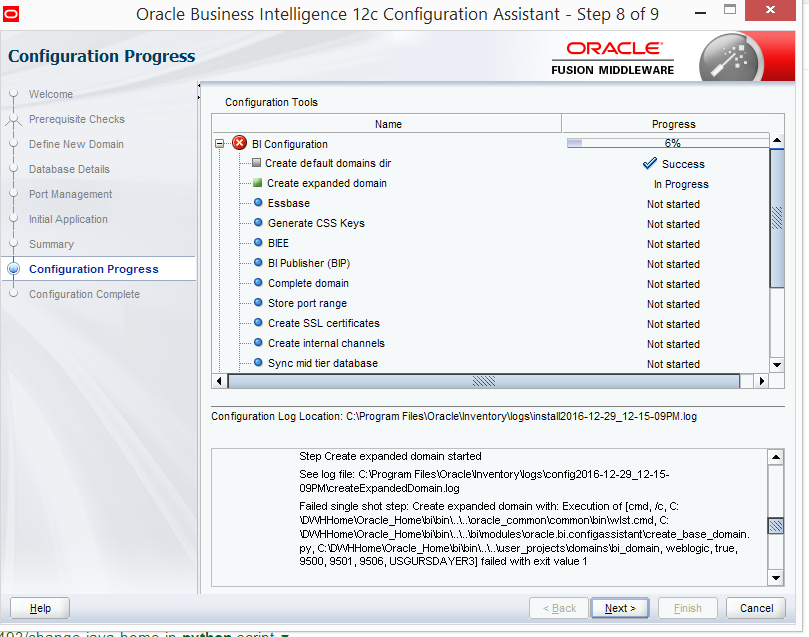
I dig around this issue and found this error.
Failed single shot step: Create expanded domain with: Execution of [cmd, /c, C:\DWHHome\Oracle_Home\bi\bin\..\..\oracle_common\common\bin\wlst.cmd, C:\DWHHome\Oracle_Home\bi\bin\..\..\bi\modules\oracle.bi.configassistant\create_base_domain.py, C:\DWHHome\Oracle_Home\bi\bin\..\..\user_projects\domains\bi_domain, weblogic, true, 9500, 9501, 9506, USGURSDAYER3] failed with exit value 1
[2016-12-29T12:16:43.759+05:30] [bi] [ERROR] [] [oracle.bi.install.config.actions] [tid: 38] [ecid: 0000L_9L9083z0WjLxyGOA1OPB3v000004,0] Non-skipped failure during configuration action: Execution of [cmd, /c, C:\DWHHome\Oracle_Home\bi\bin\..\..\oracle_common\common\bin\wlst.cmd, C:\DWHHome\Oracle_Home\bi\bin\..\..\bi\modules\oracle.bi.configassistant\create_base_domain.py, C:\DWHHome\Oracle_Home\bi\bin\..\..\user_projects\domains\bi_domain, weblogic, true, 9500, 9501, 9506, USGURSDAYER3] failed with exit value 1[[
oracle.bi.exec.ExecutionStatusException: Execution of [cmd, /c, C:\DWHHome\Oracle_Home\bi\bin\..\..\oracle_common\common\bin\wlst.cmd, C:\DWHHome\Oracle_Home\bi\bin\..\..\bi\modules\oracle.bi.configassistant\create_base_domain.py, C:\DWHHome\Oracle_Home\bi\bin\..\..\user_projects\domains\bi_domain, weblogic, true, 9500, 9501, 9506, USGURSDAYER3] failed with exit value 1
at oracle.bi.exec.StdinProcess.runProcess(StdinProcess.java:76)
at oracle.bi.exec.ExecScript.executeScript(ExecScript.java:164)
at oracle.bi.exec.ExecScript.executeSynchronousScript(ExecScript.java:96)
at oracle.bi.exec.ExecWLST.executeWLSTScript(ExecWLST.java:62)
at oracle.bi.install.config.steps.WLSTStep.executeSingleShot(WLSTStep.java:58)
at oracle.bi.install.config.basesteps.SingleShotActionStep.execute(SingleShotActionStep.java:32)
at oracle.bi.install.config.basesteps.StepList.execute(StepList.java:85)
at oracle.bi.install.config.actions.BIConfigAction.doExecute(BIConfigAction.java:129)
at oracle.as.install.engine.modules.configuration.client.ConfigAction.execute(ConfigAction.java:405)
at oracle.as.install.engine.modules.configuration.action.TaskPerformer.run(TaskPerformer.java:88)
at oracle.as.install.engine.modules.configuration.action.TaskPerformer.startConfigAction(TaskPerformer.java:108)
at oracle.as.install.engine.modules.configuration.action.ActionRequest.perform(ActionRequest.java:15)
at oracle.as.install.engine.modules.configuration.action.RequestQueue.performSequentialExecution(RequestQueue.java:284)
at oracle.as.install.engine.modules.configuration.action.RequestQueue.perform(RequestQueue.java:260)
at oracle.as.install.engine.modules.configuration.standard.StandardConfigActionManager.start(StandardConfigActionManager.java:185)
at oracle.as.install.engine.modules.configuration.boot.ConfigurationExtension.kickstart(ConfigurationExtension.java:82)
at oracle.as.install.engine.modules.configuration.ConfigurationModule.run(ConfigurationModule.java:87)
at java.lang.Thread.run(Thread.java:745)
Initially, I was getting error.
The installation jdk C:\Java\JDK18~1.0_6 is not accessible.
Please set appropriate JAVA_HOME and run again.
But I have already created an environment variable and set to this path. Also I am able to do SET JAVA_HOME from command prompt. Another thing was, If I manually run setHomeDirs.cmd or wlst.cmd, it run successfully for first time. However when I run it again, I am getting the same error.
I am not able to figure out as where we need to set the JAVA_HOME variable in OBIEE 12c files. Also not sure whether it is because of any firewall issue.
Please help.
Thanks,
Suhel
qHYbqg*81