I have an OAM-OAAM-OIM integrated environment with OTP enabled (Email and SMS) for MFA. I am now trying to integrate Oracle Mobile authenticator app with OAAM for MFA along with the existing OTP(Email and SMS).
Step1: Created a custom challeng type "ChallengeTOTP" and attached custom challenge processor TOTPChallengeProcessor.java (refer to challenge properties below). This custom challenge processor is responsible for validating the TOTP value, entered by the user against, agaist OAM using the OAM REST API and this step is working as expected.
Step2: During OAAM Challenge, to prompt ChallengeTOTP authentication method only OMA app registered users, I have also created custom ContactInfoManager TOTPCustomContactInfoManager class (refer to Registration properties) to check if the user has registered for OMA app and this step is also working as expected.
###Registration properties
bharosa.uio.default.userinfo.inputs.enum.totp=2002
bharosa.uio.default.userinfo.inputs.enum.totp.name=Mobile Authenticator
bharosa.uio.default.userinfo.inputs.enum.totp.description=Mobile Authenticator
bharosa.uio.default.userinfo.inputs.enum.totp.inputname=totp
bharosa.uio.default.userinfo.inputs.enum.totp.inputtype=links
bharosa.uio.default.userinfo.inputs.enum.totp.maxlength=40
bharosa.uio.default.userinfo.inputs.enum.totp.required=false
bharosa.uio.default.userinfo.inputs.enum.totp.order=3
bharosa.uio.default.userinfo.inputs.enum.totp.enabled=true
bharosa.uio.default.userinfo.inputs.enum.totp.managerClass=TOTPCustomContactInfoManager
###Challenge properties
bharosa.uio.default.challenge.type.enum.ChallengeTOTP=2004
bharosa.uio.default.challenge.type.enum.ChallengeTOTP.available=true
bharosa.uio.default.challenge.type.enum.ChallengeTOTP.description=Challenge TOTP
bharosa.uio.default.challenge.type.enum.ChallengeTOTP.enabled=true
bharosa.uio.default.challenge.type.enum.ChallengeTOTP.name=Mobile Authenticator
bharosa.uio.default.challenge.type.enum.ChallengeTOTP.processor=TOTPChallengeProcessor
bharosa.uio.default.challenge.type.enum.ChallengeTOTP.htmlInputType=text
bharosa.uio.default.challenge.type.enum.ChallengeTOTP.htmlLabel=TOTP Code
bharosa.uio.default.challenge.type.enum.ChallengeTOTP.displayedInfo=email
bharosa.uio.default.challenge.type.enum.ChallengeTOTP.requiredInfo=email
###Rule action for Challenge TOTP
rule.action.enum.ChallengeTOTP=2000
rule.action.enum.ChallengeTOTP.name=Challenge TOTP
rule.action.enum.ChallengeTOTP.description=Challenge the user using OAM TOTP
rule.action.enum.ChallengeTOTP.otp=true
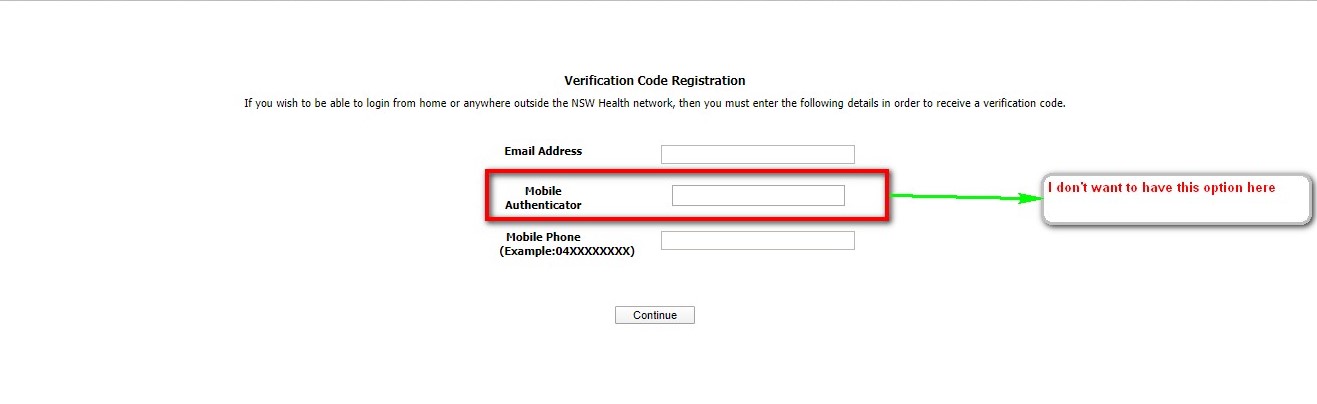
With the above configurations in place, for new users, during the registration there is an option (text field) to register for Mobile Authenticator along with Email and SMS. I don't want the Mobile Authenticator registration option to be available on Challenge registration page as the OMA app will be registered by the users separately.
If I set the property to false for (bharosa.uio.default.userinfo.inputs.enum.totp.enabled), I see the below error in OAAM logs.
<Mar 15, 2020 8:57:29 PM AEDT> <Warning> <oracle.oaam> <BEA-000000> <Name totp in enum bharosa.uio.default.userinfo.inputs.enum not found. propertyName=managerClass
java.lang.NullPointerException
at com.bharosa.common.util.UserDefEnum.getPropertyByElementId(UserDefEnum.java:1050)
Required solution:
- For new users, during registration, there should be only 2 options (Email and SMS) to register (no Mobile authenticator registration required here).
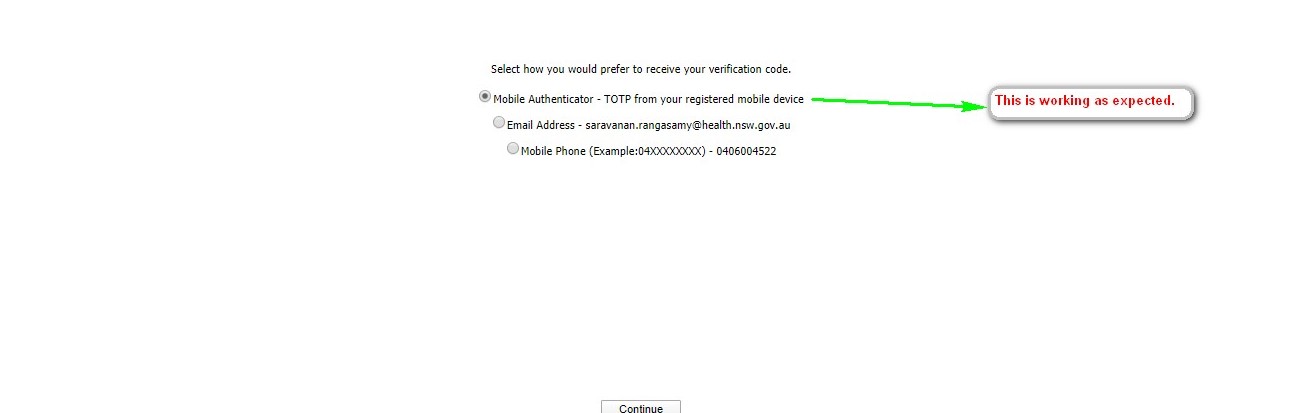
- For users who have registered for OMA app, should be challenged with Challenge TOTP option along with Email and SMS. (This section is working)
Can someone help me to resolve this issue?