Recently I asked a question on how to split a date range into multiple date ranges, for more information on that see Splitting a date range into multiple date ranges.
Thanks to @"mathguy" and other folks I was able to find a solution using a SQL. This time around I've a requirement to merge subsequent date/time ranges to consolidate and find the number of hours between the Start and End date/time.
Following is the Data set...
alter session set nls_date_format = 'dd-mm-yyyy hh24:mi'; -- just to save me some typing in the SAMPLE DATA below
with sample_data (emp_id, sdt, edt, wtype) as (
select 1, to\_date('17-07-2020 08:30'), to\_date('17-07-2020 10:30'), 'W' from dual union all

select 1, to\_date('17-07-2020 10:30'), to\_date('17-07-2020 11:00'), 'O' from dual union all

select 1, to\_date('17-07-2020 11:00'), to\_date('17-07-2020 12:30'), 'O' from dual union all

select 1, to\_date('17-07-2020 13:30'), to\_date('17-07-2020 17:30'), 'W' from dual union all

select 1, to\_date('17-07-2020 17:30'), to\_date('17-07-2020 19:30'), 'W' from dual union all

select 1, to\_date('18-07-2020 08:30'), to\_date('18-07-2020 17:30'), 'W' from dual union all

select 2, to\_date('16-07-2020 08:30'), to\_date('16-07-2020 17:30'), 'W' from dual union all

select 2, to\_date('17-07-2020 08:30'), to\_date('17-07-2020 15:30'), 'W' from dual union all

select 2, to\_date('17-07-2020 15:30'), to\_date('17-07-2020 17:30'), 'O' from dual union all

select 2, to\_date('17-07-2020 17:30'), to\_date('17-07-2020 19:30'), 'W' from dual union all

select 3, to\_date('17-07-2020 08:30'), to\_date('17-07-2020 17:30'), 'W' from dual union all

select 4, to\_date('18-05-2020 08:00'), to\_date('18-05-2020 17:00'), 'W' from dual union all

select 5, to\_date('17-09-2019 20:30'), to\_date('17-09-2019 23:00'), 'W' from dual union all

select 5, to\_date('17-09-2019 23:00'), to\_date('18-09-2019 01:30'), 'O' from dual union all

select 5, to\_date('18-09-2019 01:30'), to\_date('18-09-2019 05:30'), 'W' from dual union all

select 5, to\_date('18-09-2019 05:30'), to\_date('18-09-2019 08:00'), 'W' from dual union all

select 6, to\_date('04-01-2020 20:30'), to\_date('04-01-2020 22:00'), 'O' from dual union all

select 6, to\_date('04-01-2020 22:00'), to\_date('05-01-2020 05:30'), 'W' from dual union all

select 6, to\_date('05-01-2020 05:30'), to\_date('05-01-2020 07:00'), 'W' from dual
)
select emp_id, sdt, edt, wtype from sample_data
order by emp_id, sdt
;
The requirement is to merge the subsequent date/time range for an Employee for the same Work Type (W > Working, O > Out Of Office). So, in the following output the highlighted date/time ranges would merge and will be replaced by single rows. There will be no overlap of any date/time range for an employee. Also, there could be 2 or more adjacent date/time ranges for the same Work Type that may qualify for merging. If there is a gap between two date/time ranges, i.e., EDT != next(SDT) then we wouldn't merge those date/time ranges. We need to calculate hours between SDT and EDT as well, i.e., (EDT - SDT) * 24. I believe, it could be done with the SELECT or perhaps with MEASURES if match_recognize is being used.
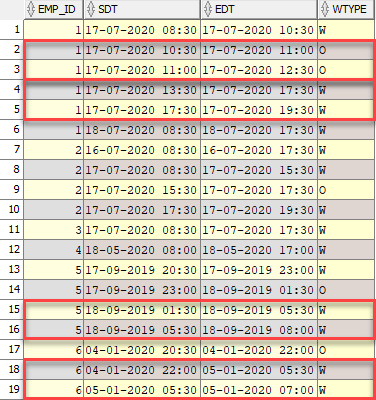
@"mathguy" solved the previous problem using match_recognize, that was my first experience with pattern recognition. I tried to give it a go but failed miserably, I guess I need more research and practice to fully understand how that works. In the meantime, any help on this would be appreciated...
Thanks,
Kashif.