Hi,
I am practising the APEX 5.0 tutorial from http://www.oracle.com/webfolder/technetwork/tutorials/obe/cloud/schema/50/Part1_Creating_Apps/Part1_Creating_Apps.html#s…
But I have installed APEX 5.1 on my machine. It looks the look and feel of Master-Detail form is different between 5.0 and 5.1.
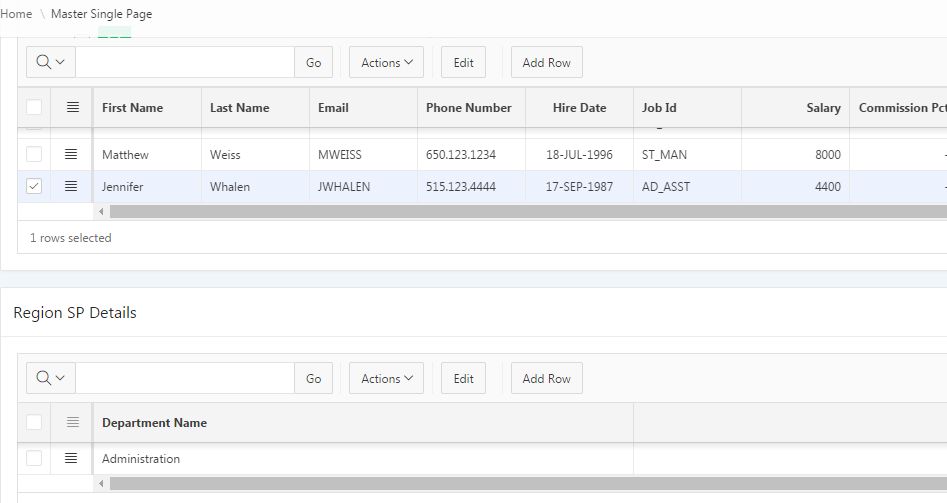
In 5.0 a single master record is displayed, while in 5.1 multiple rows of Master record is displayed.
Is there a way to create a Master-Detail in 5.1 that looks like 5.0, i.e. a single master record against which multiple detail record is displayed. Otherwise from the Calendar tutorial I am not able to create a link to the Master form!
(Further in 5.1 Create Page > Form now requires selection either "Single Page Master Details" or "Two Page Master Detail" which apparently is different from a single "Master Detail" option in 5.0. There is an "Editable Interactive Grid" option available in 5.1 which is supposed to cater for multiple level Master-Detail form - but I have not managed to find it useful so far )
APEX 5.0 Master record from Tutorial.

In 5.1 the Master detail page I created looks like this. Even when I am selecting the EDIT option, it is not changing to Single record view. And if I am selecting multiple master record by ticking the checkbox the error message "Select 1 row in the Master Region" is appearing in the Detail zone.
Thanks
Sanjay