Hi All, I am working on LDAP Authentication with Oracle Apex in On-Prem. I am having issue only with Apex in Authentication scheme
I am able to successfully connect with Apache directory studio.
Apache Directory studio(Configuration)
Hostname: DC01.ad.example.com
Port: 636
Authentication Method: Simple Authentication:
CN=Administrator,CN=Users,DC=ad,DC=example,DC=com
Password: <>
I have imported the certs to the wallet directory and able to test from the database successfully as below,
SET SERVEROUTPUT ON
DECLARE
 l_session      DBMS_LDAP.session;
 l_retval       PLS_INTEGER;

 -- Configuration
 l_ldap_host    VARCHAR2(256) := 'DC01.ad.example.com';
 l_ldap_port    NUMBER := 636;  -- LDAPS port
 l_ldap_user    VARCHAR2(256) := 'CN=Administrator,CN=Users,DC=ad,DC=example,DC=com';
 l_ldap_passwd  VARCHAR2(256) := 'OraclePwd123';
 l_wallet_path  VARCHAR2(256) := 'file:/opt/certs/wallets/default/';
 l_wallet_pwd   VARCHAR2(256) := 'OracleWallet123';

BEGIN
 -- Enable exception handling
 DBMS_LDAP.use_exception := TRUE;

 -- Step 1: Initialize connection
 BEGIN
   DBMS_OUTPUT.put_line('Connecting to ' || l_ldap_host || ':' || l_ldap_port);
   l_session := DBMS_LDAP.init(
     hostname => l_ldap_host,
     portnum  => l_ldap_port
   );
   DBMS_OUTPUT.put_line('✓ Connection initialized');
 EXCEPTION
   WHEN OTHERS THEN
     DBMS_OUTPUT.put_line('✗ Init failed: ' || SQLERRM);
     RAISE;
 END;

 -- Step 2: Open SSL connection
 BEGIN
   DBMS_OUTPUT.put_line('Opening SSL connection...');
   l_retval := DBMS_LDAP.open_ssl(
     ld             => l_session,
     sslwrl         => l_wallet_path,
     sslwalletpasswd => l_wallet_pwd,
     sslauth        => 2  -- 1=No auth, 2=One-way, 3=Two-way
   );
   DBMS_OUTPUT.put_line('✓ SSL handshake successful (return: ' || l_retval || ')');
 EXCEPTION
   WHEN OTHERS THEN
     DBMS_OUTPUT.put_line('✗ SSL handshake failed: ' || SQLERRM);
     l_retval := DBMS_LDAP.unbind_s(l_session);
     RAISE;
 END;

 -- Step 3: Bind/authenticate
 BEGIN
   DBMS_OUTPUT.put_line('Binding with credentials...');
   l_retval := DBMS_LDAP.simple_bind_s(
     ld     => l_session,
     dn     => l_ldap_user,
     passwd => l_ldap_passwd
   );
   DBMS_OUTPUT.put_line('✓ Authentication successful (return: ' || l_retval || ')');
 EXCEPTION
   WHEN OTHERS THEN
     DBMS_OUTPUT.put_line('✗ Bind failed: ' || SQLERRM);
     l_retval := DBMS_LDAP.unbind_s(l_session);
     RAISE;
 END;

 -- Step 4: Disconnect
 l_retval := DBMS_LDAP.unbind_s(l_session);
 DBMS_OUTPUT.put_line('✓ Disconnected successfully');
 DBMS_OUTPUT.put_line('');
 DBMS_OUTPUT.put_line('=== LDAPS CONNECTION TEST PASSED ===');

EXCEPTION
 WHEN OTHERS THEN
   DBMS_OUTPUT.put_line('');
   DBMS_OUTPUT.put_line('=== LDAPS CONNECTION TEST FAILED ===');
   DBMS_OUTPUT.put_line('Error: ' || SQLERRM);
END;
/
DBMS_OUTPUT
----------------
Connecting to DC01.ad.example.com:636
✓ Connection initialized
Opening SSL connection...
✓ SSL handshake successful (return: 0)
Binding with credentials...
✓ Authentication successful (return: 0)
✓ Disconnected successfully
=== LDAPS CONNECTION TEST PASSED ===

PL/SQL procedure successfully completed.
I've logged into Apex Administration and updated the wallet information.
Manage Instance > Instance Settings
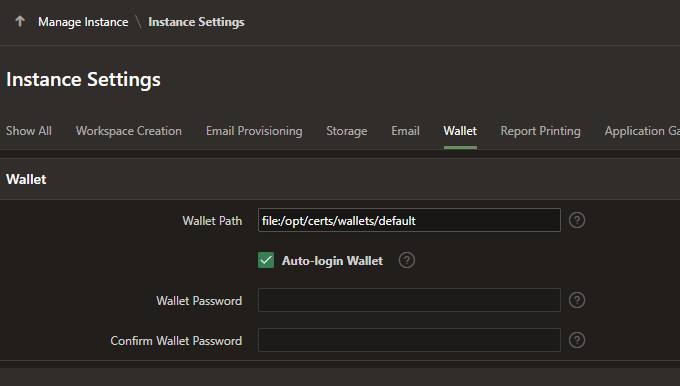
In Authentication scheme,
Host: DC01.ad.example.com
Port :636
Use SSL:  SSL
Distinguished Name (DN) String(Value Required): CN=%LDAP_USER%,CN=Users,DC=ad,DC=example,DC=com
Use Exact Distinguished Name (DN): Yes
Username: Administrator
Password: <>
I am getting the below error.
Authentication failed
ORA-31202: DBMS_LDAP: LDAP client/server error: SSL handshake failed
I wanted to know if I missed something.