We recently upgraded from Apex 4.2 to 18.1 and I inherited another developer's app that uses the following JavaScript code in the header of an interactive report to download the report to Excel. Since the upgrade, the download to Excel functionality started giving an error that the file format and the file extension don't match. (screenshots further below). When I started researching the web about this issue, I found that this exact snippet of JavaScript code is widely published on the web and our developer only edited the report name in the script to reflect our in-house report name.
<html>
<script type="text/javascript">
function fnExcelReport()
{
var tab\_text="\<table
border='2px'><tr bgcolor='#87AFC6'>";
var textRange; var j=0;

tab =
document.getElementById('5736403550789186'); // id of table
for(j = 0 ; j \< tab.rows.length ; j++)

{

    tab\_text=tab\_text+tab.rows\[j\].innerHTML+"\</tr>";
//tab_text=tab_text+"</tr>";
}
tab_text=tab_text+"</table>";
tab\_text=
tab_text.replace(/<A[^>]*>|<\/A>/g, "");//remove if u
want links in your table
tab\_text=
tab_text.replace(/<img[^>]*>/gi,""); // remove if u want
images in your table
tab\_text=
tab_text.replace(/<input[^>]*>|<\/input>/gi, ""); //
removes input params
var ua = window.navigator.userAgent;

var msie = ua.indexOf("MSIE ");

if (msie > 0 ||
!!navigator.userAgent.match(/Trident.*rv\:11\./))
// If Internet Explorer
{
txtArea1.document.open("txt/html","replace");
txtArea1.document.write(tab_text);
    txtArea1.document.close();

    txtArea1.focus();

    sa=txtArea1.document.execCommand("SaveAs",true,"PZPEXPY\_YTD\_Detail
Report_Expense.xls");
}

else
      //other browser not
tested on IE 11
sa =
window.open('data:application/vnd.ms-excel,' +
encodeURIComponent(tab_text));
return (sa);
}
</script>
<H1>CARDINAL - FZRDEFY - YTD Detail Report - Deffered
Revenue</H1>
<iframe id="txtArea1"
style="display:none"></iframe>
<table width="100%" cellspacing="5"
cellpadding="0" border="0">
<tr>
<td align="right" valign="top">
<button id="btnExport"
onclick="fnExcelReport();"
value="Export to Excel" style="font:bold 11px
verdana;color:#000000;background-color:#C0C0C0;"> Export To Excel
</button>
</td>
<td align="right" valign="top">
<div id="divButtons"
name="divButtons" style="align:right;">
<input type="button" value = "Print to
PDF" onclick="printPage()" style="font:bold 11px
verdana;color:#000000;background-color:#C0C0C0;">
</div>
</td>
</tr>
</table>
</html>
This code has been running in production for several years, but it is not working since the Apex 18.1 upgrade. So I'm wondering if this is an Apex issue or even a WIndows 10 issue, since may of our PCs were recently upgraded from WIndows 7 to WIndows 10.
When the user hits the "Export to Excel" button, the file download window appears with the filename, but the "Save file as" dropdown only displays options HTML File and Text file(.txt ) as options
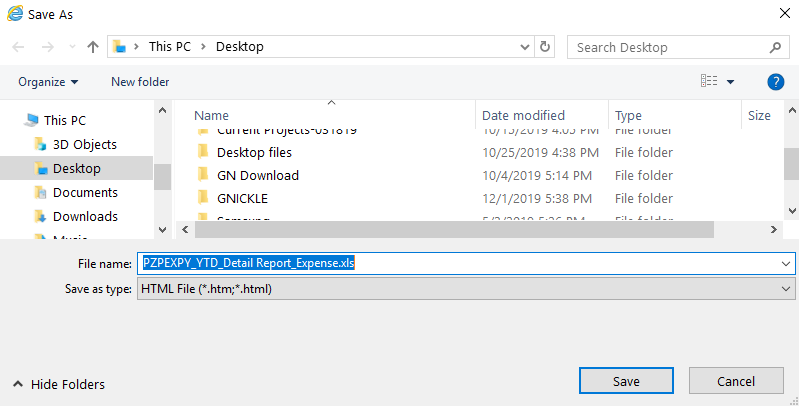
Browsers being used are IE 11 and Chrome v78.
After the user downloads the file and tries to open it in Excel (Microsoft Office Professional 2016), Excel displays the message

When opening in Chrome (v78), they get the message:

If the user opens the file, regardless of the warning message above, the file opens, but there are Excel instructions in some of the cells, as seen the screenshot below. You can see the cell that displays the total of all cells in the column also shows the Excel "Sum:" instruction, when it shouldn't.

So does anyone know if something changed in Apex 10.1 that no longer allows this JavaScript download script to operate properly? Or if this is a javascript/WIndows 10 issue? This is not my areal of expertise, so any and all advice would be appreciated!