I am migrating a APEX 4.2 application to 5.1.1.
Now I am running into an issue in the error handling with a primary key managed tabular form. My tabular form has a custom query that retrieves the data and a custom pl/sql process that does validation/dml using apex_application.g_fxx logic. In APEX 4.2 this works fine. When an error occurs, APEX can show the user which row and column is wrong.
After migration to 5.1.1, when an error occurs APEX does not show a newly added line.
After some research, I found out that is has to do with the choice for primary key vs rowid. When I create a new tabular form in APEX 5.1.1 (rowid managed) the functionality works properly (the row with the error is displayed). When I choose primary key managed, the row with the error is not shown anymore.
Some screenprints:
This is a ROWID managed tabular form in APEX 5.1.1 where I force a primary key violation:
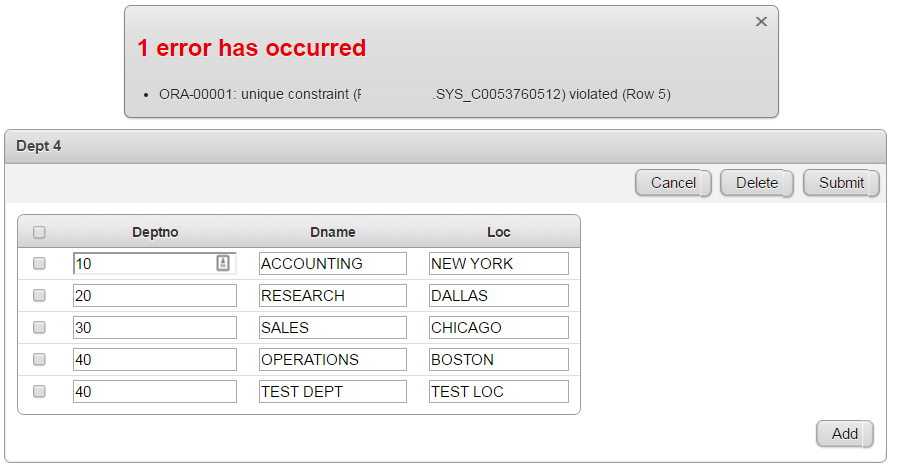
So, in this case, the error message mentions row 5 (the last row) and the user can correct the error. So no problem here.
But now the same functionality with a Primary Key managed tabular form.
This is a Primary Key managed tabular form in APEX 5.1.1 where I force a primary key violation.
Step 1 add a new row (which will cause an error):

Press Submit,
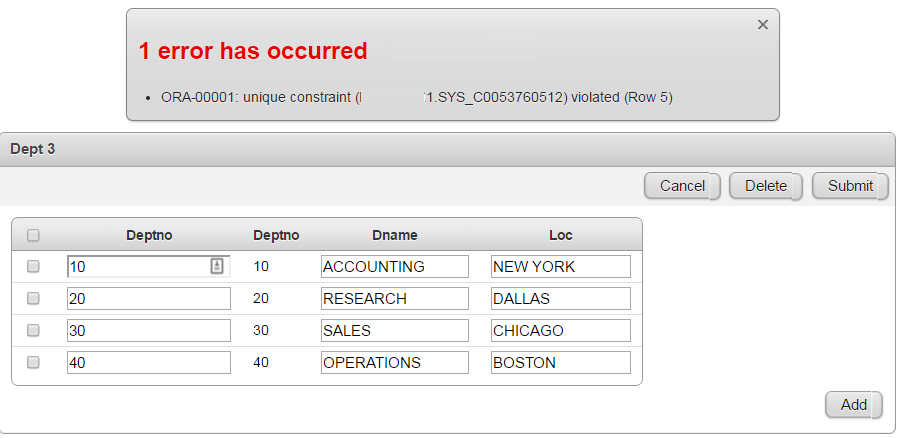
So now the same error is shown, but in this case row 5 has disappeared. The user cannot correct it anymore.
Does anyone know of a workaround? I cannot use the ROWID, because I use a custom SQL query to populate the tabular form.
Thanx,
Peter