hi am in weblogic Forms [64 Bit] Version 12.2.1.4.0 (Production) runing in solaris 11.4 sparck am geting this error
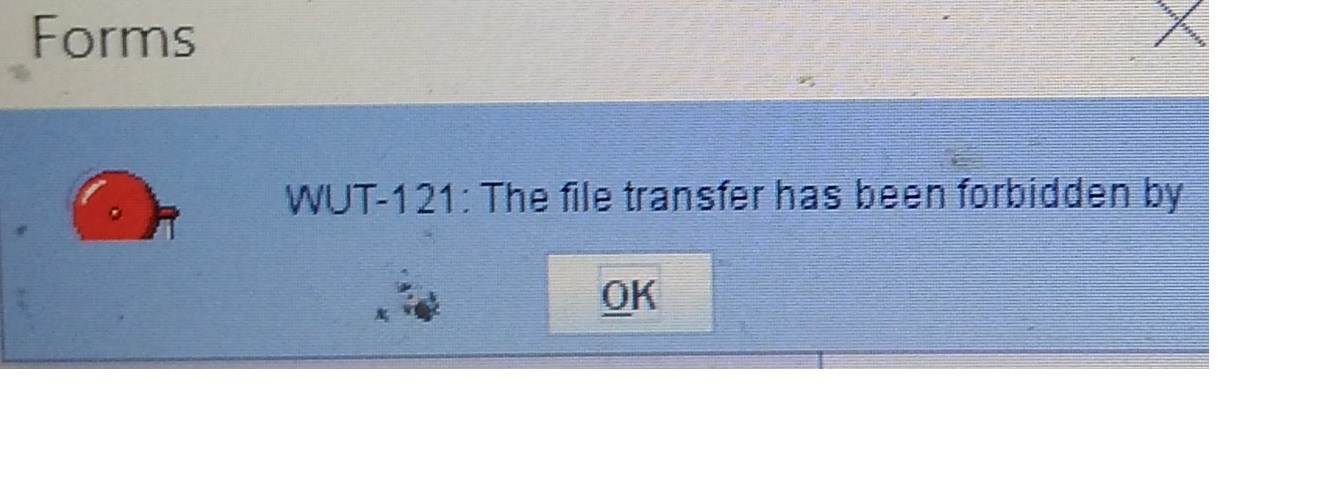
this is my webutil cfg
# ---------------------------------------------------------------------------
# webutil.cfg - WebUtil default configuration file
# ---------------------------------------------------------------------------
# This file provides all of the configuration settings for webutil. These are
# divided into the following sections:
# 1. Logging Options
# 2. Installation Options
# 3. File Upload and Download Options
# 1. Server Side Logging Options for logging errors and log messages
# You must set logging.enabled to true to allow mid-tier logging. Without this
# mid-tier logging will not take place no matter what PL/SQL or URL options
# are supplied to switch it on. Once logging is enabled the other settings come
# into play.
# Details
# -------
# logging.file : Defines the file name and location of the log file.
# Note that WebUtil does no log file management. You may
# need to manually clean this file up from time to time.
# logging.enabled : Can be TRUE or FALSE
# logging.errorsonly : Can be TRUE or FALSE. Setting to true will ensure that
# only errors and not normal informational log messages
# are written to the log file. For product use this would
# normally be set to TRUE
# logging.connections: Can be TRUE or FALSE. Setting to true will cause each
# connection from a client using WebUtil to write into
# the log as it sets up.
logging.file=
logging.enabled=FALSE
logging.errorsonly=FALSE
logging.connections=FALSE
# 2. Installation Options
# WebUtil needs to download some files to the client in order to perform
# certain integration operations such as OLE or Registry Access. These files
# are downloaded to the client when webutil is being run for the first time.
# Subsequent runs will use the cached dll. You have to define the location of
# these files on the server and the location on the client.
# Here is a table that shows various numeric constants and their meanings. They
# are used in the install options configurations. These constants are defined
# in WEBUTIL_CORE package spec. Note that the Client OS Processor Architecture
# is typically the architecture of the JVM that will be running on the client,
# not necessarily same as the actual client OS architecture.
# <os> - Client OS Family <arch> - Client OS Processor Architecture
# 0 - Windows 0 - 32 bit architecture
# 1 - Linux 1 - 64 bit architecture
# 2 - SOLARIS
# 3 - HP
# 4 - AIX
# 5 - Mac
# 9 - Unknown
# <package> - Package Name
# 7 - WEBUTIL_OLE2
# 9 - WEBUTIL_C_API
# We don't yet have downloads for other packages. If there is a need, refer
# WEBUTIL_CORE package spec for the constants of other packages
# Details
# -------
# NOTE: For all settings <arch> field is optional. Without this field, the
# setting will be applicable for both 32 bit and 64 bit client OS (JVM)
# architectures.
# install.syslib.location.<os>.<arch> :
# The virtual path to the directory holding the webutil library files on the
# server side. This must either be an absolute URL or a URL that is relative
# to the documentbase.
# NOTE: <os> field is optional for this setting. In the absence of a setting
# that has the matching client OS and ARCH, it will use
# install.syslib.location. <arch> cannot be specified if <os> is omitted.
# install.syslib.location.client.<os>.<arch> :
# The path to the directory on the client machine where webutil library
# files will be downloaded. This must either be an absolute path or a path
# that is relative to client user profile or HOME. Directory will be created
# if necessary along with other required parent directories. If the path is
# not set, it will be treated as a special case where libraries will be
# downloaded to client JRE\bin (windows) or JRE/lib (unix). If this
# directory is changed, all the libraries will be redownloaded again.
# Please keep in mind that other Forms server could also have a similar
# location setting and thus libraries could be overwritten when the same
# client runs webutil from different forms server. It is therefore
# advisable that the location has a subdirectory that can be unique to your
# server, such as server host name. You could use $(SERVERHOST) in the
# location. This string will be replaced with the actual server host name
# install.syslib.<os>.<arch>.<package>.<n> :
# The name(s) of the libraries required for particular webutil beans. The
# format of this is name|size|version|showDownloadDialog. Multiple libraries
# can be downloaded per package. But ensure that the <n> values are
# consecutive and start at 1 for a given os, arch and package set.
install.syslib.location=/webutil
install.syslib.location.0.0=/webutil/win32
install.syslib.location.0.1=/webutil/win64
# Add/change the following if you want to specify a different client location
# where the syslib libraries can be downloaded.
# Format:
# install.syslib.location.client.<os>.<arch>=<location>
install.syslib.location.client.0.0=webutil\syslib\$(SERVERHOST)\win32
install.syslib.location.client.0.1=webutil\syslib\$(SERVERHOST)\win64
# Change size and version if necessary, like when upgrading the library.
# Normally this would not be required since most of these libraries come with
# install itself. Jacob however does not come with install
# Format:
# install.syslib.<os>.<arch>.<package>.<n>=name|size|version|showDownloadDialog
install.syslib.0.0.7.1=jacob-1.18-M2-x86.dll|167424|1.18-M2|false
install.syslib.0.1.7.1=jacob-1.18-M2-x64.dll|204800|1.18-M2|false
install.syslib.0.0.9.1=JNIsharedstubs.dll|45056|1.0|true
install.syslib.0.1.9.1=JNIsharedstubs.dll|58368|1.0|true
install.syslib.0.0.9.2=d2kwut60.dll|81920|1.0|true
install.syslib.0.1.9.2=d2kwut60.dll|102400|1.0|true
# You can also add your own libraries in here, e.g.
#install.syslib.0.0.user.1=testwebutil.dll|204872|1.0|true
#install.syslib.0.0.user.1=ffisamp.dll|40960|1.0|true
#install.syslib.0.1.user.1=ffisamp.dll|35328|1.0|true
# 3. Upload / Download options
# For the file upload and download options you can define the default locations
# on the server that webutil can use as a work area. Optionally you can switch
# upload and download off
# Details
# -------
# transfer.database.enabled : Can be TRUE or FALSE - allows you to enable or
# disable upload and download from the database
# server.
# transfer.appsrv.enabled : Can be TRUE or FALSE - allows you to enable or
# disable upload and download from the
# application server.
# transfer.appsrv.workAreaRoot: The root of the location in which WebUtil can
# store temporary files uploaded from the client.
# If no location is specified, application server
# user_home/temp will be assumed.
# This location is always readable and writable
# no matter what the settings in
# transfer.appsrv.* are. This setting is
# required if you need the Client side
# READ/WRITE_IMAGE_FILE procedures.
# transfer.appsrv.accessControl:Can be TRUE or FALSE - allows you to indicate
# that uploads and downloads can only occur from
# the directories named in the
# transfer.appsrv.read.n and
# transfer.appsrv.write.n entries and their
# subdirectories. If this setting is FALSE,
# transfers can happen anywhere.
# transfer.appsrv.read.<n>: List of directory names that downloads can read
# from.
# transfer.appsrv.write.<n>: List of directory names that uploads can write
# to.
#NOTE: By default the file transfer is disabled as a security measure
transfer.database.enabled=TRUE
transfer.appsrv.enabled=TRUE
transfer.appsrv.workAreaRoot=/home/temp/
transfer.appsrv.accessControl=FALSE
#list transfer.appsrv.read.<n> directories
transfer.appsrv.read.1=/tmp/
#list transfer.appsrv.write.<n> directories
transfer.appsrv.write.1=/tmp/
# 4. Others
# Details
# -------
# BlockAllowHeartBeat : To continue the heart beat communication with the
# server when set to TRUE. By default the value is
# set to False. When False there would not be heart
# beat communication in blocking mode.
BlockAllowHeartBeat=False