Good morning everyone,
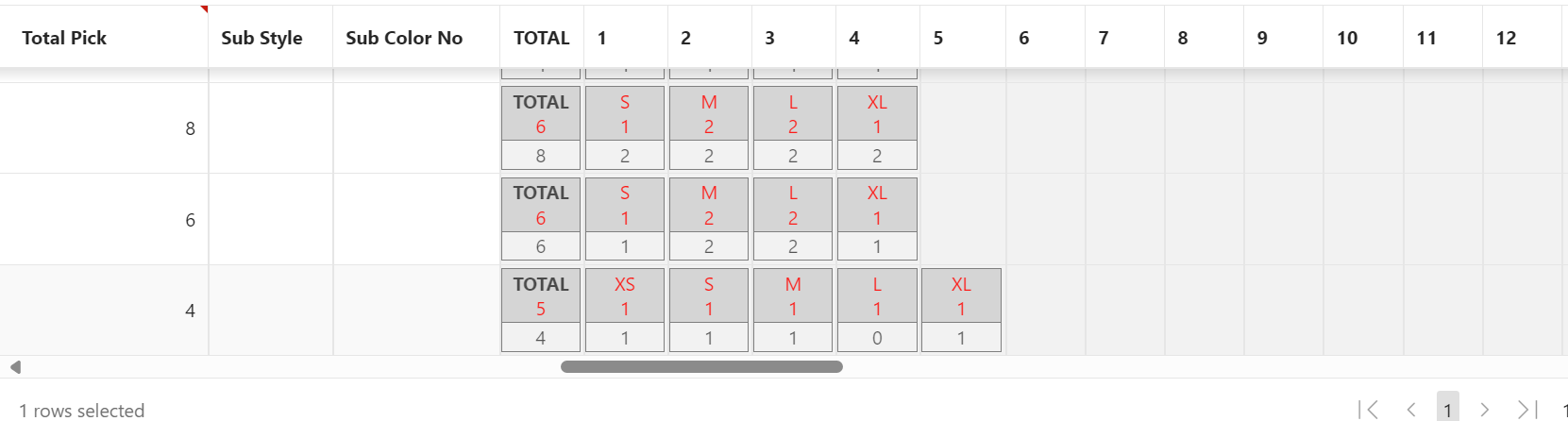
I have been working on writing an app for the apparel industry where you have sizes and these sizes fields can go from 1 to 18 fields. Since each particular item can have different sizes line S, M, L, XL or 6, 6.5, 7, 7.5, 8, 8.5, … 10. for example, that means that I can't use the heading on the columns since the size names can only be shown for the selected line in the grid.
So, we decided to do this as an HTML column and write a nested table to display the sizes and haven an item for each size name so the user can type the quantity for that size name, and we have a JavaScript function updating the actual columns via the model. However, the problem is that if you have multiple input items in a cell/column of the grid, the focus always go to the first input field rather than staying on the one the user clicks, so if you click on size XL, the focus should stay in XL, but rather it goes into S.
Here is a sample HTML stripped code for the HTML column.
<table id="order-qty">
  <thead>
    <tr>
      <th>Small<br>1</th><th>Medium<br>2</th><th>Large<br>2</th><th>X-Large<br>1</th>
    </tr>
  </thead>
  <tbody>
    <tr>
      <td>
        <input id="sz1" type="text" name="sz1"/>
      </td>
      <td>
        <input id="sz2" type="text" name="sz2"/>
      </td>
      <td>
        <input id="sz3" type="text" name="sz3"/>
      </td>
      <td>
        <input id="sz4" type="text" name="sz4"/>
      </td>
    </tr>
  </tbody>
</table>
The question is if there's a way to override this behavior as I don't want to create 18 HTML columns for this as it would be much better to display the complete sizes for each line along with the quantity without having to show columns for sizes that some lines used, but not others line in the second screenshot below. Probably @john-snyders-oracle has the answer as to why this is.
Both of the screenshots below have input items on each column with a nested table.