##--Get root access--##
##--Export proxy variables--##
export http_proxy=”http://www-xyz.com:80”
export https_proxy=”https://www-xyz.com:80”
##--Create a backup of public-yum-ol6.repo--##
cd /etc/yum.repos.d
mv public-yum-ol6.repo public-yum-ol6.repo_old
##--Get the latest version--##
wget http://public-yum.oracle.com/public-yum-ol6.repo
##--Edit public-yum-ol6.repo--##
vi /etc/yum.repos.d/public-yum-ol6.repo
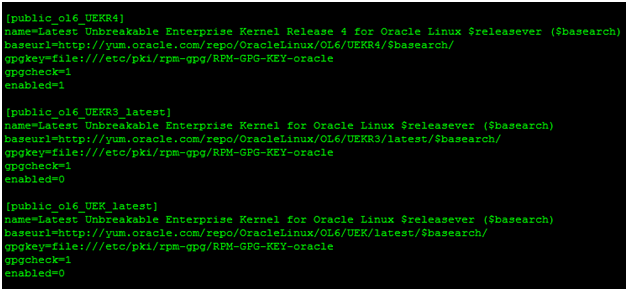
##--Change the enabled flag for the following entries:--##
##--Save the file--##
##--Update--##
yum update
##--Reboot--##
##--Edit public-yum-ol6.repo--##
vi /etc/yum.repos.d/public-yum-ol6.repo
##--Change the enabled flag for the following entry:--##

##--Save the file--##
##--Install docker-engine--##
yum install docker-engine
##--Check docker version--##

##--Edit this file for proxy settings--##
vi /etc/sysconfig/docker
##--Add these entries--##
export HTTP_PROXY=”http://www-xyz.com:80”
export HTTPS_PROXY=”https://www-xyz.com:80”
##--Start docker--##

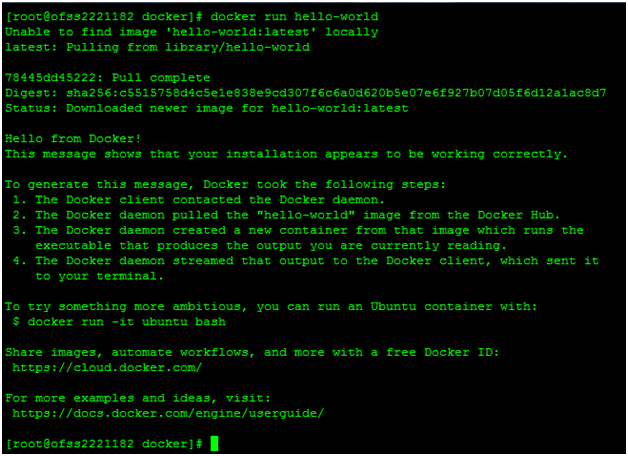
##--Run this command to pull and run your hello-world program from docker repository.--##
docker run hello-world
##--Stop docker--##
