Hello, my name is Jhonatan
I am realy new to this lvl of configuration when it comes to DataBase so hope i can ask for help in the best way possible.
I have a laptop Asus-k53t with Windows 7 Pro 64 bits - ServPack 1
i get the next error during the instalation of Oracle 12 c Database:
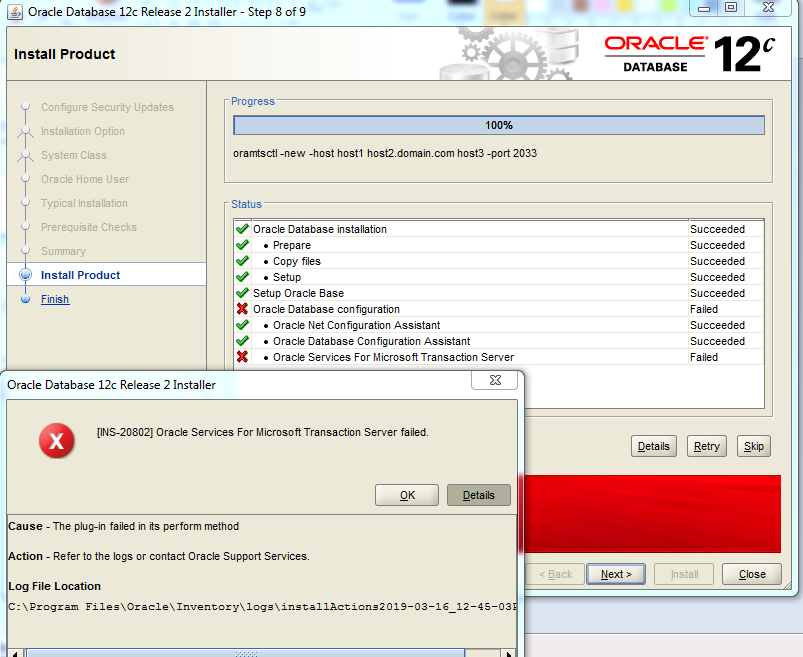
when i go to the log file i see the next last lines:
| InstallActions |
|
INFO: Entering ConfigClient.initClientAndSession method
INFO: ConfigClient.initClientAndSession status : connected to the config framework
INFO: ConfigClient.initClientAndSession session begun oracle.sysman.emCfg.client.CfwSession@330b412a
INFO: ConfigClient.initClientAndSession m_oAggregate=[Loracle.sysman.emCfg.common.IAggregate;@72bd5c35
INFO: Configuration log directory - C:\Users\OracleDataBase\product\12.2.0\dbhome_1\cfgtoollogs
INFO: Exiting ConfigClient.init method
INFO: Calling event ConfigSessionInitialized
INFO: ConfigClient.registerOutErrStream method called
INFO: Updating Transient Parameters in the Aggregates
INFO: Updating Transient Parameters for oracle.server
INFO: Setting value to transient variable s_dbcaArgs
INFO: Setting value to transient variable s_netCA_Args
INFO: Setting value to transient variable s_sysPasswordFlag
INFO: Setting value to transient variable s_systemPasswordFlag
INFO: Setting value to transient variable s_pdbadminPasswordFlag
INFO: Setting value to transient variable S_WINSERVICEUSERPASSWORD
INFO: Setting value to transient variable S_SYSTEMPASSWORD
INFO: Setting value to transient variable s_emadminPasswordFlag
INFO: Setting value to transient variable windows_commandline_prefix
INFO: Setting value to transient variable S_DBSNMPPASSWORD
INFO: Setting value to transient variable s_dbsnmpPasswordFlag
INFO: Setting value to transient variable S_ASMSNMPPASSWORD
INFO: Setting value to transient variable s_asmsnmpPasswordFlag
INFO: Setting value to transient variable S_SYSPASSWORD
INFO: Setting value to transient variable S_EMADMINPASSWORD
INFO: Setting value to transient variable s_winServiceUserPasswordFlag
INFO: Setting value to transient variable S_PDBADMINPASSWORD
INFO: Setting value to transient variable s_dbcaArgsOverride
INFO: Updating Transient Parameters for oracle.assistants.netca.client
INFO: Updating Transient Parameters for OuiConfigVariables
INFO: Updating Transient Parameters for oracle.sysman.ccr
INFO: Updating Transient Parameters for oracle.ntoramts
INFO: Setting value to transient variable s_winServiceUserPasswordFlag
INFO: Setting value to transient variable S_WINSERVICEUSERPASSWORD
INFO: Successfully updated Transient Parameters in the Aggregates
INFO: Entering ConfigClient.getToolsList method
INFO: Selecting job named 'Oracle Services For Microsoft Transaction Server' for retry
INFO: Configuration log directory - C:\Users\OracleDataBase\product\12.2.0\dbhome_1\cfgtoollogs
INFO:
The Runconfig command constructed is C:\Users\OracleDataBase\product\12.2.0\dbhome_1\oui\bin\runConfig.bat ORACLE_HOME=C:\Users\OracleDataBase\product\12.2.0\dbhome_1 MODE=perform ACTION=configure RERUN=true %*
INFO: Since the option is to overwrite the existing C:\Users\OracleDataBase\product\12.2.0\dbhome_1\cfgtoollogs\configToolAllCommands file, backing it up
INFO: The backed up file name is C:\Users\OracleDataBase\product\12.2.0\dbhome_1\cfgtoollogs\configToolAllCommands.bak.13
INFO: Entering ConfigClient.executeSelectedToolsInAggregate method
INFO: ConfigClient.executeSelectedToolsInAggregate oAggregate=oracle.server:oracle.server:12.2.0.1.0:common
INFO: Entering ConfigClient.assignAction method
INFO: ConfigClient.assignAction actionref=[Loracle.sysman.emCfg.common.IActionReference;@7eb5c9ed
INFO: ConfigClient.assignAction action is of type :configuration
INFO: Exiting ConfigClient.assignAction method
INFO: ConfigClient.executeSelectedToolsInAggregate action assigned
INFO: Started Plugin named: Oracle Services For Microsoft Transaction Server
INFO: Found associated job
INFO: Starting 'Oracle Services For Microsoft Transaction Server'
INFO: Starting 'Oracle Services For Microsoft Transaction Server'
INFO: GenericInternalPlugIn.parseAggregateArgs: -winServiceUserPassword argument already present.
INFO: MTSInternalPlugIn: ... adding </ouiinternal>
INFO: Executing MTS
INFO: Command C:\Windows\system32\cmd.exe /c call C:\Users\OracleDataBase\product\12.2.0\dbhome_1\bin\oramtsctl.exe -new -internal -new -internal -new -internal -new -internal -new -internal -new -internal -new -internal -new -internal -new -internal -new -internal -new -internal
INFO: ... GenericInternalPlugIn.handleProcess() entered.
INFO: ... GenericInternalPlugIn: getting configAssistantParmas.
INFO: ... GenericInternalPlugIn: checking secretArguments.
INFO: ... GenericInternalPlugIn: starting read loop.
INFO: Read: OracleMTSRecoveryService Control Utility: Version 12.1.0.0.0 - Production
INFO: OracleMTSRecoveryService Control Utility: Version 12.1.0.0.0 - Production
WARNING: Skipping line: OracleMTSRecoveryService Control Utility: Version 12.1.0.0.0 - Production
INFO: Read:
WARNING: Skipping line:
INFO: Read: Copyright (c) 2012, Oracle. All rights reserved.
INFO: Copyright (c) 2012, Oracle. All rights reserved.
WARNING: Skipping line: Copyright (c) 2012, Oracle. All rights reserved.
INFO: Read:
WARNING: Skipping line:
INFO: Read: Usage:
INFO: Usage:
WARNING: Skipping line: Usage:
INFO: Read:
WARNING: Skipping line:
INFO: Read: oramtsctl <-new|-delete|-start|-stop|-status|-config|-passwd|-trace|-trcdir>
INFO: oramtsctl <-new|-delete|-start|-stop|-status|-config|-passwd|-trace|-trcdir>
WARNING: Skipping line: oramtsctl <-new|-delete|-start|-stop|-status|-config|-passwd|-trace|-trcdir>
INFO: Read: [-host <hostname|IP_address> ...]
INFO: [-host <hostname|IP_address> ...]
WARNING: Skipping line: [-host <hostname|IP_address> ...]
INFO: Read: [-port <number>]
INFO: [-port <number>]
WARNING: Skipping line: [-port <number>]
INFO: Read: [-ip <IP_address>]
INFO: [-ip <IP_address>]
WARNING: Skipping line: [-ip <IP_address>]
INFO: Read: [-dtchost <DTC_hostname>]
INFO: [-dtchost <DTC_hostname>]
WARNING: Skipping line: [-dtchost <DTC_hostname>]
INFO: Read: [-cluster <on|off>]
INFO: [-cluster <on|off>]
WARNING: Skipping line: [-cluster <on|off>]
INFO: Read: [-default]
INFO: [-default]
WARNING: Skipping line: [-default]
INFO: Read:
WARNING: Skipping line:
INFO: Read: -new Create and start a new OracleOraDB12Home1MTSRecoveryService service.
INFO: -new Create and start a new OracleOraDB12Home1MTSRecoveryService service.
WARNING: Skipping line: -new Create and start a new OracleOraDB12Home1MTSRecoveryService service.
INFO: Read:
WARNING: Skipping line:
INFO: Read: -delete [Oracle_home_directory]
INFO: -delete [Oracle_home_directory]
WARNING: Skipping line: -delete [Oracle_home_directory]
INFO: Read: Delete OracleMTSRecoveryService of current home or specified home.
INFO: Delete OracleMTSRecoveryService of current home or specified home.
WARNING: Skipping line: Delete OracleMTSRecoveryService of current home or specified home.
INFO: Read:
WARNING: Skipping line:
INFO: Read: -start Start OracleOraDB12Home1MTSRecoveryService service.
INFO: -start Start OracleOraDB12Home1MTSRecoveryService service.
WARNING: Skipping line: -start Start OracleOraDB12Home1MTSRecoveryService service.
INFO: Read:
WARNING: Skipping line:
INFO: Read: -stop Stop OracleOraDB12Home1MTSRecoveryService service.
INFO: -stop Stop OracleOraDB12Home1MTSRecoveryService service.
WARNING: Skipping line: -stop Stop OracleOraDB12Home1MTSRecoveryService service.
INFO: Read:
WARNING: Skipping line:
INFO: Read: -status Query OracleOraDB12Home1MTSRecoveryService service status.
INFO: -status Query OracleOraDB12Home1MTSRecoveryService service status.
WARNING: Skipping line: -status Query OracleOraDB12Home1MTSRecoveryService service status.
INFO: Read:
WARNING: Skipping line:
INFO: Read: -config [-port <number>] [-ip <IP_address>] [-dtchost <DTC_hostname>]
INFO: -config [-port <number>] [-ip <IP_address>] [-dtchost <DTC_hostname>]
WARNING: Skipping line: -config [-port <number>] [-ip <IP_address>] [-dtchost <DTC_hostname>]
INFO: Read: [-cluster <on|off>] [-default]
INFO: [-cluster <on|off>] [-default]
WARNING: Skipping line: [-cluster <on|off>] [-default]
INFO: Read: Show or set OracleOraDB12Home1MTSRecoveryService service configuration.
INFO: Show or set OracleOraDB12Home1MTSRecoveryService service configuration.
WARNING: Skipping line: Show or set OracleOraDB12Home1MTSRecoveryService service configuration.
INFO: Read: Use -default to reset OracleOraDB12Home1MTSRecoveryService configuration.
INFO: Use -default to reset OracleOraDB12Home1MTSRecoveryService configuration.
WARNING: Skipping line: Use -default to reset OracleOraDB12Home1MTSRecoveryService configuration.
INFO: Read:
WARNING: Skipping line:
INFO: Read: -passwd Update OracleOraDB12Home1MTSRecoveryService service user password.
INFO: -passwd Update OracleOraDB12Home1MTSRecoveryService service user password.
INFO: Processing: -passwd Update OracleOraDB12Home1MTSRecoveryService service user password. for argument tag -winServiceUserPassword
INFO: End of argument passing to stdin
INFO: Read:
WARNING: Skipping line:
INFO: Read: -trace [0-5]
INFO: -trace [0-5]
WARNING: Skipping line: -trace [0-5]
INFO: Read: Show traces or set trace level. Set level 0 to turn off tracing.
INFO: Show traces or set trace level. Set level 0 to turn off tracing.
WARNING: Skipping line: Show traces or set trace level. Set level 0 to turn off tracing.
INFO: Read:
WARNING: Skipping line:
INFO: Read: -trcdir [trace_directory]
INFO: -trcdir [trace_directory]
WARNING: Skipping line: -trcdir [trace_directory]
INFO: Read: Show or set trace directory.
INFO: Show or set trace directory.
WARNING: Skipping line: Show or set trace directory.
INFO: Read:
WARNING: Skipping line:
INFO: Read: -host <hostname|IP_address> ...
INFO: -host <hostname|IP_address> ...
WARNING: Skipping line: -host <hostname|IP_address> ...
INFO: Read: Execute operation on host(s) identified by name(s) or IP address(es).
INFO: Execute operation on host(s) identified by name(s) or IP address(es).
WARNING: Skipping line: Execute operation on host(s) identified by name(s) or IP address(es).
INFO: Read: Local host is used if option not specified.
INFO: Local host is used if option not specified.
WARNING: Skipping line: Local host is used if option not specified.
INFO: Read:
WARNING: Skipping line:
INFO: Read: -port <number>
INFO: -port <number>
WARNING: Skipping line: -port <number>
INFO: Read: Execute -new or -config with this option to specify a service port.
INFO: Execute -new or -config with this option to specify a service port.
WARNING: Skipping line: Execute -new or -config with this option to specify a service port.
INFO: Read: Service port is configured automatically if option not specified.
INFO: Service port is configured automatically if option not specified.
WARNING: Skipping line: Service port is configured automatically if option not specified.
INFO: Read:
WARNING: Skipping line:
INFO: Read: -ip <IP_address>
INFO: -ip <IP_address>
WARNING: Skipping line: -ip <IP_address>
INFO: Read: Execute -new or -config with this option to specify an IP address.
INFO: Execute -new or -config with this option to specify an IP address.
WARNING: Skipping line: Execute -new or -config with this option to specify an IP address.
INFO: Read:
WARNING: Skipping line:
INFO: Read: -default
INFO: -default
WARNING: Skipping line: -default
INFO: Read: Execute -new or -config with this option to set default configuration.
INFO: Execute -new or -config with this option to set default configuration.
WARNING: Skipping line: Execute -new or -config with this option to set default configuration.
INFO: Read:
WARNING: Skipping line:
INFO: Read: Examples:
INFO: Examples:
WARNING: Skipping line: Examples:
INFO: Read:
WARNING: Skipping line:
INFO: Read: Install the service with automatic configuration:
INFO: Install the service with automatic configuration:
WARNING: Skipping line: Install the service with automatic configuration:
INFO: Read: oramtsctl -new
INFO: oramtsctl -new
WARNING: Skipping line: oramtsctl -new
INFO: Read:
WARNING: Skipping line:
INFO: Read: Install the service on port 2032:
INFO: Install the service on port 2032:
WARNING: Skipping line: Install the service on port 2032:
INFO: Read: oramtsctl -new -port 2032
INFO: oramtsctl -new -port 2032
WARNING: Skipping line: oramtsctl -new -port 2032
INFO: Read:
WARNING: Skipping line:
INFO: Read: Configure the service to use port 2033:
INFO: Configure the service to use port 2033:
WARNING: Skipping line: Configure the service to use port 2033:
INFO: Read: oramtsctl -config -port 2033
INFO: oramtsctl -config -port 2033
WARNING: Skipping line: oramtsctl -config -port 2033
INFO: Read:
WARNING: Skipping line:
INFO: Read: Update the service user password:
INFO: Update the service user password:
INFO: Processing: Update the service user password: for argument tag -winServiceUserPassword
INFO: Read: oramtsctl -passwd
INFO: oramtsctl -passwd
WARNING: Skipping line: oramtsctl -passwd
INFO: Read:
WARNING: Skipping line:
INFO: Read: Install the service on several hosts and use uniform port 2033:
INFO: Install the service on several hosts and use uniform port 2033:
WARNING: Skipping line: Install the service on several hosts and use uniform port 2033:
INFO: Read: oramtsctl -new -host host1 host2.domain.com host3 -port 2033
INFO: oramtsctl -new -host host1 host2.domain.com host3 -port 2033
WARNING: Skipping line: oramtsctl -new -host host1 host2.domain.com host3 -port 2033
INFO: Read:
WARNING: Skipping line:
INFO: Completed Plugin named: Oracle Services For Microsoft Transaction Server
|
And in the ruth C:\Users\OracleDataBase\product\12.2.0\dbhome_1\cfgtoollogs
| configTools_2019-03-16_12-45-03PM |
|
Command: [C:\Windows\system32\cmd.exe /c call C:\Users\OracleDataBase\product\12.2.0\dbhome_1\bin\oramtsctl.exe -new -internal -new -internal -new -internal -new -internal -new -internal -new -internal -new -internal -new -internal -new -internal -new -internal -new -internal ]
OracleMTSRecoveryService Control Utility: Version 12.1.0.0.0 - Production
Copyright (c) 2012, Oracle. All rights reserved.
Usage:
oramtsctl <-new|-delete|-start|-stop|-status|-config|-passwd|-trace|-trcdir>
      \[-host    \<hostname|IP\_address> ...\]

      \[-port    \<number>\]

      \[-ip      \<IP\_address>\]

      \[-dtchost \<DTC\_hostname>\]

      \[-cluster \<on|off>\]

      \[-default\]
-new Create and start a new OracleOraDB12Home1MTSRecoveryService service.
-delete [Oracle_home_directory]
Delete OracleMTSRecoveryService of current home or specified home.
-start Start OracleOraDB12Home1MTSRecoveryService service.
-stop Stop OracleOraDB12Home1MTSRecoveryService service.
-status Query OracleOraDB12Home1MTSRecoveryService service status.
-config [-port <number>] [-ip <IP_address>] [-dtchost <DTC_hostname>]
     \[-cluster \<on|off>\] \[-default\]

     Show or set OracleOraDB12Home1MTSRecoveryService service configuration.

     Use -default to reset OracleOraDB12Home1MTSRecoveryService configuration.
-passwd Update OracleOraDB12Home1MTSRecoveryService service user password.
-trace [0-5]
Show traces or set trace level. Set level 0 to turn off tracing.
-trcdir [trace_directory]
Show or set trace directory.
-host <hostname|IP_address> ...
     Execute operation on host(s) identified by name(s) or IP address(es).

     Local host is used if option not specified.
-port <number>
     Execute -new or -config with this option to specify a service port.

     Service port is configured automatically if option not specified.
-ip <IP_address>
Execute -new or -config with this option to specify an IP address.
-default
Execute -new or -config with this option to set default configuration.
Examples:
Install the service with automatic configuration:
oramtsctl -new
Install the service on port 2032:
oramtsctl -new -port 2032
Configure the service to use port 2033:
oramtsctl -config -port 2033
Update the service user password:
oramtsctl -passwd
Install the service on several hosts and use uniform port 2033:
oramtsctl -new -host host1 host2.domain.com host3 -port 2033
[ Exit Code ] 1
[ End ] MTS
|
furthermore when i try to execute the las command in cmd i get the next result
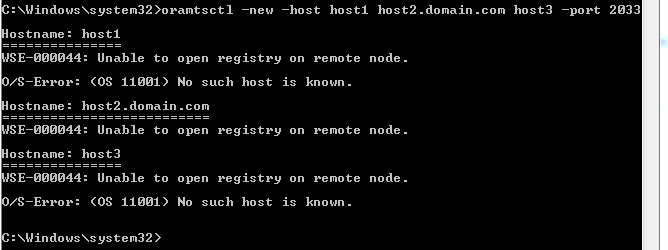
i cant find something related to this specific problem online , so i hope someone could guide me to solve this problem.
Thank you in advance.