I have followed content creator Database Star's Oracle installation guide with a containerized server but I am observing the following issue when attempting to use the Oracle SQL Developer extension in VSCode. I have tried remaking the server, reinstalling VS Code, running as administrator but I am unsure where the block could possibly be.
When I attempt to open a folder under my connections such as my tables it will generate two errors: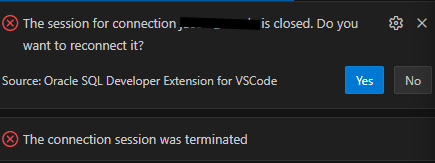
I can still create a table and select * From tablename to view the data but I would like full end to end functionalities of the extension as I learn about databases.
I can use the SQL developer application without issues.