Skip to Main Content

APEX

Announcement

For appeals, questions and feedback about Oracle Forums, please email oracle-forums-moderators_us@oracle.com. Technical questions should be asked in the appropriate category. Thank you!

How to use validate a field using regular expression in Apex.

VimalPSOct 8 2018 — edited Oct 11 2018

Hi All,

I have a field where user should only enter =,<,> and digits from 0 to 9.

eg :- >20 , < 30 , =40 , <>30, >=20 like this..

If any other characters entered, it'll throw error.

Is it possible to achieve this validation through - Item matches Regular expression.

I tried with giving pattern like this .*[^0-9<>=].*

But never works.
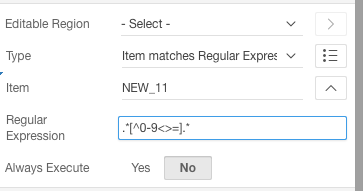
Screen Shot 2018-10-08 at 7.57.43 PM.png

Can someone help on this, please..

Thanks

This post has been answered by fac586 on Oct 8 2018
Jump to Answer
Comments
Post Details
Added on Oct 8 2018
8 comments
7,472 views