Hello everyone,
I would like to use custom icons for my navigation menu. I have done everything according to this Post, which worked great. But if I use the same class for a sub navigation entry, no image is displayed (Picture). Can anyone tell me why?
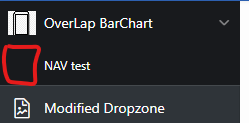
This is what i did:
- Create CSS File “navigation.css” and Uplaod them as Theme File
.t-NavigationBar-menu .a-AppIcon {
  width: var(--a-menu-icon-size, 16px);
  height: var(--a-menu-icon-size, 16px);
  background-size: cover;
}

  .a-AppIcon.handy {
    background-image: url(handy.png);
    background-size: cover;
}
2. Upload the Image “handy.png” as Theme File
3. Add the class name to the Image/Class property on each of the relevant navigation menu entrys
Also does anyone know what size an icon must be to fit in the container. My Image is an Example, but this ones doesnt fit perfectly.
Here you find the login data, if you want to have a look at my demo workspace
Oracle Apex Version: 23.1.1
Workspace: demo_
Name: demo
PW: demo1234
Application : 165269 – Fishbone
I would be very grateful for any advice!
Best Regards
Jego