Hello
I could make beautiful my Table in IG with highlights:
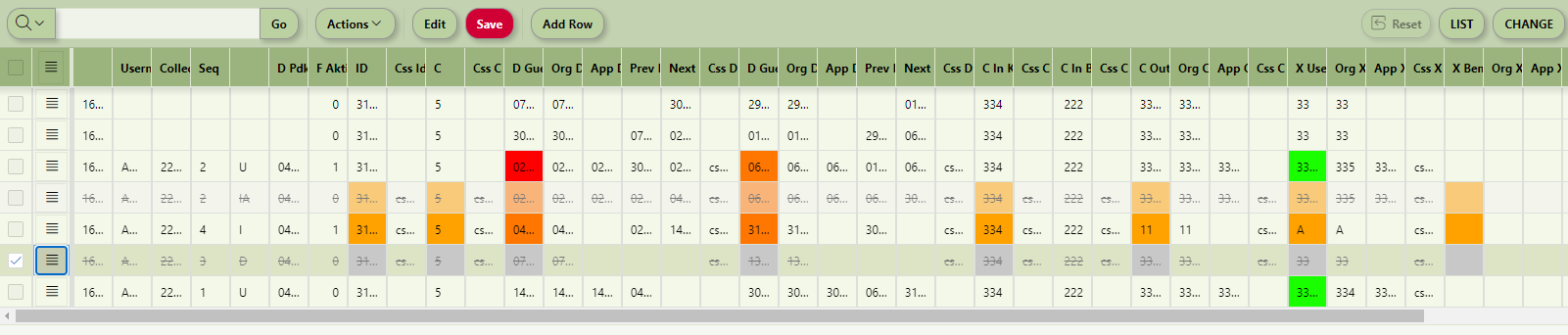
It is just an Example where I can see the different Colors. Very good. Thanks Karel!
Now what I try is that i set some rows to “deleted” based on other column value.
But I can not manage this.. I have problem with the understanding of the IG-Model, View too :(
For example: There are two states of deleted records as I know it:
- Marked for Delete
- Really deleted
Actually I would like to have the followings:
- the row should be set only as “Marked for Delete”
- the row should be showed as Deleted
- the row could but it is not strict needed to be listed in getChanges
More simplier: I want to simulate the same as I would delete the Row manually.
I tried this one:
var ig$ = apex.region("IG_TEST").widget();
var grid = ig$.interactiveGrid("getViews", "grid");
var model = grid.model;

model.forEach(function(record, index, id)
{
   activeRecordId = model.getRecordId( record );
   cellCssValue = model.getValue(record, cellCssField);

       if ( cellCssValue == "css_deleted" )
       {
           model.deleteRecords(activeRecordId);
       }
}
But I can not see any changes.
Could you please help me?
Do you know a very good Study Guides or Book where I can read about such things? Mainly about IG!
Thank you very much in advance.