Skip to Main Content

APEX

Announcement

For appeals, questions and feedback about Oracle Forums, please email oracle-forums-moderators_us@oracle.com. Technical questions should be asked in the appropriate category. Thank you!

How to resize Editable Interactive Grid Column

hmaguireMar 26 2018 — edited Mar 27 2018

I am using Apex version 5.1.4

I have an interactive grid that has a column of textarea, this column is for notes.

I resized the column based on the following Interactive Grid column widths – HardLikeSoftware and the following discussion. How to control interactive grid columns width?

The column could be resized and looks good when it is not being edited.
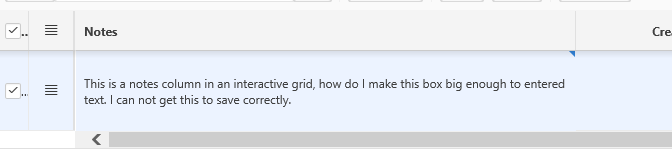
pastedImage_2.png

However, when I edit the column, the editable area is very small and does not extend to the size of the column. Is there a way to fix this so the editable area is as large as the column when the field is clicked?pastedImage_0.png

This post has been answered by Dharmendra Kumar-Oracle on Mar 27 2018
Jump to Answer
Comments
Locked Post
New comments cannot be posted to this locked post.
Post Details
Locked on Apr 24 2018
Added on Mar 26 2018
4 comments
1,213 views