We are running Apex 5.1 with ORDS 3.0.9 + Glassfish 4.1.
For Chinese character in PDF report, we follow the doc 2131300.1 to replace default font helvetica to Chinese font AibanyWTSC by fop.xml as below:
| fop.xml
|
|
<fop version="1.0" encoding="UTF-8">
<strict-configuration>true</strict-configuration>
<fonts>
\<substitutions>

   \<substitution>

     \<from font-family="Helvetica" />

     \<to font-family="Albany WT SC" />

   \</substitution>

   \<substitution>

     \<from font-family="Helvetica-Bold" />

     \<to font-family="Albany WT SC" />

   \</substitution>

\</substitutions>
</fonts>
<renderers>
 \<renderer mime="application/pdf">

   \<filterList>

      \<value>flate\</value>

   \</filterList>

   \<fonts>
<font kerning="yes" embed-url="/u01/apex_5.1/ords309/fonts/ALBANWTS.ttf">
       \<font-triplet name="Albany WT SC" style="normal" weight="normal"/>

     \</font>

   \</fonts>

   \<stroke-text>false\</stroke-text>

 \</renderer>
</renderers>
</fop>
|
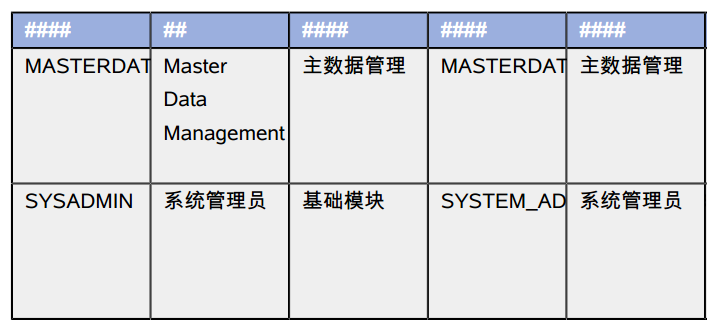
After above change, the font Helvetica has replaced by AlbanyWTSC, but Helvetica-Bold still keep in PDF file, all Chinese Character in report header displayed as "####" as below:
And we can see fonts used in PDF as below:
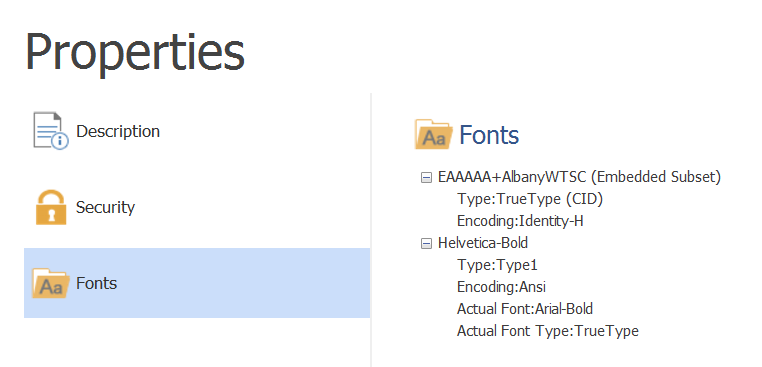
So how to replace Helvetica-Bold with AlbanyWTSC?
Thanks!
Yun