Hello, experts
Recently, there are 3 versions of Oracle on my laptop -11.2.0.4.0, 12.1.0.2.0 and 12.2.0.1.0 and I have written 3 batch files for switching to another version easily.
It's all of my codes of 3 batch files as follows,
(1) ora11gr2.bat
@echo off
set ORACLE_BASE=C:\app\Administrator
set ORACLE_HOME=%ORACLE_BASE%\product\11.2.0\dbhome_1
set ORACLE_SID=ora11gr2
set PATH=%ORACLE_HOME%\bin;%PATH%
(2) ora12cr1.bat
@echo off
set ORACLE_BASE=C:\app\Administrator
set ORACLE_HOME=%ORACLE_BASE%\product\12.1.0\dbhome_1
set ORACLE_SID=ora12cr1
set PATH=%ORACLE_HOME%\bin;%PATH%
(3) ora12cr2.bat
@echo off
set ORACLE_BASE=C:\app\Administrator\virtual
set ORACLE_HOME=%ORACLE_BASE%\product\12.2.0\dbhome_1
set ORACLE_SID=ora12cr2
set PATH=%ORACLE_HOME%\bin;%PATH%
Now, I use 11.2.0.4.0 and 12.1.0.2.0, so I'll execute ora11gr2.bat and ora12cr1.bat on CMD window as an Administrator, see my snapshot below,


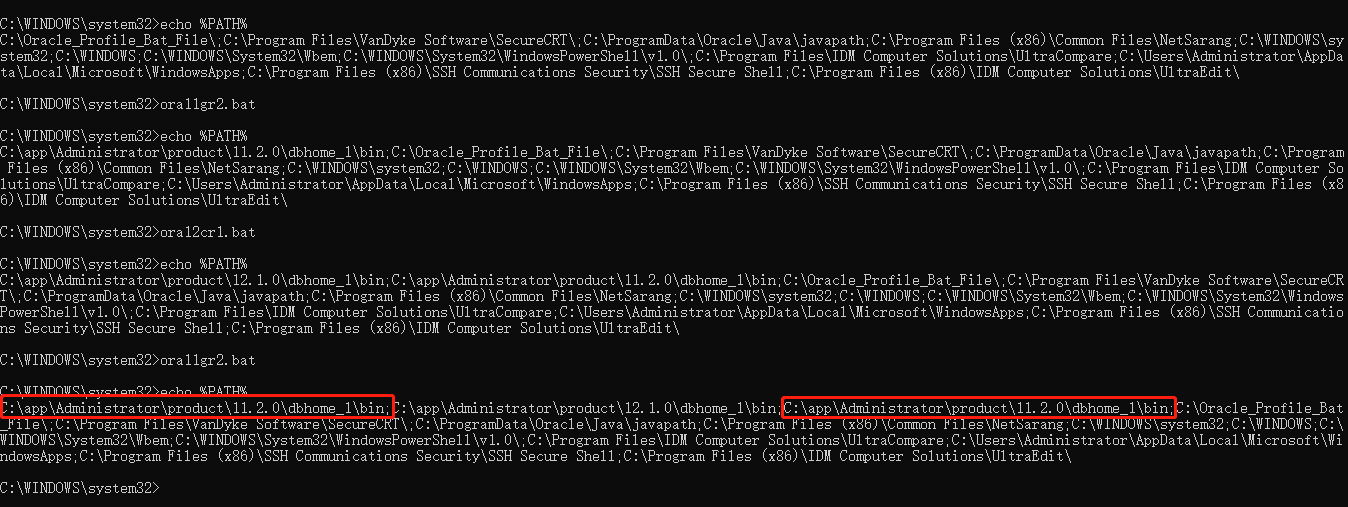
From the 3th snapshot above, you could see the same two values when I execute ora11gr2.bat again (such as, executing ora12cr1.bat or ora12cr2.bat again is the same situation).
So how to modify my these 3 batch files on Windows 10 about Oracle for meeting the logic (after executing more times, it has shown only one value on "%PATH%") ?
Best Regards
Quanwen Zhao