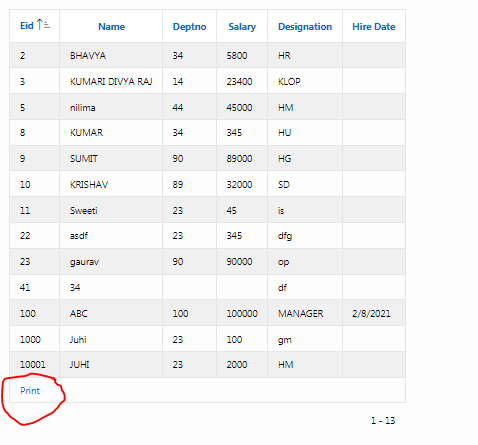
Hello everyone, here I am trying to print header with the classic report after clicking on the print.
 I have written code for page header text with html which is as follows:
<h1> EMPLOYEE DETAILS </h1>
<table style="width:100%; ">
<tbody>
<tr><td>name</td> <td>abc</td> <td>post</td> <td ></td></tr>
<tr><td > Date</td> <td>10-Dec-18</td> <td> End Date</td> <td></td></tr>
<tr><td >Phone No.</td> <td ></td> <td>Telephone No.</td> <td> </td></tr>
<tr><td >Order Date</td> <td></td> <td> Pass Date</td> <td> </td></tr>
<tr><td >Desination </td><td></td> <td>salary</td> <td></td></tr>
<tr><td >Address</td> <td> </td></tr>
<tr><td ></td> <td> </td></tr>
<tr><td >Remark</td> <td></td></tr>
</tbody>
</table>
when i am printing this report is showing the output like this :
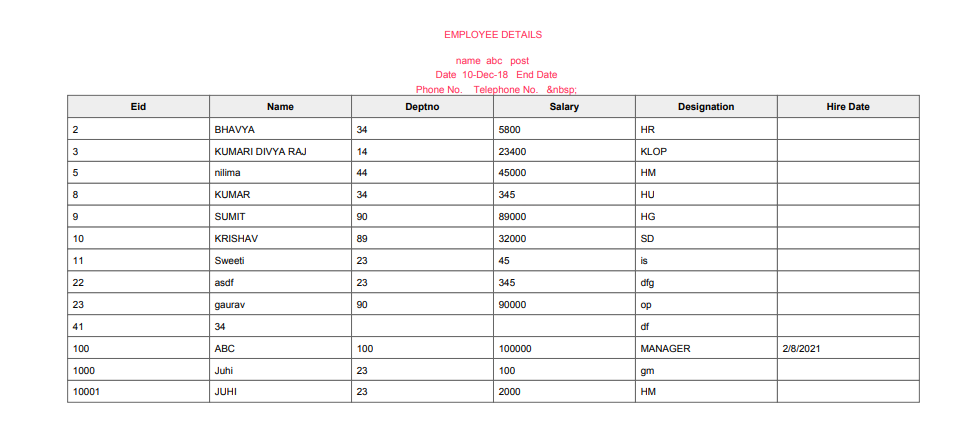
here as you can see the report is being generated by overlapping the header with the classic report.
My requirement is to increase the header height so that if my header contain 4-5 line they are displayed clearly. How this layout is set can i modify it. I also tried modifying generic report layout in shared component but it did not work.